
KSE EnergyConnect
KSE GmbH Auto & Vehicles
The digital service app for KSE wallboxes with EnergyHub.
- Downloads
- 109+
- on Google Play
- Price
- Free
- No in-app purchases
- Updated
- Jul 28
- 2026 · v2.0.4
Screenshots
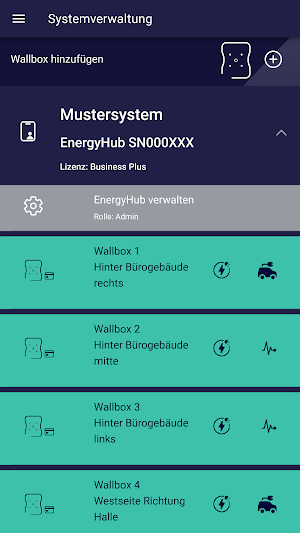
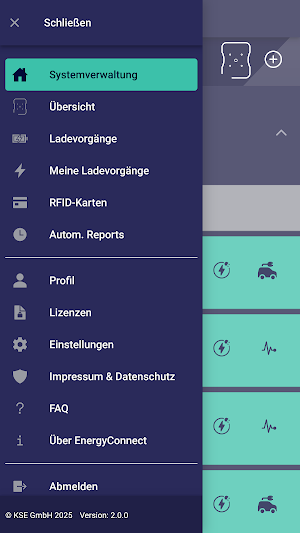
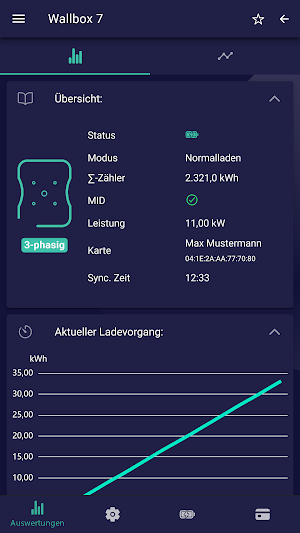


About KSE EnergyConnect
KSE EnergyConnect keeps you up-to-date on all relevant parameters of your wallbox(es) at all times. Important settings can be configured or changed directly via the app.
The most important functions of the KSE EnergyConnect app at a glance:
• All information at a glance
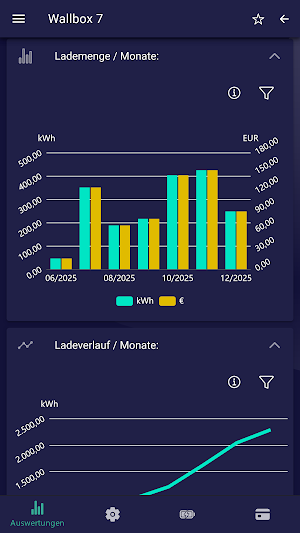
With the KSE EnergyConnect app, you always have an overview of your wallbox(es): current status, charging processes, consumption, charging power, and costs.
You decide what you want to see and when.
• What was that again…?
Of course, the app not only displays all current values and charts, but also allows you to view completed charging processes in the history.
• Changes with one click
Change charging modes or adjust the charging power with a single click. With the KSE EnergyConnect app, you can switch between "surplus charging" and "instant charging" in seconds, or adjust the charging power variably between 1.4 and 3.6 kW or 4.1 and 11 kW for three-phase charging. Tailored to your individual needs!
• Combining multiple wallboxes
View your wallbox(es) individually or combine them into a clear charging management system. This saves you valuable time, as you can apply basic settings directly to all wallboxes within a charging management system.
• RFID management
With the RFID function, you decide who is authorized to charge your vehicle.
In conjunction with the KSE Wallbox wBX16 RFID smart and wBX16 ChargeConnect, RFID tags can be conveniently managed via the app and, if an NFC module is available, even programmed. New tags can be added or removed. Existing tags – e.g., from your garage door or home access system – can be programmed to the wallbox and then also managed via the app. And of course, you can view all parameters, such as consumption, charging time, etc., for each day at any time.
``` Easy setup:
1. Create an account
2. Scan the QR code from the charging management system
3. The wallbox is automatically linked to the account
Please note:
The KSE EnergyConnect app only works in conjunction with the KSE wBX16 ChargeConnect wallbox or the external KSE EnergyHub charging management system with internet access and all connected wBX16/wBX16 RFID smart devices.
Please note:
The KSE ChargeConnect app only works in conjunction with the KSE wBX16 ChargeConnect wallbox or the external KSE LMwBX charging management system with internet access and all connected wBX16/wBX16 RFID smart devices.
The most important functions of the KSE EnergyConnect app at a glance:
• All information at a glance
With the KSE EnergyConnect app, you always have an overview of your wallbox(es): current status, charging processes, consumption, charging power, and costs.
You decide what you want to see and when.
• What was that again…?
Of course, the app not only displays all current values and charts, but also allows you to view completed charging processes in the history.
• Changes with one click
Change charging modes or adjust the charging power with a single click. With the KSE EnergyConnect app, you can switch between "surplus charging" and "instant charging" in seconds, or adjust the charging power variably between 1.4 and 3.6 kW or 4.1 and 11 kW for three-phase charging. Tailored to your individual needs!
• Combining multiple wallboxes
View your wallbox(es) individually or combine them into a clear charging management system. This saves you valuable time, as you can apply basic settings directly to all wallboxes within a charging management system.
• RFID management
With the RFID function, you decide who is authorized to charge your vehicle.
In conjunction with the KSE Wallbox wBX16 RFID smart and wBX16 ChargeConnect, RFID tags can be conveniently managed via the app and, if an NFC module is available, even programmed. New tags can be added or removed. Existing tags – e.g., from your garage door or home access system – can be programmed to the wallbox and then also managed via the app. And of course, you can view all parameters, such as consumption, charging time, etc., for each day at any time.
``` Easy setup:
1. Create an account
2. Scan the QR code from the charging management system
3. The wallbox is automatically linked to the account
Please note:
The KSE EnergyConnect app only works in conjunction with the KSE wBX16 ChargeConnect wallbox or the external KSE EnergyHub charging management system with internet access and all connected wBX16/wBX16 RFID smart devices.
Please note:
The KSE ChargeConnect app only works in conjunction with the KSE wBX16 ChargeConnect wallbox or the external KSE LMwBX charging management system with internet access and all connected wBX16/wBX16 RFID smart devices.
What’s new
Version 2.0.4 · Updated July 28, 2026
Anpassungen an aktuelle Google Play-Anforderungen
Alternatives to KSE EnergyConnect
Looking for apps like KSE EnergyConnect? Here are 6 similar Android apps on Google Play. The highest rated is Orari Bus Ladispoli Cerveteri (5.0/5), and all 6 are free to download.
-
BDC TRACK
-
Motorbazee: Buy/Sell Vehicles
-
Şarjlı Enerji – Şarj İstasyonu
-
Orari Bus Ladispoli Cerveteri 5.0
-
Caartl
-
CE Care
| App | Rating | Price | Installs | Last updated | Compare |
|---|---|---|---|---|---|
| KSE EnergyConnect | – | Free | 100+ | Jul 28, 2026 | |
| BDC TRACK | – | Free | 100+ | – | Compare |
| Motorbazee: Buy/Sell Vehicles | – | Free | 100+ | Apr 8, 2026 | Compare |
| Şarjlı Enerji – Şarj İstasyonu | – | Free | 500+ | Oct 13, 2026 | Compare |
| Orari Bus Ladispoli Cerveteri | 5.0 / 5 | Free | 1,000+ | Aug 19, 2026 | Compare |
| Caartl | – | Free | 50+ | May 9, 2026 | Compare |
| CE Care | – | Free | 500+ | – | Compare |
Compare KSE EnergyConnect with the top alternatives: ratings, updates, ASO score and keyword gaps →
Similar apps on Google Play
- BDC TRACK
- Motorbazee: Buy/Sell Vehicles
- Şarjlı Enerji – Şarj İstasyonu
- Orari Bus Ladispoli Cerveteri
- Caartl
- CE Care
- Faso Sira
- FleetOn-FLS
- WeelDeel
- VRD LOGS
- AUTINX: Oficinas e Orçamentos
- PitSync: Car Manager & Tracker
- Alemarco Classics
- Driving Instructor
- B click
- MY CAR
- FleetSist
- Singapore TrafficKing
- Frontdoor Services
- Aghsalni - Lavage
- Speed Camera & Radar
- Mintnd
- vehicleX
- Boreal Tracking
- Daşa