
알약 스캐너 - 약 사진 검색
%EA%B9%80%EC%9B%90%EC%9E%A5%EC%9D%98 %EC%84%9C%EC%9E%AC Medical
Find the medication with just a single photo, even if you don't know the name. From pill search and prescription recognition to medication reminders and checking for contraindications.
- Downloads
- 1.2K+
- on Google Play
- Price
- Free
- No in-app purchases
- Updated
- Aug 5
- 2026 · v1.0
Screenshots


About 알약 스캐너 - 약 사진 검색
Pills lying around on your desk, medicine packets with erased names, or unidentified medicine your parents are taking.
With just one photo, we can identify the medicine.
We use data released directly by the Ministry of Food and Drug Safety.
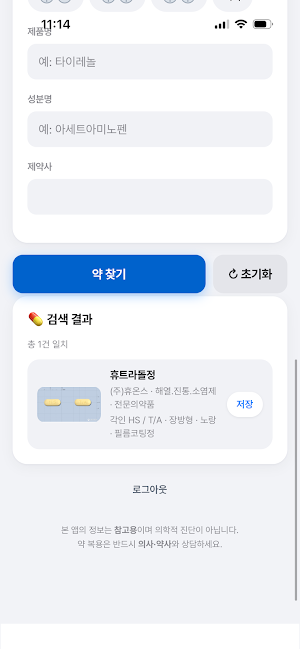
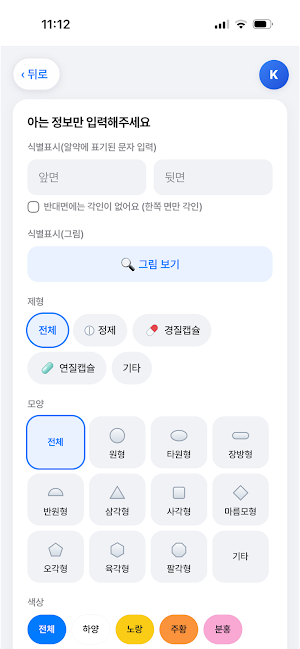
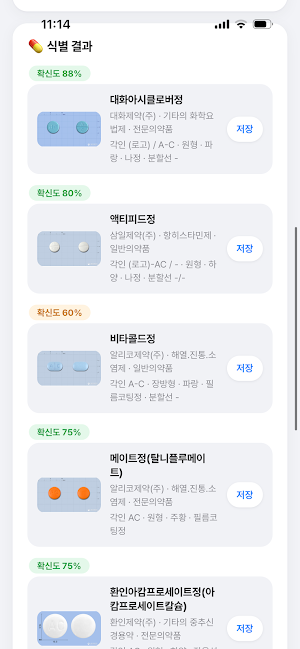
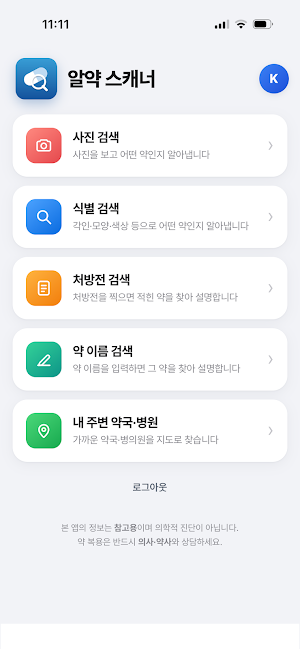
■ Four Ways to Find Medicine
· Search by Name - Both Korean and English ingredient names are supported.
· Search by Photo - Simply take a picture of the pill, and the AI will identify it.
· Search by Engraving, Shape, or Color - Narrows the search by these criteria even if the photo is blurry.
· Search by Prescription - Take a picture of your prescription, and the listed medicines will be organized all at once.
■ Medications I Am Taking
Register your medications to view them at any time.
Set your dosage times, and you will receive notifications.
Log in to view the same list on both your mobile phone and computer.
■ Automatic Check for Contraindications
We will notify you if there are any combinations of medications that should not be taken together.
We automatically check based on the Ministry of Food and Drug Safety's contraindication data.
Even if a warning appears, do not stop taking the medication arbitrarily; be sure to consult with a doctor.
■ You can view this information
· Full text of efficacy, dosage, and precautions
· Active ingredient and content, ATC code
· Reference drug/Bioequivalence mark
· Manufacturer, classification, shape, color, identification characters
■ Pharmacies & Hospitals Near Me
Find nearby pharmacies and hospitals on the map.
You can also check if they are currently open.
■ For these people
· Those taking medication for their parents
· Those taking multiple medications
· Those who have lost their medicine bag or whose name has been erased
· Those who are curious about what medication they have been prescribed
The information provided by this app is for reference only and does not replace the judgment of a doctor or pharmacist.
Please be sure to consult with a professional before deciding whether to take the medication.
What’s new
Version 1.0 · Updated August 5, 2026
알약 스캐너 첫 출시입니다. · 사진 검색 - 알약 앞뒤를 찍으면 어떤 약인지 찾아드립니다 · 식별 검색 - 각인, 모양, 색상으로 약을 찾습니다 · 처방전 검색 - 처방전을 찍으면 적힌 약을 설명해 드립니다 · 약 이름 검색 - 첫 화면 검색창에 이름만 넣으면 됩니다 · 내약 저장소 - 찾은 약을 저장하고, 복용 시간을 정해 알림을 받습니다 · 내 주변 약국·병원 - 가까운 약국과 병의원을 지도로 찾습니다 연고, 시럽, 점안액, 패치 등 모든 제형을 검색할 수 있습니다.
Alternatives to 알약 스캐너 - 약 사진 검색
Looking for apps like 알약 스캐너 - 약 사진 검색? Here are 6 similar Android apps on Google Play. 5 of the 6 are free to download.






| App | Rating | Price | Installs | Last updated | Compare |
|---|---|---|---|---|---|
| 알약 스캐너 - 약 사진 검색 | – | Free | 1,000+ | Aug 5, 2026 | |
| ludwigsapo | – | Free | 50+ | – | Compare |
| Support Pets | – | Free | 500+ | – | Compare |
| Trauma-guide | – | 4.49 USD | 1+ | Mar 6, 2026 | Compare |
| HealthySteps for SMCH | – | Free | 100+ | – | Compare |
| RPI BH Client Portal | – | Free | 100+ | – | Compare |
| App Paciente | – | Free | 500+ | – | Compare |
Compare 알약 스캐너 - 약 사진 검색 with the top alternatives: ratings, updates, ASO score and keyword gaps →
Similar apps on Google Play
- ludwigsapo
- Support Pets
- Trauma-guide
- HealthySteps for SMCH
- RPI BH Client Portal
- App Paciente
- QCC
- InsulinCalc
- OncoUP
- Chikitsa Mitra
- myTENCare
- Aria Doctor
- BawaHealth Hospital
- One HealSol
- Prisma
- Telewellcare
- Pillar Portal
- Pharmonie
- Namur SRL
- Baby N Me
- Ambuce Rescue Team
- iYeasound
- Braes Home Health
- Stoma
- MyPIMSY