

KTN Print Server
Tools
Thermal receipt printing server via HTTP. Supports Bluetooth, USB, and IP networks.
- Downloads
- 5+
- on Google Play
- Price
- Free
- No in-app purchases
- Updated
- Sep 10
- 2026 · v26.09.100
Screenshots
About KTN Print Server
KTN Printer Server turns your Android device into a thermal receipt printing server accessible from any app on the same network. Simply send a single HTTP request, and the receipt prints instantly—no drivers, no SDKs, and no custom client-side code.
Suitable for web-based POS applications, queuing systems, kitchen displays, and even e-commerce integrations that require printing receipts to a local thermal printer.
▣ HOW IT WORKS
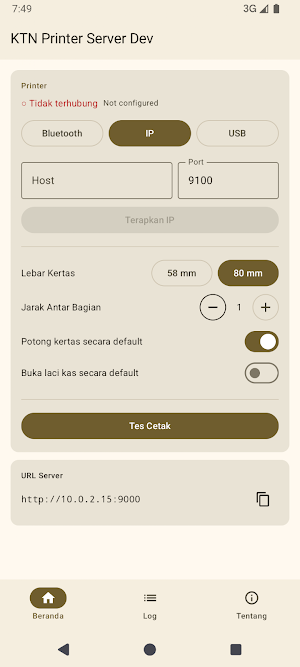
The app runs a lightweight HTTP server on port 9000. Other devices on the same network (LAN/Wi-Fi) simply send a POST request to the server address to print a formatted receipt. The app forwards the printout to your thermal printer via Bluetooth, USB, or IP.
▣ CONNECTION OPTIONS (TRANSPORT)
• Bluetooth (SPP) — pair the printer once, ready to go
• USB — support for USB Printer class (class 7) printers
• IP / Network — direct connection to IP-based printers (default port 9100, RAW/JetDirect)
▣ RICH RECEIPT FORMATS
The receipt layout uses simple, row-based markup, making it easy to integrate:
• Alignment & columns: left [L], center [C], right [R] — ideal for item + price lines
• Text styles: bold, underline, double underline
• Multi-level font sizes: normal, wide, tall, large, up to 7x
• Images (PNG base64), barcodes (EAN-13, EAN-8, UPC-A, UPC-E, Code128), and QR Codes
• Adjustable spacing to fit receipts across printer models
▣ FLEXIBLE SETTINGS
• Paper width: 58 mm (32 columns) or 80 mm (48 columns)
• Section spacing 0–6 lines
• Auto-cut (on/off)
• Cash drawer open (on/off)
• All settings are automatically saved and remain active after the application is closed
▣ SIMPLE INTERFACE
• Displays server URL and LAN IP, complete with copy button
• Real-time printer connection status indicator
• Test Print button to ensure printer is ready
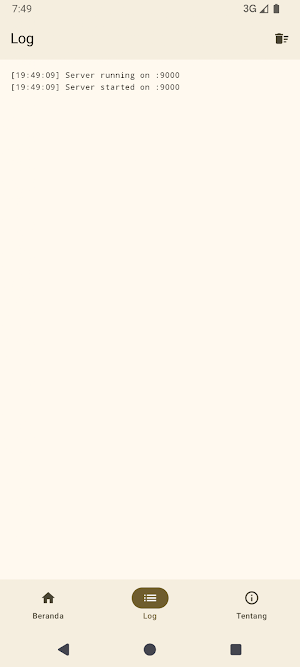
• Log panel to monitor and debug print activity
▣ HTTP API
• GET /health — check server status
• GET /status — current printer transport & connection info
• POST /print — send receipt for printing (cut, drawer open, and spacing can be set per print)
- Responses are in JSON format with clear error codes, making it easy for developers to integrate.
▣ PERMISSION NOTE
On Android 12+, the app requests Bluetooth permissions (BLUETOOTH_CONNECT & BLUETOOTH_SCAN) upon first launch. These permissions are required to use a Bluetooth connection. The app also requires local network access to run the server.
Turn one device into a receipt printing bridge for your entire system — lightweight, fast, and ready to go.
Suitable for web-based POS applications, queuing systems, kitchen displays, and even e-commerce integrations that require printing receipts to a local thermal printer.
▣ HOW IT WORKS
The app runs a lightweight HTTP server on port 9000. Other devices on the same network (LAN/Wi-Fi) simply send a POST request to the server address to print a formatted receipt. The app forwards the printout to your thermal printer via Bluetooth, USB, or IP.
▣ CONNECTION OPTIONS (TRANSPORT)
• Bluetooth (SPP) — pair the printer once, ready to go
• USB — support for USB Printer class (class 7) printers
• IP / Network — direct connection to IP-based printers (default port 9100, RAW/JetDirect)
▣ RICH RECEIPT FORMATS
The receipt layout uses simple, row-based markup, making it easy to integrate:
• Alignment & columns: left [L], center [C], right [R] — ideal for item + price lines
• Text styles: bold, underline, double underline
• Multi-level font sizes: normal, wide, tall, large, up to 7x
• Images (PNG base64), barcodes (EAN-13, EAN-8, UPC-A, UPC-E, Code128), and QR Codes
• Adjustable spacing to fit receipts across printer models
▣ FLEXIBLE SETTINGS
• Paper width: 58 mm (32 columns) or 80 mm (48 columns)
• Section spacing 0–6 lines
• Auto-cut (on/off)
• Cash drawer open (on/off)
• All settings are automatically saved and remain active after the application is closed
▣ SIMPLE INTERFACE
• Displays server URL and LAN IP, complete with copy button
• Real-time printer connection status indicator
• Test Print button to ensure printer is ready
• Log panel to monitor and debug print activity
▣ HTTP API
• GET /health — check server status
• GET /status — current printer transport & connection info
• POST /print — send receipt for printing (cut, drawer open, and spacing can be set per print)
- Responses are in JSON format with clear error codes, making it easy for developers to integrate.
▣ PERMISSION NOTE
On Android 12+, the app requests Bluetooth permissions (BLUETOOTH_CONNECT & BLUETOOTH_SCAN) upon first launch. These permissions are required to use a Bluetooth connection. The app also requires local network access to run the server.
Turn one device into a receipt printing bridge for your entire system — lightweight, fast, and ready to go.
What’s new
Version 26.09.100 · Updated September 10, 2026
- Split the shared code into separate logic and interface modules. - Refresh the app colors with neutral white and black surfaces.
Alternatives to KTN Print Server
Looking for apps like KTN Print Server? Here are 4 similar Android apps on Google Play. The highest rated is Rocket Lawyer Legal & Law Help (4.8/5), and all 4 are free to download.
-
NEC Electrician Exam Prep 2026 3.5
-
FAX Desk: Send Fax from Phone 4.6
-
Rocket Lawyer Legal & Law Help 4.8
-
PDF Merge: Scan, Sign & Edit 3.8
| App | Rating | Price | Installs | Last updated | Compare |
|---|---|---|---|---|---|
| KTN Print Server | – | Free | 5+ | Sep 10, 2026 | |
| NEC Electrician Exam Prep 2026 | 3.5 / 5 | Free | 10,000+ | Feb 7, 2026 | Compare |
| FAX Desk: Send Fax from Phone | 4.6 / 5 | Free | 10,000+ | Dec 19, 2025 | Compare |
| Rocket Lawyer Legal & Law Help | 4.8 / 5 | Free | 100,000+ | Oct 20, 2026 | Compare |
| PDF Merge: Scan, Sign & Edit | 3.8 / 5 | Free | 5,000,000+ | Feb 2, 2026 | Compare |
Compare KTN Print Server with the top alternatives: ratings, updates, ASO score and keyword gaps →