

Kee Vault
Kee Vault Productivity In-app purchases
Secure passwords, simply
- Downloads
- 2.3K+
- on Google Play
- Price
- Free
- In-app purchases
- Updated
- Feb 20
- 2026 · v2.6.0
Screenshots


About Kee Vault
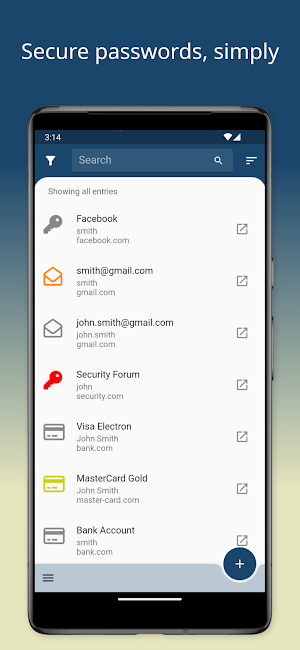
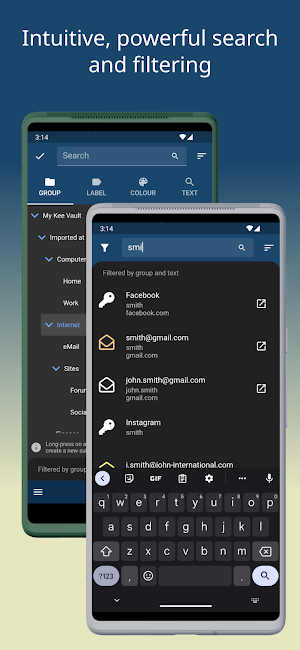
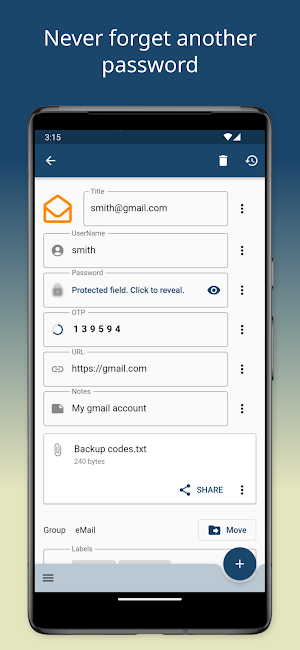
Save time and hassle, sign in easily to the apps and websites you use every day and never go through another password reset procedure.
Protect yourself and people you know from the nightmare of your accounts being hacked.
One strong password protects all your passwords using the latest secure encryption technology.
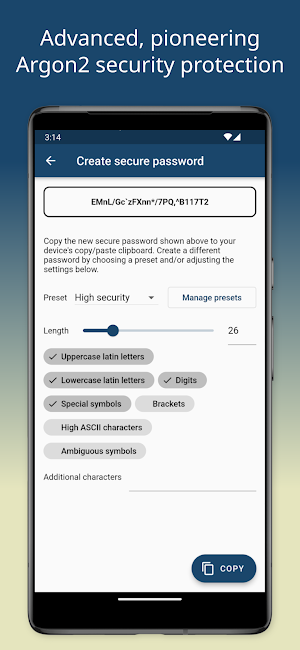
Our innovative use of Argon2 technology adapts to the strength of your main Kee Vault password to provide extra protection when it's needed. Compared to the old "PBKDF2 SHA" approach, Argon2 is massively more secured against brute force attacks using modern computer equipment. We were an early adopter of this high-security technology and still one of only a handful of password managers in 2023 that can boast this level of security protection for your passwords!
Kee Vault comes in two versions. This is version 2, which works on Android and iOS devices. Version 1 works on all devices and can be accessed from anywhere at https://keevault.pm.
You can make changes in both versions, even while offline (disconnected).
You can mix and match between both versions seamlessly and rest assured that both use the latest secure encryption technology. Version 2 is simply an upgraded version and a way for us to donate our software to those that can’t pay for a subscription.
If you can find a little spare change each year, adding a Kee Vault Subscription to your account allows us to synchronise your passwords across all of your devices, ensure there is a backup of your important information and helps support our ongoing development work.
All Kee Vault security software is Open Source because this is the only safe way to develop security software. Surprisingly, if you have heard of any other password manager brands, there's a good chance they are Closed Source - the complete opposite of the secure way to develop security software! You can find out more on our website - https://www.kee.pm/open-source/
We're thankfully not the only Open Source password manager but we're pretty confident that we're the best option for anyone looking for a personal password manager so please give us a try and let us know what you think! We're always open to feedback and if you come across any problems, you can let us know on our community forum where we and the rest of the Kee Vault community are best placed to assist. https://forum.kee.pm
Protect yourself and people you know from the nightmare of your accounts being hacked.
One strong password protects all your passwords using the latest secure encryption technology.
Our innovative use of Argon2 technology adapts to the strength of your main Kee Vault password to provide extra protection when it's needed. Compared to the old "PBKDF2 SHA" approach, Argon2 is massively more secured against brute force attacks using modern computer equipment. We were an early adopter of this high-security technology and still one of only a handful of password managers in 2023 that can boast this level of security protection for your passwords!
Kee Vault comes in two versions. This is version 2, which works on Android and iOS devices. Version 1 works on all devices and can be accessed from anywhere at https://keevault.pm.
You can make changes in both versions, even while offline (disconnected).
You can mix and match between both versions seamlessly and rest assured that both use the latest secure encryption technology. Version 2 is simply an upgraded version and a way for us to donate our software to those that can’t pay for a subscription.
If you can find a little spare change each year, adding a Kee Vault Subscription to your account allows us to synchronise your passwords across all of your devices, ensure there is a backup of your important information and helps support our ongoing development work.
All Kee Vault security software is Open Source because this is the only safe way to develop security software. Surprisingly, if you have heard of any other password manager brands, there's a good chance they are Closed Source - the complete opposite of the secure way to develop security software! You can find out more on our website - https://www.kee.pm/open-source/
We're thankfully not the only Open Source password manager but we're pretty confident that we're the best option for anyone looking for a personal password manager so please give us a try and let us know what you think! We're always open to feedback and if you come across any problems, you can let us know on our community forum where we and the rest of the Kee Vault community are best placed to assist. https://forum.kee.pm
What’s new
Version 2.6.0 · Updated February 20, 2026
* New autocomplete feature on the Username field - select from previously used usernames to speed up the creation of new entries with common usernames such as your primary email address. * Improved AutoFill behaviour in some apps and websites. * Updated Flutter and other dependencies. * Improved performance on newer Android devices (by supporting 16K Android memory page size).
User reviews

Kee vault is the first proper password manager I've used and I've found it reliable and easy to use. I especially like the biometrics. I've used a really complex password so it would be good if I was able to see what I was typing when I have to log in again, as I keep getting it wrong, but not a big problem as I onl...

This password manager is easy to use, reliable and has the best security. My favourite feature is that I can unlock my passwords database quickly by using my finger print, this way I protect my master password when I am in public. The password auto-complete feature works very well on every website and mobile app I u...
Alternatives to Kee Vault
Looking for apps like Kee Vault? Here are 6 similar Android apps on Google Play. All of them are free to download.






| App | Rating | Price | Installs | Last updated | Compare |
|---|---|---|---|---|---|
| Kee Vault | – | Free | 1,000+ | Feb 20, 2026 | |
| Projecter Bridge | – | Free | 50+ | Jul 3, 2025 | Compare |
| Rsmart AEP | – | Free | 1,000+ | Oct 11, 2026 | Compare |
| SceneMatch | – | Free | 1,000+ | Sep 24, 2026 | Compare |
| B2Field | – | Free | 1,000+ | Aug 10, 2026 | Compare |
| TopFleet GPS | – | Free | 50+ | Jun 16, 2026 | Compare |
| Fortuna and co | – | Free | 50+ | Sep 14, 2026 | Compare |
Compare Kee Vault with the top alternatives: ratings, updates, ASO score and keyword gaps →
Similar apps on Google Play
- Projecter Bridge
- Rsmart AEP
- SceneMatch
- B2Field
- TopFleet GPS
- Fortuna and co
- Graziela Flores
- King Pay
- FuelNet
- EVcheck
- CCAA Logbooks
- IleGodzin
- Think: AI Help, Anytime
- ANSE ON APP
- Retable
- Cibotech
- Axel AI
- Globaltrak
- Student Attendance System
- Senttia.
- INSULFLEX Insul-Calc
- Sainik Suvidha
- Mi WAI Net
- Stars Club
- Azwa Group