

Imagely Resizer
KD Studios Labs Photography
Image Resizer for JPEG, PNG, Photo Compression & Crop
- Downloads
- 17+
- on Google Play
- Price
- Free
- No in-app purchases
- Updated
- Sep 5
- 2026 · v1.0.4
Screenshots
About Imagely Resizer
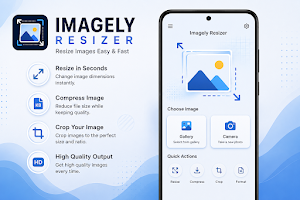
Resize, compress, crop, and optimize your photos with **Imagely Resizer** – the fast, simple, and professional image editing tool. Whether you want to reduce image size for social media, email, websites, online forms, or save storage space, Imagely Resizer helps you resize images without compromising quality.
Designed with a clean interface and powerful image processing, Imagely Resizer makes photo resizing quick and effortless. Process your images directly on your device for maximum privacy and speed.
## ⭐ Key Features
📏 **Resize Images**
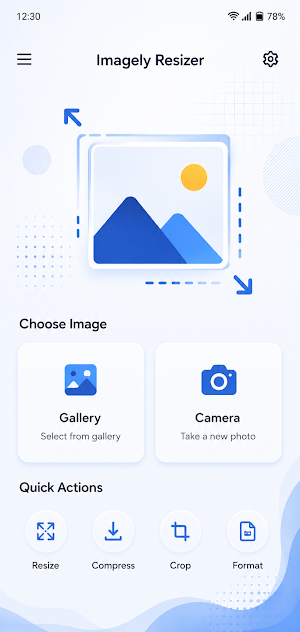
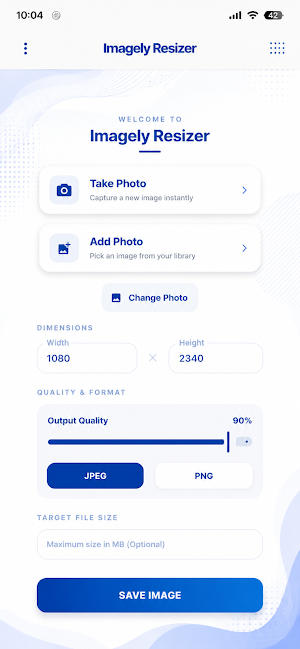
Resize photos to custom width and height while maintaining the original aspect ratio.
🗜️ **Image Compression**
Reduce image file size without noticeable quality loss. Perfect for sharing, uploading, and saving storage.
✂️ **Crop Images**
Crop your photos with precision before resizing or compressing.
🖼️ **High Quality Output**
Advanced image processing preserves sharpness and image quality after resizing.
⚡ **Fast Performance**
Resize and compress images in just a few taps.
🔒 **100% Offline**
Your photos never leave your device. Everything is processed locally to ensure complete privacy.
📂 **Easy Save & Share**
Save resized images directly to your gallery and share them instantly with friends, family, or social media.
🎨 **Simple & Modern Interface**
A clean, user-friendly design makes image editing easy for everyone.
## Perfect For
• Social Media Posts
• WhatsApp Images
• Instagram Photos
• Facebook Uploads
• X (Twitter) Images
• Email Attachments
• Online Forms
• Website Uploads
• Job Applications
• Document Uploads
• Reducing Storage Space
## Why Choose Imagely Resizer?
✔ Fast Image Resizing
✔ High Quality Compression
✔ Custom Resize Dimensions
✔ Smart Image Optimization
✔ Easy Crop Tool
✔ Lightweight & Smooth
✔ Secure Offline Processing
✔ No Account Required
✔ No Watermarks
✔ Simple User Experience
## Supported Image Formats
• JPEG (JPG)
• PNG
• WEBP
*(More formats may be added in future updates.)*
## Your Privacy Matters
Imagely Resizer processes all images directly on your device. No photos are uploaded to any server, and no personal information is collected. Your images always remain private and under your control.
## Coming Soon
• Batch Image Resizer
• Image Format Converter
• Rotate & Flip Images
• Advanced Compression Levels
• More Editing Tools
Thank you for choosing **Imagely Resizer**. We are continuously improving the app with new features, performance enhancements, and bug fixes to provide the best image resizing experience.
**Download Imagely Resizer today and resize, compress, crop, and optimize your photos with ease!**
What’s new
Version 1.0.4 · Updated September 5, 2026
What's New in v1.0.4: • Added Aspect Ratio Lock for proportional image resizing. • Added 1-Tap Quick Presets (25%, 50%, 75%, 100%). • Added KB & MB toggle for target file size compression. • Post-resize summary dialog with direct Share option. • Memory optimization for high-resolution photos & Android 15 compatibility. • Performance improvements & bug fixes.
Alternatives to Imagely Resizer
Looking for apps like Imagely Resizer? Here are 6 similar Android apps on Google Play. All of them are free to download.
-
Food Scan AI
-
Interviewerly AI
-
Docly - PDF Reader & Editor
-
ScanPro: PDF Scanner & Editor
-
Stack Tower
-
Votex
| App | Rating | Price | Installs | Last updated | Compare |
|---|---|---|---|---|---|
| Imagely Resizer | – | Free | 10+ | Sep 5, 2026 | |
| Food Scan AI | – | Free | 10+ | Sep 26, 2026 | Compare |
| Interviewerly AI | – | Free | 10+ | – | Compare |
| Docly - PDF Reader & Editor | – | Free | 10+ | Aug 14, 2026 | Compare |
| ScanPro: PDF Scanner & Editor | – | Free | 100+ | Aug 30, 2026 | Compare |
| Stack Tower | – | Free | 10+ | – | Compare |
| Votex | – | Free | 50+ | Aug 8, 2026 | Compare |
Compare Imagely Resizer with the top alternatives: ratings, updates, ASO score and keyword gaps →