
PixelShrink: Compress & Resize
Kastovia Holdings LLC Photography In-app purchases
Fix rejected uploads. Compress or resize photos offline to exact pixels or KB.
- Downloads
- 4.2K+
- on Google Play
- Price
- Free
- In-app purchases
- Updated
- Oct 17
- 2026 · v1.9.1
Screenshots


About PixelShrink: Compress & Resize
Photo rejected for being too large, the wrong dimensions or the wrong format? Turn the visible requirements into a new file that matches the measurable limits in a few clear steps.
PixelShrink is a private, offline photo compressor and image resizer. Pick a photo, choose the result, preview it, and save a new file. Your original is never overwritten.
THREE SIMPLE TASKS
• Compress a photo — target a smaller file size while keeping the image clear.
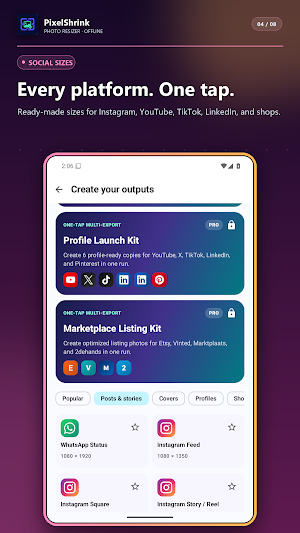
• Resize for a platform — choose ready-made sizes for posts, stories, profiles, banners, thumbnails and marketplace listings.
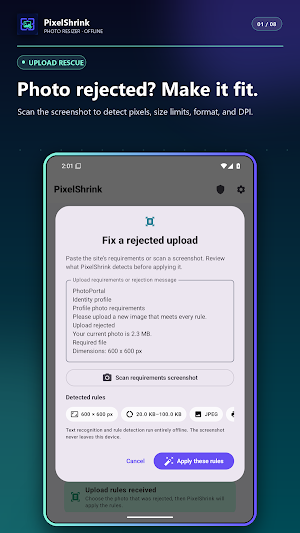
• Fix upload requirements — scan a screenshot or enter the requested settings, review what PixelShrink detected, and create a measured result.
MATCH MEASURABLE UPLOAD REQUIREMENTS
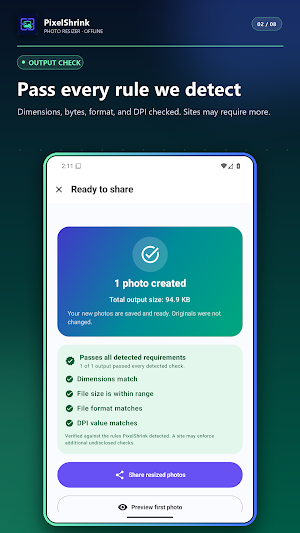
PixelShrink can detect supported pixel dimensions, maximum KB or MB, JPEG/PNG/WebP, DPI and stated background instructions. It shows the detected settings before processing and the actual dimensions, bytes and format afterwards. Background instructions are detected for manual review; PixelShrink does not remove or replace an existing image background.
Review the result before submitting. The receiving website may apply additional checks.
READY-MADE PHOTO SIZES
Resize for Instagram, WhatsApp, Facebook, YouTube, X, TikTok, LinkedIn, Pinterest, Snapchat, Tumblr, Etsy, Vinted, Marktplaats and Tweedehands. Platform names identify output destinations only; PixelShrink is not affiliated with those services.
TOOLS WHEN YOU NEED THEM
• Exact width and height, percentage or long edge
• Keep aspect ratio, crop to fill or add coloured padding
• JPEG and WebP quality controls
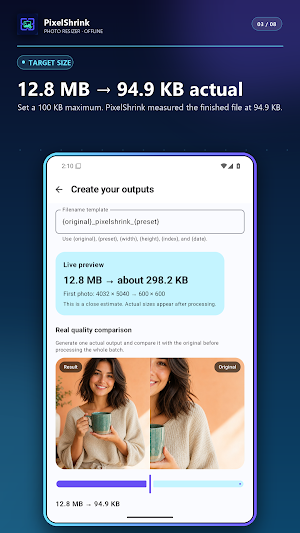
• Bounded targeting for a maximum KB or MB
• Rotation normalisation and explicit EXIF choices
• Batch progress, cancel, retry and per-file errors
• Direct sharing of finished pictures
• Recent exports and reusable workflows
• PDF, ZIP, print and multi-output tools under More Tools
FREE THAT COMPLETES REAL WORK
Basic includes three successful photo exports per day, every individual platform size, batches of up to three photos, one advanced exact-size result, one upload-requirement workflow and one saved workflow. There are no interstitial ads.
PIXELSHRINK PRO — LIFETIME OR 7 DAYS
Choose the access that fits your work. Lifetime Pro is one purchase and permanently yours. The 7-day Pro Pass is one payment for seven days and never renews automatically. Both remove the daily export limit and unlock unlimited batches and upload fixes, exact KB/MB targeting, creator and custom multi-output packs, unlimited saved workflows and reruns, PDF/ZIP delivery, print/DPI controls and advanced EXIF options. Restore eligible access with the Google Play account that purchased it.
PRIVATE BY DESIGN
• Image processing works offline
• No PixelShrink account
• No advertising SDK
• No broad photo-library permission
• Optional, consent-based usage and advertising measurement; photo contents and file details stay on-device
• Originals are never overwritten
On-device text recognition and face focus use Google ML Kit. Photo and text content is not sent to Google; ML Kit may send limited app, device and performance metrics to Google for diagnostics.
JPEG, PNG and WebP are supported. HEIC/HEIF works when the device supplies a compatible codec.
PixelShrink is a private, offline photo compressor and image resizer. Pick a photo, choose the result, preview it, and save a new file. Your original is never overwritten.
THREE SIMPLE TASKS
• Compress a photo — target a smaller file size while keeping the image clear.
• Resize for a platform — choose ready-made sizes for posts, stories, profiles, banners, thumbnails and marketplace listings.
• Fix upload requirements — scan a screenshot or enter the requested settings, review what PixelShrink detected, and create a measured result.
MATCH MEASURABLE UPLOAD REQUIREMENTS
PixelShrink can detect supported pixel dimensions, maximum KB or MB, JPEG/PNG/WebP, DPI and stated background instructions. It shows the detected settings before processing and the actual dimensions, bytes and format afterwards. Background instructions are detected for manual review; PixelShrink does not remove or replace an existing image background.
Review the result before submitting. The receiving website may apply additional checks.
READY-MADE PHOTO SIZES
Resize for Instagram, WhatsApp, Facebook, YouTube, X, TikTok, LinkedIn, Pinterest, Snapchat, Tumblr, Etsy, Vinted, Marktplaats and Tweedehands. Platform names identify output destinations only; PixelShrink is not affiliated with those services.
TOOLS WHEN YOU NEED THEM
• Exact width and height, percentage or long edge
• Keep aspect ratio, crop to fill or add coloured padding
• JPEG and WebP quality controls
• Bounded targeting for a maximum KB or MB
• Rotation normalisation and explicit EXIF choices
• Batch progress, cancel, retry and per-file errors
• Direct sharing of finished pictures
• Recent exports and reusable workflows
• PDF, ZIP, print and multi-output tools under More Tools
FREE THAT COMPLETES REAL WORK
Basic includes three successful photo exports per day, every individual platform size, batches of up to three photos, one advanced exact-size result, one upload-requirement workflow and one saved workflow. There are no interstitial ads.
PIXELSHRINK PRO — LIFETIME OR 7 DAYS
Choose the access that fits your work. Lifetime Pro is one purchase and permanently yours. The 7-day Pro Pass is one payment for seven days and never renews automatically. Both remove the daily export limit and unlock unlimited batches and upload fixes, exact KB/MB targeting, creator and custom multi-output packs, unlimited saved workflows and reruns, PDF/ZIP delivery, print/DPI controls and advanced EXIF options. Restore eligible access with the Google Play account that purchased it.
PRIVATE BY DESIGN
• Image processing works offline
• No PixelShrink account
• No advertising SDK
• No broad photo-library permission
• Optional, consent-based usage and advertising measurement; photo contents and file details stay on-device
• Originals are never overwritten
On-device text recognition and face focus use Google ML Kit. Photo and text content is not sent to Google; ML Kit may send limited app, device and performance metrics to Google for diagnostics.
JPEG, PNG and WebP are supported. HEIC/HEIF works when the device supplies a compatible codec.
What’s new
Version 1.9.1 · Updated October 17, 2026
Clearer Lifetime Pro pricing and offer end dates. Improved purchase-screen readability and fixed a startup navigation issue. Existing Pro access is preserved.
User reviews

I can't believe I didn't discover Pixel Shrink sooner! This app works like a charm on my Android device - no lags, no glitches, just smooth performance all around. Reducing image sizes has never been easier, and the best part is that the photos still look amazing even after shrinking. If you're looking for a reliabl...
Alternatives to PixelShrink: Compress & Resize
Looking for apps like PixelShrink: Compress & Resize? Here are 6 similar Android apps on Google Play. The highest rated is Ink Cards (4.8/5), and all 6 are free to download.
-
Image Toolbox - Edit & Convert 4.7
-
Ink Cards 4.8
-
PhotoSpot: For Travel Planning 4.4
-
MeeAww-AI Photo & Video Editor 4.2
-
Background remover - remove.bg 3.5
-
Background Eraser - BG Remover 4.4
| App | Rating | Price | Installs | Last updated | Compare |
|---|---|---|---|---|---|
| PixelShrink: Compress & Resize | – | Free | 1,000+ | Oct 17, 2026 | |
| Image Toolbox - Edit & Convert | 4.7 / 5 | Free | 500,000+ | Sep 4, 2026 | Compare |
| Ink Cards | 4.8 / 5 | Free | 1,000,000+ | Oct 9, 2026 | Compare |
| PhotoSpot: For Travel Planning | 4.4 / 5 | Free | 5,000+ | Jun 10, 2026 | Compare |
| MeeAww-AI Photo & Video Editor | 4.2 / 5 | Free | 1,000,000+ | Oct 21, 2026 | Compare |
| Background remover - remove.bg | 3.5 / 5 | Free | 10,000,000+ | Mar 5, 2024 | Compare |
| Background Eraser - BG Remover | 4.4 / 5 | Free | 1,000,000+ | Sep 18, 2026 | Compare |
Similar apps on Google Play
- Image Toolbox - Edit & Convert
- Ink Cards
- PhotoSpot: For Travel Planning
- MeeAww-AI Photo & Video Editor
- Background remover - remove.bg
- Background Eraser - BG Remover
- PhotoPills
- MobiSaver: Data&Photo Recovery
- PicWish: AI Photo Editor
- celebrate: share photo & video
- PhotoPad Photo Editor
- Smart Gallery - Photo Manager
- Picta x CVS Photo Print
- Photobook: Photo Books & Gifts
- Photo Studio: Photo Editor App
- Geulgram - Text on Photo
- PICNIC-AI Photo Edit&SkyFilter
- Optimalprint: Photo Gifts
- TouchNote: Gifts & Cards
- Plankpad
- Collect by WeTransfer
- Gallery
- Personal Creations
- Easy-PhotoPrint Editor
- Rocketbook
- Lalalab - Photo printing
- HerePrint
- SELPHY Photo Layout
- Photo Scan App by Photomyne