
Text Scan Note
karashidaimyojin Productivity Contains ads
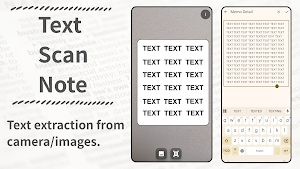
Text extraction from camera/images.
- Downloads
- 202+
- on Google Play
- Price
- Free
- No in-app purchases
- Updated
- Jun 24
- 2026 · v1.1
Screenshots

About Text Scan Note
📄 Just Scan, Just Capture. Information to Your Notes.
"Text Scan Note" is a next-generation OCR note-taking app that instantly digitizes text through camera scanning and saves it as editable memos.
---
✨ Perfect for These Situations
1. Reading & Study Sessions
Simply photograph important passages from books or documents to save them as text. Edit freely later.
2. Business Scenarios
Whiteboard meeting notes, business card information, paper documents... Just point your camera and instantly digitize.
3. Daily Life
Recipe notes, flyer information, handwritten memos... Manage all text information on your smartphone, anytime.
---
🚀 Key Features
1. Camera Scanning
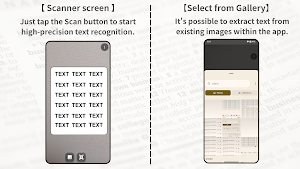
Launch the app and go straight to the scanner screen. Just tap the scan button to start high-precision text recognition.
2. Scan from Images
Extract text from existing images within the app. Digitize photos you've taken in the past, right now.
3. Free Editing
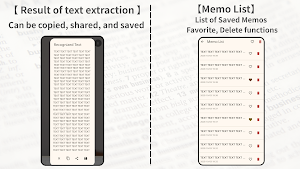
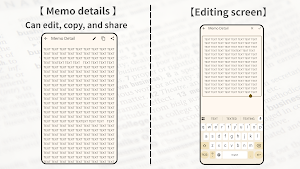
Recognized text can be saved as memos. Easily correct recognition errors or add your own notes later.
4. Favorites Function
Mark important memos as "favorites." Find crucial information instantly.
5. Share Function
Copy and share features allow integration with other apps. Email, messaging, social media... Use it anywhere.
6. Customization Settings
Choose to turn shutter sound and vibration on/off. Use confidently even in quiet places.
---
💡 Why "Text Scan Note"?
- Simple Operation
No complicated setup required. Launch, capture, save. A simple 3-step design.
- High-Precision OCR
Latest text recognition technology using Google ML Kit. A scanner that recognizes with high accuracy.
- Works Offline
Text recognition is completed on your device. No internet connection required—use it anytime, anywhere.
- Data Safely Managed on Device
All recognized text is stored in the device's database. Use with confidence while protecting your privacy.
- Completely Free
All features provided completely free. No in-app purchases or feature restrictions whatsoever.
---
📲 Download Now and Take Your Information Management to the Next Level
With "Text Scan Note", transform paper information with digital power.
"Text Scan Note" is a next-generation OCR note-taking app that instantly digitizes text through camera scanning and saves it as editable memos.
---
✨ Perfect for These Situations
1. Reading & Study Sessions
Simply photograph important passages from books or documents to save them as text. Edit freely later.
2. Business Scenarios
Whiteboard meeting notes, business card information, paper documents... Just point your camera and instantly digitize.
3. Daily Life
Recipe notes, flyer information, handwritten memos... Manage all text information on your smartphone, anytime.
---
🚀 Key Features
1. Camera Scanning
Launch the app and go straight to the scanner screen. Just tap the scan button to start high-precision text recognition.
2. Scan from Images
Extract text from existing images within the app. Digitize photos you've taken in the past, right now.
3. Free Editing
Recognized text can be saved as memos. Easily correct recognition errors or add your own notes later.
4. Favorites Function
Mark important memos as "favorites." Find crucial information instantly.
5. Share Function
Copy and share features allow integration with other apps. Email, messaging, social media... Use it anywhere.
6. Customization Settings
Choose to turn shutter sound and vibration on/off. Use confidently even in quiet places.
---
💡 Why "Text Scan Note"?
- Simple Operation
No complicated setup required. Launch, capture, save. A simple 3-step design.
- High-Precision OCR
Latest text recognition technology using Google ML Kit. A scanner that recognizes with high accuracy.
- Works Offline
Text recognition is completed on your device. No internet connection required—use it anytime, anywhere.
- Data Safely Managed on Device
All recognized text is stored in the device's database. Use with confidence while protecting your privacy.
- Completely Free
All features provided completely free. No in-app purchases or feature restrictions whatsoever.
---
📲 Download Now and Take Your Information Management to the Next Level
With "Text Scan Note", transform paper information with digital power.
What’s new
Version 1.1 · Updated June 24, 2026
Added support for Android 17.
Alternatives to Text Scan Note
Looking for apps like Text Scan Note? Here are 6 similar Android apps on Google Play. All of them are free to download.




| App | Rating | Price | Installs | Last updated | Compare |
|---|---|---|---|---|---|
| Text Scan Note | – | Free | 100+ | Jun 24, 2026 | |
| Fisheye Camera | – | Free | 10,000+ | Jun 23, 2026 | Compare |
| Fisheye Image | – | Free | 1,000+ | Jun 23, 2026 | Compare |
| Monochrome Camera | – | Free | 5,000+ | Jun 23, 2026 | Compare |
| Sepia Image | – | Free | 1,000+ | – | Compare |
| Geomancy Divination | – | Free | 500+ | Jun 25, 2026 | Compare |
| Favorite Images | – | Free | 100+ | Jun 24, 2026 | Compare |
Compare Text Scan Note with the top alternatives: ratings, updates, ASO score and keyword gaps →