
Books Tracker: Reading Tracker
Jonathan ANTOINE Books & Reference In-app purchases
Track books, manage your TBR list, and organize your reading library.
- Downloads
- 3.7K+
- on Google Play
- Price
- Free
- In-app purchases
- Updated
- Sep 21
- 2026 · v19.0.516
Screenshots


About Books Tracker: Reading Tracker
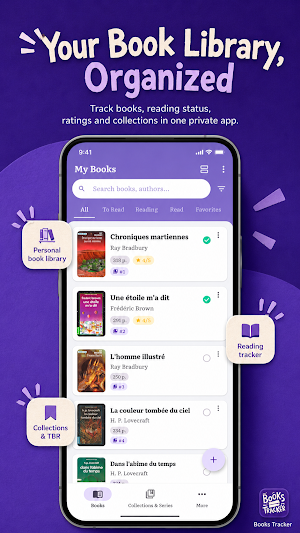
Your private book library, reading tracker and ISBN scanner — no account required.
Catalogue your books, organise your shelves, track reading progress and understand your reading habits. Works offline by default, with optional Google Drive sync.
📚 Build your book library
Create a digital library for novels, comics, manga, ebooks, paperbacks, hardcovers, rare books and personal collections.
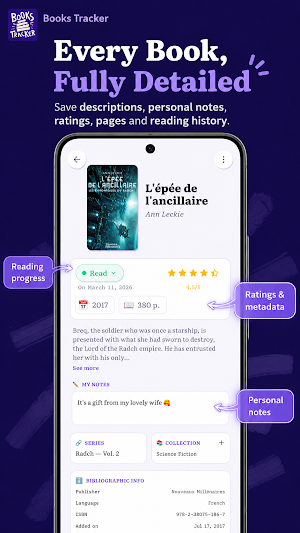
Store title, author, cover, ISBN, genre, publisher, language, page count, publication year, purchase date, description, notes and rating.
🏠 A rare Android widget for book tracking
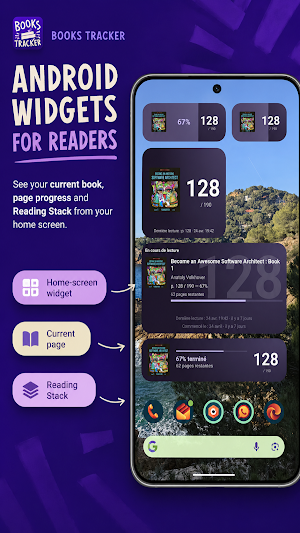
Most book library apps stop inside the app. Books Tracker also includes a responsive Android home-screen widget for your current book, page progress, pages left and Reading Stack.
📷 Scan books in seconds
Point your camera at an ISBN barcode and Books Tracker looks up the book online.
Use Quick Scan mode to scan a shelf: choose target collections, scan, and keep going. Existing books and duplicate ISBNs are detected.
🔍 Search online or add manually
Search by title, author or ISBN. Add a book instantly, edit it before saving, or create your own entry from scratch.
Books Tracker uses multiple online sources for book metadata and covers, while still letting you edit everything manually.
🗂 Organise your library your way
Create custom collections for shelves, rooms, genres, moods, reading challenges or anything else.
Use the Reading Stack to plan what to read next, and the Wishlist to remember books you want to buy, borrow or discover later.
Group books into series, set volume numbers, and show missing numbers to spot gaps.
📖 Track your reading progress
Use four reading states: To read, Reading, Read and Dropped.
Track your current page, see your progress percentage, and record daily page updates. Each book has its own reading history timeline: start, progress, finish and dropped events.
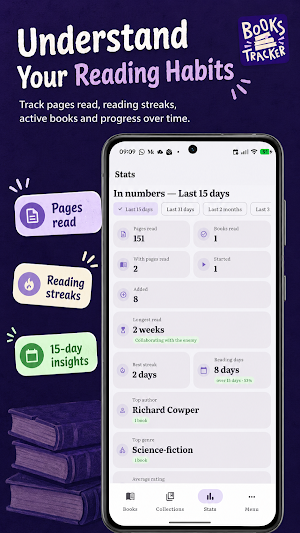
📊 Understand your reading habits
The Statistics tab gives you a clear view of your reading life:
• Reading calendar
• Pages read over time
• Current and best reading streaks
• Books read, started, dropped and active
• Average reading duration
• Top authors and genres
• Reading history timeline
• Library breakdown by status
🔖 Track ownership, not just reading
Reading status and ownership are separate. Mark books as borrowed, lent, returned, for sale or sold. Add a person and a date to remember who borrowed what, and when.
⚡ Manage many books faster
Select multiple books and edit them in bulk. Change status, update details, add or remove collections, assign series, add books to your Reading Stack, or delete several books.
🔎 Find any book instantly
Search by title or author. Filter by reading status, rating or ownership. Sort by title, author, added date, last action, rating or page count.
Choose standard list, compact list or grid view with adjustable columns.
🔁 Private sync, only if you want it
Books Tracker works offline by default. No account is required.
Enable Google Drive sync for backup across Android and iOS devices. Your data is stored in a private app folder and merged automatically.
💾 Import, export and stay in control
Export your library to CSV. Import books from an existing file and choose how conflicts are handled.
Your library stays yours.
What’s included:
Library management
• Book library manager
• Custom collections
• Reading Stack
• Wishlist
• Series and volume tracking
• Missing-number detection
Adding books
• ISBN barcode scanner
• Quick Scan mode
• Online book search
• Manual book creation
• Duplicate detection
Reading tracking
• To read, Reading, Read, Dropped
• Page progress tracking
• Daily reading history
• Reading calendar
• Reading streaks
• Pages-read chart
Organisation and control
• Search, filter and sort
• Standard, compact and grid views
• Bulk editing
• CSV import and export
• Optional Google Drive sync
• Android home-screen widget
• Ownership tracking
• English and French
What’s new
Version 19.0.516 · Updated September 21, 2026
🖼️ Find missing covers: search online covers for every book without one (one-time purchase) 📚 Scanner now recognises Spanish, German, Norwegian and Portuguese books 🌍 Statistics by language, full ranked lists for genres and authors 🎁 Filter by person and by gift 📅 Custom date range in Statistics 📱 Ebooks tracked as a percentage read, with their own filter 💰 Log price and place of purchase, see your spending ⏰ Return date for lent or borrowed books 📌 Pin books in progress on top
User reviews

Amazing, functional, easy to use, beautiful design. The best I have used and I tried many!
Alternatives to Books Tracker: Reading Tracker
Looking for apps like Books Tracker: Reading Tracker? Here are 6 similar Android apps on Google Play. The highest rated is NEC Electrical Exam by Dakota (4.8/5), and 5 of the 6 are free to download.
-
CDLP
-
Box Tops for Education™ 4.2
-
NEC Electrical Exam by Dakota 4.8
-
SmartTeach 4.3
-
On Point Barbershop
-
Pocket Prep Fitness 2026 4.7
| App | Rating | Price | Installs | Last updated | Compare |
|---|---|---|---|---|---|
| Books Tracker: Reading Tracker | – | Free | 1,000+ | Sep 21, 2026 | |
| CDLP | – | – | 100+ | Aug 12, 2026 | Compare |
| Box Tops for Education™ | 4.2 / 5 | Free | 1,000,000+ | Sep 23, 2026 | Compare |
| NEC Electrical Exam by Dakota | 4.8 / 5 | Free | 5,000+ | Sep 16, 2026 | Compare |
| SmartTeach | 4.3 / 5 | Free | 50,000+ | Sep 8, 2026 | Compare |
| On Point Barbershop | – | Free | 100+ | Sep 26, 2025 | Compare |
| Pocket Prep Fitness 2026 | 4.7 / 5 | Free | 10,000+ | Aug 25, 2026 | Compare |