

Generic Viewer
Dokon Jang Tools Contains ads
Generic viewer is 2D/3D viewer for Aveva Marine.
- Downloads
- 1K+
- on Google Play
- Price
- Free
- No in-app purchases
- Updated
- Jul 23
- 2026 · v1.1.9
Screenshots

About Generic Viewer
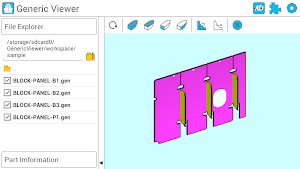
Generic viewer is 2D/3D viewer for Aveva Marine(Aveva's CAD for shipbuilding design) and is for Tribon's GEN file for ship structure.
GEN files which have ship body's 2D/3D outline information can be viewed on your smart phone or tablet
[Characteristics]
1. 3D Viewer
- Selected parts can be moved to the center or to the 2D viewer
- Zoom-in/out, panning, rotation are possible
- ISO view, Deck view, Frame view, Long view are provided.
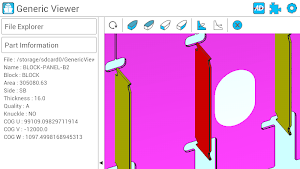
- The information(Block/Panel name, WCOG etc) of the selected part can be viewed.
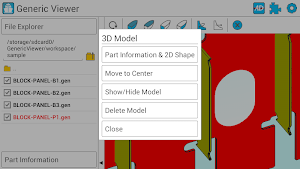
- various menus are diplayed by pressing on the gen file or directory in the explorer.
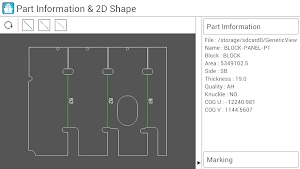
2. 2D Viewr
- Outer contour of shape/Hole/Marking is displayed as 2D image
- Markings can be toggled
- Zoom-in/out, panning, rotation are possible
3. Settings
(1) Basic settings
- working directory can be set.
- The sensitivity of rotation/panning/zooming can be adjusted.
(2) 3D Model settings
- the color of the selected part can be changed on the file explorer.
- the color can be set according to the part's wideness.
(3) 2D Marking settings
- Only required generic file's marking information can be viwed by setting on the 2D viewer.
(4) Assembly directory wizard
- Multiple gen files from the specific directory can be structured as like assembly in the working directory.
(5) Plugin
- Generic viewer has plugin which makes generic file interface from the shipbuilding company's system.
- Each shipbuilding company can make each own interface between drawing system and generic viewer by customizing the viewer.
GEN files which have ship body's 2D/3D outline information can be viewed on your smart phone or tablet
[Characteristics]
1. 3D Viewer
- Selected parts can be moved to the center or to the 2D viewer
- Zoom-in/out, panning, rotation are possible
- ISO view, Deck view, Frame view, Long view are provided.
- The information(Block/Panel name, WCOG etc) of the selected part can be viewed.
- various menus are diplayed by pressing on the gen file or directory in the explorer.
2. 2D Viewr
- Outer contour of shape/Hole/Marking is displayed as 2D image
- Markings can be toggled
- Zoom-in/out, panning, rotation are possible
3. Settings
(1) Basic settings
- working directory can be set.
- The sensitivity of rotation/panning/zooming can be adjusted.
(2) 3D Model settings
- the color of the selected part can be changed on the file explorer.
- the color can be set according to the part's wideness.
(3) 2D Marking settings
- Only required generic file's marking information can be viwed by setting on the 2D viewer.
(4) Assembly directory wizard
- Multiple gen files from the specific directory can be structured as like assembly in the working directory.
(5) Plugin
- Generic viewer has plugin which makes generic file interface from the shipbuilding company's system.
- Each shipbuilding company can make each own interface between drawing system and generic viewer by customizing the viewer.
What’s new
Version 1.1.9 · Updated July 23, 2026
Bug Fix
User reviews

Its very good
Alternatives to Generic Viewer
Looking for apps like Generic Viewer? Here are 4 similar Android apps on Google Play. The highest rated is Bosch MeasureOn (4.3/5), and all 4 are free to download.


| App | Rating | Price | Installs | Last updated | Compare |
|---|---|---|---|---|---|
| Generic Viewer | – | Free | 1,000+ | Jul 23, 2026 | |
| Bosch MeasureOn | 4.3 / 5 | Free | 50,000+ | Oct 19, 2026 | Compare |
| ArcGIS Earth | 4.0 / 5 | Free | 500,000+ | Sep 2, 2026 | Compare |
| MEAZOR - Smart Measuring Tool | 2.1 / 5 | Free | 10,000+ | Nov 19, 2025 | Compare |
| Rambler GPX Editor | – | Free | 5,000+ | Jul 28, 2017 | Compare |
Compare Generic Viewer with the top alternatives: ratings, updates, ASO score and keyword gaps →