
snap voca - 사진으로 만드는 영단어장
koz Education
An app that takes English photos and selects words to create flashcard vocabulary lists.
- Downloads
- 100+
- on Google Play
- Price
- Free
- No in-app purchases
- Updated
- Sep 2
- 2026 · v1.2.0
Screenshots
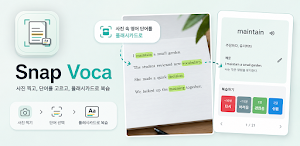
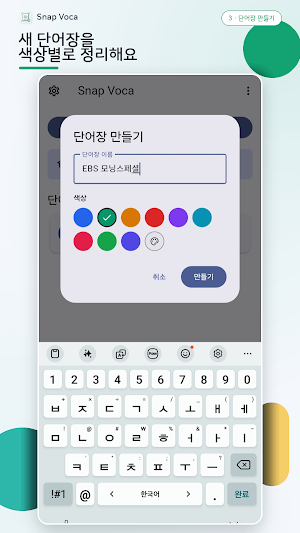
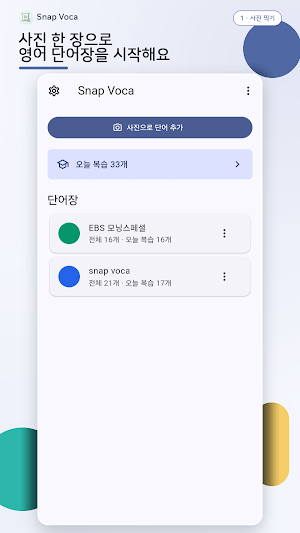
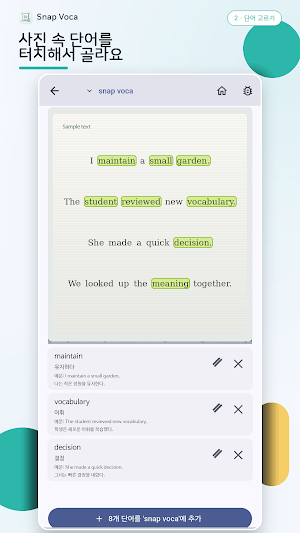


About snap voca - 사진으로 만드는 영단어장
Snap Voca is a photo-based flashcard learning app that reduces the hassle of typing English words one by one. Simply take a picture of English text from textbooks, printouts, instructions, or on your screen with your camera, or import it from your gallery, and your device's Optical Character Recognition (OCR) will identify the English words and expressions.
You can tap the words directly on the photo or select them from a recommendation list. You can select all recommended words at once or deselect them all, and you can group 2 to 5 words from the same line to create a single expression or idiom card.
- Quick Meaning Suggestions
Selected words and expressions are first looked up in the built-in local English-Korean dictionary. For items not found in the dictionary, the device's translation model suggests a Korean meaning, and you can also check the interpretation of the original OCR text. You can edit the suggested meanings and example sentences directly before saving.
※ An internet connection may be required for the initial download or update of the device's translation model.
- Flashcards and Review
You can save only the words you need to your desired vocabulary lists and manage them by list. It supports Interval Repetition (SRS) review, where you study the cards to memorize today according to a review schedule, and Free Study, where you can view any cards you want regardless of the schedule. You can listen to the English pronunciation of the cards via TTS.
- Learning Notifications
If desired, you can set a learning notification time once a day. An internal device notification is displayed only when there are cards to review at the set time, and tapping the notification takes you directly to the review screen.
- Data Management
• Full backup and restoration of vocabulary lists, cards, and review history
• Import/export card materials in TXT and XLSX formats
• Manage cards by vocabulary list and delete multiple cards
• Delete all learning data
- Key Features
• Take photos with English text using the camera
• Recognize English words in gallery images
• Zoom in, zoom out, pan, and select words directly in photos
• Select all recommended words / Deselect all current words
• Create expressions (idioms) using 2 to 5 words in the same line
• Meaning suggestions via the built-in local English-Korean dictionary and on-device translation
• OCR sentence interpretation suggestions
• Save flashcards to desired vocabulary lists
• Spacingd Repetition (SRS) review and free study
• Listen to TTS English pronunciation
• Daily local study notification
• Backup/restore and TXT/XLSX import/export
- Privacy and Permissions
Snap Voca does not use accounts, logins, ad SDKs, subscriptions, in-app billing, analytics tools, external AI APIs, or external translation APIs. Vocabulary lists, cards, review records, and settings are stored on the user's device. Card data, OCR text, and original photos are not uploaded to the developer's server.
Captured photos are used temporarily only during the OCR selection process and are deleted when the card is saved or the task is completed. For gallery photos and backup, import, and export files, only those directly selected by the user via the system selector are processed.
Snap Voca is suitable for those who want to quickly organize unknown words and expressions while studying with English textbooks or printouts, and for repeated learning using flashcards.
What’s new
Version 1.2.0 · Updated September 2, 2026
사전 뜻풀이를 전부 다시 쓰고, 요청 주신 기능을 넣었습니다. • 어색한 뜻 17,454개를 학습자용으로 새로 번역했습니다. source의 첫 뜻이 "샘"이 아니라 "원천"으로 바뀌었습니다. • 첫 번째로 보이는 뜻이 뒤바뀌던 문제를 고쳤습니다. able은 이제 "~할 수 있는"이 먼저 나옵니다. • 토익·토플·수능 필수 어휘 620개를 새로 넣었습니다. • claimed, boosted처럼 변형된 형태를 못 찾던 단어 340개를 고쳤습니다. • 뜻 입력 칸을 누르면 기존 뜻이 자동으로 비워집니다. • 복습 버튼 4개의 간격을 설정에서 직접 정할 수 있습니다. • 학습 알림이 오지 않던 문제를 고쳤습니다. • you're, we've 같은 축약형 45개를 인식합니다. • 업데이트 후 첫 실행에서 무엇이 바뀌었는지 알려드립니다. 설정 > 새로운 기능에서 언제든 다시 볼 수 있습니다. • 설정에서 앱 버전을 확인할 수 있습니다.
Alternatives to snap voca - 사진으로 만드는 영단어장
Looking for apps like snap voca - 사진으로 만드는 영단어장? Here are 6 similar Android apps on Google Play. All of them are free to download.
-
Deaf Culture: Learn & Explore
-
KasKalba: Learn Lithuanian
-
Test Guide for GDP
-
paripesa
-
Spring Branch ISD TX
-
Dawa Asili
| App | Rating | Price | Installs | Last updated | Compare |
|---|---|---|---|---|---|
| snap voca - 사진으로 만드는 영단어장 | – | Free | 100+ | Sep 2, 2026 | |
| Deaf Culture: Learn & Explore | – | Free | 100+ | – | Compare |
| KasKalba: Learn Lithuanian | – | Free | 100+ | Sep 8, 2026 | Compare |
| Test Guide for GDP | – | Free | 1,000+ | May 20, 2026 | Compare |
| paripesa | – | Free | 50+ | Jul 25, 2026 | Compare |
| Spring Branch ISD TX | – | Free | 1,000+ | Jul 8, 2026 | Compare |
| Dawa Asili | – | Free | 1,000+ | Oct 3, 2026 | Compare |
Similar apps on Google Play
- Deaf Culture: Learn & Explore
- KasKalba: Learn Lithuanian
- Test Guide for GDP
- paripesa
- Spring Branch ISD TX
- Dawa Asili
- ABL INDIA
- ScriptPad: Japanese Writing
- AI Math Solver & Homework Help
- EuroKids Ghorahi
- Fastrack Maths & Reasoning
- Schule Künten
- Conjulejo: Portuguese Verbs
- Jyoti Punj Sec Boarding School
- GoldenEar - Ear Training
- Ollie for Coursera Plus
- Hajóra Fel! - Hajós vizsga
- BrainEd
- WitSpeak: AI English Coach
- Sarkari Scheme Guide
- Bebop by the Numbers
- Milo Learns
- Sakina: İslami Meditasyon
- prime academy
- Travel Chinese for Taiwan