
English Tutor: Read & Speak
JB Andro Education In-app purchases Contains ads
Read, listen & enhance English fluency with fun stories & interactive tools.
- Downloads
- 5+
- on Google Play
- Price
- Free
- In-app purchases
- Updated
- Oct 23
- 2024 · v1.0.0
Screenshots


About English Tutor: Read & Speak
With this app, you can read or listen to exciting stories while enhancing your English fluency effortlessly.
Key Features
📚 All Stories, One Place
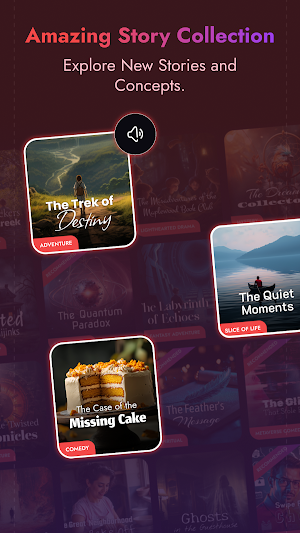
• Explore a wide range of stories, each categorized to make it easy for users to pick the ones that interest them.
• Practice your English or reading skills with fun and engaging content.
• Enjoy every story to the fullest—each one offers something new!
📖 Story Screen
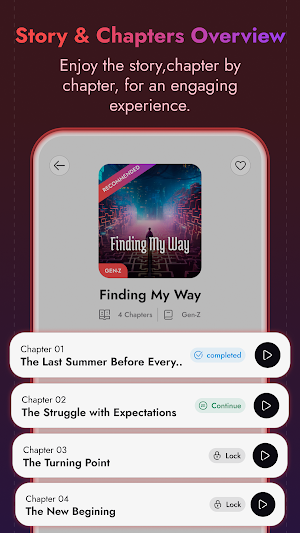
• Access chapters and easily track your progress with the continue reading tag.
• Mark your favorite stories and view summaries to get an idea before reading or listening.
🎧 Reading or Listening Screen
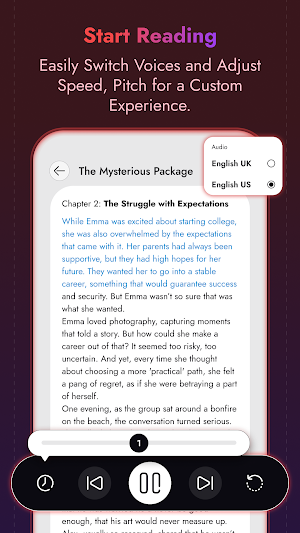
• Read or listen to stories.
• Tap on text for actions like share, copy, search it, translate, highlight, speak, or bookmark it.
• Adjust the speaker’s speed and pitch, and user can switch between UK and US English.
• Use the Replay button to listen again.
📂 Collections – Stay Organized
Users will find three sections here:
1 Favorite: Access stories marked as favorites.
2 Continue: Pick up right where you left off.
3 Completed: View the list of stories you have finished.
🔖 Bookmark
• All the words or sentences bookmarked by the user while reading or listening can be found here.
• Find all your bookmarks in one place for easy review.
📝 Paste & Listen
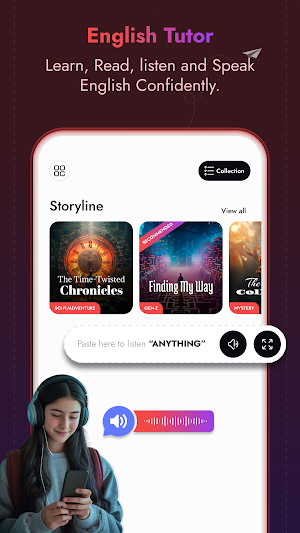
• On the Home Screen, there will be an input box. If the user wants to listen to their content, they can simply paste it and listen.
Why Choose English Tutor: Read & Speak?
• Practice fluency with interactive stories.
• Interactive Reading & Listening
• Track progress and completed reads.
• Bookmark your important learning.
• Custom Content Playback, Paste any text into the input box and listen to it read aloud.
• Fun & Educational, Explore new stories, chapter by chapter.
Key Features
📚 All Stories, One Place
• Explore a wide range of stories, each categorized to make it easy for users to pick the ones that interest them.
• Practice your English or reading skills with fun and engaging content.
• Enjoy every story to the fullest—each one offers something new!
📖 Story Screen
• Access chapters and easily track your progress with the continue reading tag.
• Mark your favorite stories and view summaries to get an idea before reading or listening.
🎧 Reading or Listening Screen
• Read or listen to stories.
• Tap on text for actions like share, copy, search it, translate, highlight, speak, or bookmark it.
• Adjust the speaker’s speed and pitch, and user can switch between UK and US English.
• Use the Replay button to listen again.
📂 Collections – Stay Organized
Users will find three sections here:
1 Favorite: Access stories marked as favorites.
2 Continue: Pick up right where you left off.
3 Completed: View the list of stories you have finished.
🔖 Bookmark
• All the words or sentences bookmarked by the user while reading or listening can be found here.
• Find all your bookmarks in one place for easy review.
📝 Paste & Listen
• On the Home Screen, there will be an input box. If the user wants to listen to their content, they can simply paste it and listen.
Why Choose English Tutor: Read & Speak?
• Practice fluency with interactive stories.
• Interactive Reading & Listening
• Track progress and completed reads.
• Bookmark your important learning.
• Custom Content Playback, Paste any text into the input box and listen to it read aloud.
• Fun & Educational, Explore new stories, chapter by chapter.
Alternatives to English Tutor: Read & Speak
Looking for apps like English Tutor: Read & Speak? Here are 6 similar Android apps on Google Play. The highest rated is Background Recorder Camera (4.2/5), and all 6 are free to download.
-
Auto Wallpaper Changer 4K & HD 4.1
-
Background Recorder Camera 4.2
-
Mobile Magnify & FlashLight 4.0
-
Text Audio Language Translator
-
Edge Gesture Controls
-
Mobile Shortcut Maker for All
| App | Rating | Price | Installs | Last updated | Compare |
|---|---|---|---|---|---|
| English Tutor: Read & Speak | – | Free | 5+ | Oct 23, 2024 | |
| Auto Wallpaper Changer 4K & HD | 4.1 / 5 | Free | 100,000+ | Aug 26, 2026 | Compare |
| Background Recorder Camera | 4.2 / 5 | Free | 100,000+ | Jun 25, 2026 | Compare |
| Mobile Magnify & FlashLight | 4.0 / 5 | Free | 50,000+ | May 28, 2026 | Compare |
| Text Audio Language Translator | – | Free | 100,000+ | Oct 21, 2026 | Compare |
| Edge Gesture Controls | – | Free | 100,000+ | Jun 15, 2026 | Compare |
| Mobile Shortcut Maker for All | – | Free | 100,000+ | May 14, 2025 | Compare |
Similar apps on Google Play
- Auto Wallpaper Changer 4K & HD
- Background Recorder Camera
- Mobile Magnify & FlashLight
- Text Audio Language Translator
- Edge Gesture Controls
- Mobile Shortcut Maker for All
- Auto Nickname Name Font Styles
- Signal Strength Scanner
- Flashlight Custom Settings
- GPS Photo: Location Map Tags
- Sunrise Sunset Alarm Clock
- Draw Route On Map & Navigation
- Transparent Keyboard
- Apps Default Settings Controls
- Investor's Finance Calculator