
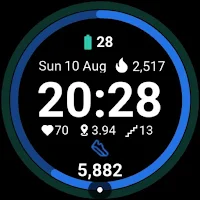
G Fit: Health Watch Face Wear
isapps corporation Lifestyle
Save battery with this minimal health watch face for Wear OS. Fitbit ready.
- Downloads
- 22+
- on Google Play
- Price
- $0.99
- No in-app purchases
- Updated
- Aug 19
- 2026 · v1.0.2
Screenshots


About G Fit: Health Watch Face Wear
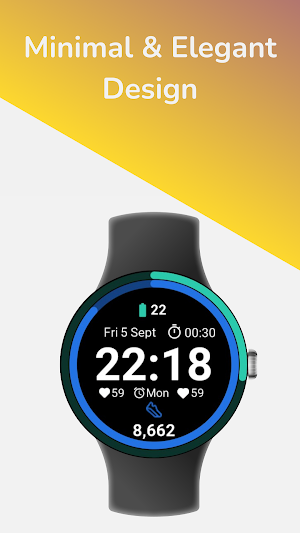
**Elevate your fitness journey with G Fit**, a premium, minimalist watch face designed exclusively for Wear OS.
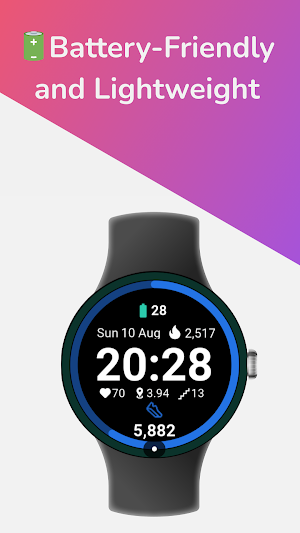
G Fit combines a sleek, modern aesthetic with powerful health tracking. Built using Google's official **Watch Face Format (WFF)**, it ensures your battery lasts longer while keeping your most important stats—steps, heart rate, and activity—just a glance away.
Whether you use a **Google Pixel Watch, Samsung Galaxy Watch**, or any other Wear OS device, G Fit adapts perfectly to your lifestyle.
### ⚡ WHY CHOOSE G FIT?
Unlike standard watch faces that drain your battery, G Fit is engineered for efficiency. We use the latest Weas OS standards to provide a smooth, lag-free experience that respects your device's energy.
### 🌟 KEY FEATURES:
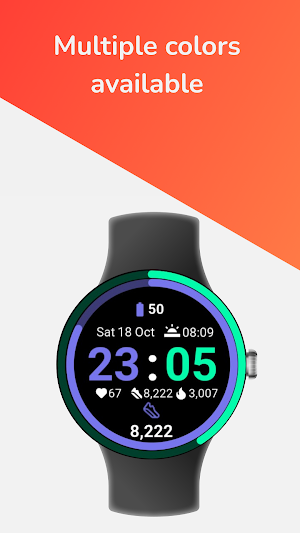
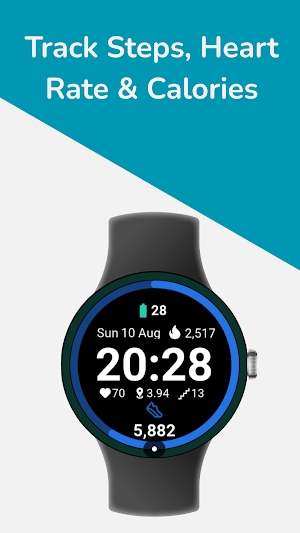
* **Health at a Glance:** Seamlessly visualizes your Steps, Heart Rate, and Calories Burned. compatible with Google Fit & Fitbit data.
* **Battery Saver Design:** Optimized with "Watch Face Format" (WFF) technology to consume minimal energy.
* **True Black Background:** Perfect for OLED screens, looking sharp while saving power.
* **Always-On Display (AOD):** A dimmed, elegant mode that keeps time visible without waking the watch.
* **Customizable Complications:** Choose what data you want to see.
* **Large, Legible Typography:** Read your stats easily during workouts or on the go.
### ⌚ DEVICE COMPATIBILITY:
Fully compatible with all **Wear OS 3, 4, and 5+** devices, including:
* **Google Pixel Watch** (All Generations)
* **Samsung Galaxy Watch** 4, 5, 6, 7 & Ultra
* **OnePlus Watch** 2
* **TicWatch** Pro 5
* **Xiaomi Watch** 2 Pro
### 🎨 DESIGNED FOR MOVEMENT
G Fit cuts out the clutter. There are no distracting animations or useless graphics—just a clean interface that helps you focus on your goals. Ideal for running, gym sessions, or office wear.
### 🛠️ INSTALLATION & SETUP
1. Install the app on your phone and watch.
2. Long press your watch center > select "G Fit".
3. **Important:** Tap "Allow" when asked for sensor permissions (Heart Rate & Activity) to enable health tracking features.
---
**Feedback & Support:**
We are dedicated to building the best Wear OS watch faces. If you enjoy G Fit, please leave a **5-star review**!
G Fit combines a sleek, modern aesthetic with powerful health tracking. Built using Google's official **Watch Face Format (WFF)**, it ensures your battery lasts longer while keeping your most important stats—steps, heart rate, and activity—just a glance away.
Whether you use a **Google Pixel Watch, Samsung Galaxy Watch**, or any other Wear OS device, G Fit adapts perfectly to your lifestyle.
### ⚡ WHY CHOOSE G FIT?
Unlike standard watch faces that drain your battery, G Fit is engineered for efficiency. We use the latest Weas OS standards to provide a smooth, lag-free experience that respects your device's energy.
### 🌟 KEY FEATURES:
* **Health at a Glance:** Seamlessly visualizes your Steps, Heart Rate, and Calories Burned. compatible with Google Fit & Fitbit data.
* **Battery Saver Design:** Optimized with "Watch Face Format" (WFF) technology to consume minimal energy.
* **True Black Background:** Perfect for OLED screens, looking sharp while saving power.
* **Always-On Display (AOD):** A dimmed, elegant mode that keeps time visible without waking the watch.
* **Customizable Complications:** Choose what data you want to see.
* **Large, Legible Typography:** Read your stats easily during workouts or on the go.
### ⌚ DEVICE COMPATIBILITY:
Fully compatible with all **Wear OS 3, 4, and 5+** devices, including:
* **Google Pixel Watch** (All Generations)
* **Samsung Galaxy Watch** 4, 5, 6, 7 & Ultra
* **OnePlus Watch** 2
* **TicWatch** Pro 5
* **Xiaomi Watch** 2 Pro
### 🎨 DESIGNED FOR MOVEMENT
G Fit cuts out the clutter. There are no distracting animations or useless graphics—just a clean interface that helps you focus on your goals. Ideal for running, gym sessions, or office wear.
### 🛠️ INSTALLATION & SETUP
1. Install the app on your phone and watch.
2. Long press your watch center > select "G Fit".
3. **Important:** Tap "Allow" when asked for sensor permissions (Heart Rate & Activity) to enable health tracking features.
---
**Feedback & Support:**
We are dedicated to building the best Wear OS watch faces. If you enjoy G Fit, please leave a **5-star review**!
Alternatives to G Fit: Health Watch Face Wear
Looking for apps like G Fit: Health Watch Face Wear? Here are 6 similar Android apps on Google Play. 3 of the 6 are free to download.
-
Blue Ring Watch Face
-
Dazzling Color- for wear os 5
-
AD Gemini - Watch Face
-
Ocean Sport Watch Face
-
Minimal Cyan watch face
-
Racing Lines Watch Face
| App | Rating | Price | Installs | Last updated | Compare |
|---|---|---|---|---|---|
| G Fit: Health Watch Face Wear | – | $0.99 | 10+ | Aug 19, 2026 | |
| Blue Ring Watch Face | – | Free | 1,000+ | Aug 13, 2026 | Compare |
| Dazzling Color- for wear os 5 | – | 0.99 USD | 0+ | Sep 18, 2024 | Compare |
| AD Gemini - Watch Face | – | 1.49 USD | 50+ | – | Compare |
| Ocean Sport Watch Face | – | 1.99 USD | 500+ | Aug 9, 2026 | Compare |
| Minimal Cyan watch face | – | Free | 10+ | Mar 3, 2025 | Compare |
| Racing Lines Watch Face | – | Free | 1,000+ | – | Compare |
Similar apps on Google Play
- Blue Ring Watch Face
- Dazzling Color- for wear os 5
- AD Gemini - Watch Face
- Ocean Sport Watch Face
- Minimal Cyan watch face
- Racing Lines Watch Face
- SamWatch PointColor 48
- Digital 1
- GW Weather 2
- Vivid Time 3
- SonarFace
- Simple Ptt Watch Face
- JCD 06
- Watch Face WF102
- Fit Dashboard Watch face
- Fusion Watch Face
- Fit ONE: Watch face
- JHW Digital Info v2: Wear OS
- OMG H1
- Numeric Format Watch Face
- Milestone Watch Face Wear OS
- Digital Black Watch Face
- Imperial: Digital Watch Face
- SG-102
- Watch face CNW0031
- Digital Color WearOS NTV570
- Ocean Run Watch Face
- HKR015