Document to pdf converter
Scan to PDF with OCR. Pro features: edit, scan, secure & manage docs easily!
About Document to pdf converter
Transform your mobile device into a powerful scanning tool with Document to PDF Converter — the ultimate solution for anyone needing a document scanner, document reader, or doc scanner. Whether it's for personal, academic, or business use, this all-in-one scanner app makes it easier than ever to scan, convert, and manage files.
Scan everything from handwritten notes to books, receipts, and ID cards. The app uses advanced OCR (Optical Character Recognition) to instantly convert images to text, making it perfect for creating editable content from physical documents.
🔹 Why Choose Document to PDF Converter?
Fast and accurate document scanner
Converts any document into high-quality PDF
Powerful image to text OCR engine
Works offline and protects your privacy
Trusted alternative to CamScanner, TapScanner, iScanner, Scan Hero, and more
✅ Core Features:
Document to PDF Converter: Convert paper files into digital PDFs with just one tap
Doc Scanner: High-speed scanning for multipage documents
Scan to PDF: Capture content and save directly in PDF format
Text Scanner OCR: Extract text from images, handwritten notes, or printed materials
Document Reader: Open and read any scanned or uploaded document
Document Recovery: Recover scanned files securely in case of accidental deletion
Batch Scan: Scan multiple documents at once and merge into a single file
Secure Scanner App: Add passwords or fingerprint lock to protect sensitive files
📦 Also Included:
Compatible with Cam Scanner PDF, Scan Hero, Libro Book Scanner, VFlat Scan, and Mobile Document Capture
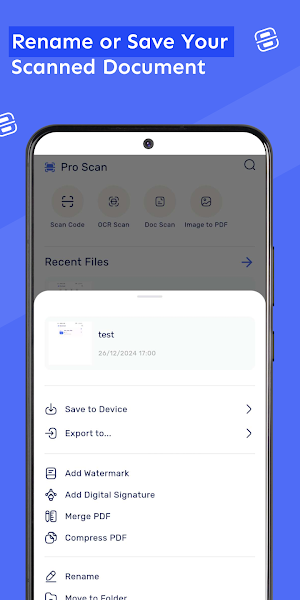
Export files via email, cloud storage, WhatsApp, or direct link
Automatic edge detection, crop, and enhancement filters
Dark mode support and low battery usage
🔍 Who’s it for?
Students: Digitize textbooks, notes (perfect document reader!)
Professionals: Scan contracts, ID cards, or reports (doc scanner on the go)
Freelancers: Invoice & receipt scanning, bill organization
Everyone: Snap & store – scan anything anytime, anywhere
📈 Why It Works:
Unlike other scanner apps, Document to PDF Converter maintains clarity and quality without watermarks. It supports multiple formats and performs as a fast docscanner, perfect for users searching for free PDF scanners, scaner apps, and even document recovery tools.
With integrated support for image scanner, pdf document scanner, scaner, and document to pdf converter features, your files are always just one scan away from becoming organized and accessible.
Download Document to PDF Converter today and enjoy an all-in-one document scanner, doc scanner, document reader, and image to text OCR app – optimized for everyday scanning. Join millions who trust their mobile device as their primary scanner app for professional and personal productivity.
Document to pdf converter details
Document to pdf converter is a free Productivity app for Android with 10,000+ installs on Google Play and a 5.0/5 average rating from 1 rating. It was released on December 30, 2024 and last updated on September 18, 2026. It's developed by Fitness %26 Career Builder. It requires Android 8.0 or later.
- Category
- Productivity
- Rating
- 5.0 / 5 (1 rating)
- Installs
- 10,000+
- Price
- Free
- In-app purchases
- No
- Ads
- No ads
- Current version
- 6.0.22
- Requires Android
- 8.0
- Content rating
- Everyone
- Released
- December 30, 2024
- Last updated
- September 18, 2026
- Developer
- Fitness %26 Career Builder


