

VainicaMobile
Iddeon Technologies Business
The perfect solution for sales representatives and sales agents.
- Downloads
- 100+
- on Google Play
- Price
- Free
- No in-app purchases
- Updated
- Feb 26
- 2018 · v1.5.6
Screenshots


About VainicaMobile
VainicaMobile - The Android solution for sales representatives.
VainicaMobile brings a truly effective tool for their sales representatives, providing a simple and effective solution to display goods catalogs,
Displays relevant information about customers, such as sales by different criteria, risk, etc.
VainicaMobile provides important information for sale, such as colors, sizes and composition of the items detailed article.
Application vainicamobile representatives.
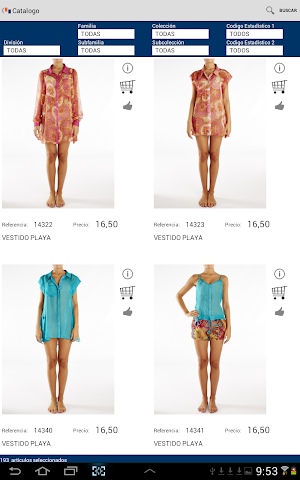
- Product catalog with high-resolution images
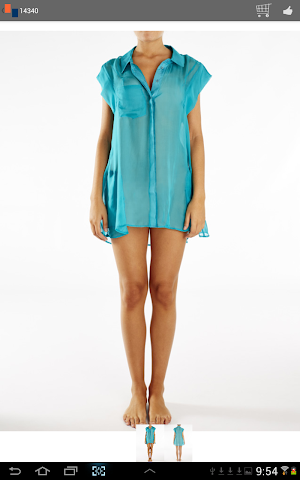
- Zoom in the presentation of the image.
- Allows multiple pictures per model.
- Management of different criteria catalog.
- Filters season, division, family, subfamily, collection, sub-collection, composition, etc ...
- Operation in offline
- Vainicamobile provides a complete link with ERP idd.vainica (vertical application for the textile sector)
- Vainicamobile possible link with other applications
Customer Management:
- Import data from ERP
- Maintenance of data representative clients, delivery addresses and contacts.
- Search for customers by different filters.
- Display of receivables and shipping option PDF documents.
- Geographic location
- Geographic Viewing closest customers by location.
Management Cart:
- Incorporation into the shopping cart from the catalog
- Display of the car and maintaining it.
- Generating PDF order and shipping document to the client.
- Order PDF formats vertically (up to 10 sizes) and horizontally
Orders management:
- Browse by various criteria.
- Option of customer signature
- Reprint Order delivery via email
- Sending orders to ERP
- Print images in order
Statistics Request:
- Comparison Chart seasonal
- Cancellations customer and company
- Top Ten Customers
- Top Ten Products
Steps for installing demo vainicamobile, once the application is installed:
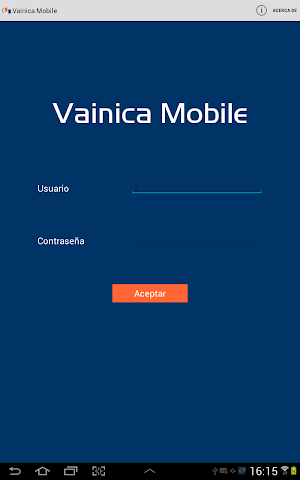
- Record user (demo) and password (demo) and click "OK"
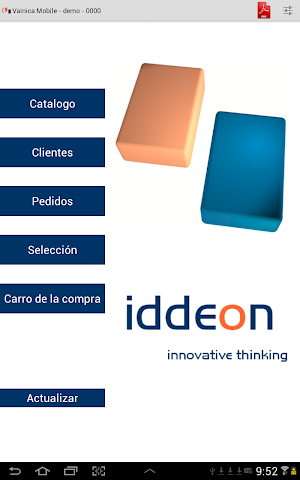
- Once in the main menu, press the "update"
- Check the options "download server data" and "download images from server" and click the "Start download" (the download takes a few minutes)
- Once downloaded the application will return to the main menu
- Go to Settings (button in the upper right corner) and you can select:
- Company: select "DEMO company"
- Season: select "SPRING / SUMMER 2016" (season with images)
- Fee: select "Rate 1" to display prices
- PDF: Select any
- Once these changes back to main menu and press option "Catalogue" to start the demo.
VainicaMobile brings a truly effective tool for their sales representatives, providing a simple and effective solution to display goods catalogs,
Displays relevant information about customers, such as sales by different criteria, risk, etc.
VainicaMobile provides important information for sale, such as colors, sizes and composition of the items detailed article.
Application vainicamobile representatives.
- Product catalog with high-resolution images
- Zoom in the presentation of the image.
- Allows multiple pictures per model.
- Management of different criteria catalog.
- Filters season, division, family, subfamily, collection, sub-collection, composition, etc ...
- Operation in offline
- Vainicamobile provides a complete link with ERP idd.vainica (vertical application for the textile sector)
- Vainicamobile possible link with other applications
Customer Management:
- Import data from ERP
- Maintenance of data representative clients, delivery addresses and contacts.
- Search for customers by different filters.
- Display of receivables and shipping option PDF documents.
- Geographic location
- Geographic Viewing closest customers by location.
Management Cart:
- Incorporation into the shopping cart from the catalog
- Display of the car and maintaining it.
- Generating PDF order and shipping document to the client.
- Order PDF formats vertically (up to 10 sizes) and horizontally
Orders management:
- Browse by various criteria.
- Option of customer signature
- Reprint Order delivery via email
- Sending orders to ERP
- Print images in order
Statistics Request:
- Comparison Chart seasonal
- Cancellations customer and company
- Top Ten Customers
- Top Ten Products
Steps for installing demo vainicamobile, once the application is installed:
- Record user (demo) and password (demo) and click "OK"
- Once in the main menu, press the "update"
- Check the options "download server data" and "download images from server" and click the "Start download" (the download takes a few minutes)
- Once downloaded the application will return to the main menu
- Go to Settings (button in the upper right corner) and you can select:
- Company: select "DEMO company"
- Season: select "SPRING / SUMMER 2016" (season with images)
- Fee: select "Rate 1" to display prices
- PDF: Select any
- Once these changes back to main menu and press option "Catalogue" to start the demo.
What’s new
Version 1.5.6 · Updated February 26, 2018
Mejoras y revisiones
Alternatives to VainicaMobile
Looking for apps like VainicaMobile? Here are 5 similar Android apps on Google Play. The highest rated is Munbyn Print (4.0/5), and 4 of the 5 are free to download.
-
Homestyler - Home Design Game 3.5
-
Munbyn Print 4.0
-
AI Home Decor: Interior Design
-
ZWCAD Mobile - DWG Viewer 3.8
-
Orion by Wix
| App | Rating | Price | Installs | Last updated | Compare |
|---|---|---|---|---|---|
| VainicaMobile | – | Free | 100+ | Feb 26, 2018 | |
| Homestyler - Home Design Game | 3.5 / 5 | Free | 10,000,000+ | Oct 13, 2026 | Compare |
| Munbyn Print | 4.0 / 5 | Free | 100,000+ | Oct 12, 2026 | Compare |
| AI Home Decor: Interior Design | – | – | 10,000+ | Sep 4, 2026 | Compare |
| ZWCAD Mobile - DWG Viewer | 3.8 / 5 | Free | 1,000,000+ | Aug 12, 2026 | Compare |
| Orion by Wix | – | Free | 10,000+ | Oct 1, 2026 | Compare |
Compare VainicaMobile with the top alternatives: ratings, updates, ASO score and keyword gaps →