

Camera Remote Shutter
ICM Software Studio Photography
Pro wireless shutter. No shake, no blur. Just perfect shots every time.
- Downloads
- 50+
- on Google Play
- Price
- $1.19
- No in-app purchases
- Updated
- Jul 7
- 2026 · v1.4
Screenshots

About Camera Remote Shutter
📸 TIRED OF BLURRY LONG-EXPOSURE SHOTS?
You know the frustration. You've set up the perfect astrophotography shot, your camera is perfectly positioned, stars aligned... then you press the shutter button and introduce just enough camera shake to ruin everything.
Professional photographers spend $50-100 on wireless shutters for one reason: camera shake is the silent killer of perfect shots.
🎯 NOW YOU HAVE THAT SAME POWER — FOR FREE
Transform your old phone into a professional wireless camera remote. No cables. No apps to sync. No complicated setup. Just pure Bluetooth simplicity.
⭐ WHEN YOU ABSOLUTELY CANNOT TOUCH YOUR CAMERA
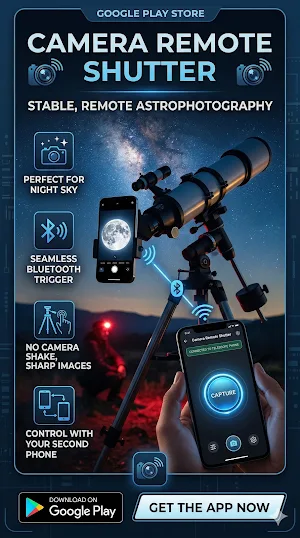
- ASTROPHOTOGRAPHY: 30-second exposures without a single vibration
- WILDLIFE PHOTOGRAPHY: Trigger from 10 meters away, stay hidden
- LIGHT PAINTING: Keep your hands free while controlling the shutter
- MACRO PHOTOGRAPHY: Zero shake = razor-sharp flower details
- LONG EXPOSURES: Waterfalls, light trails, night scenes — perfectly crisp
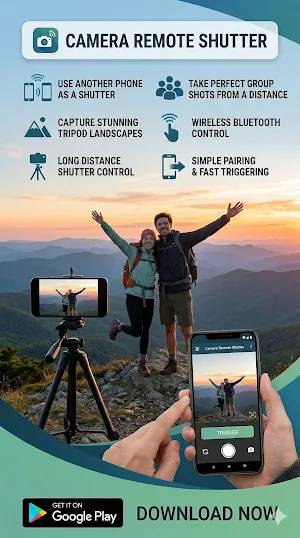
- GROUP PHOTOS: Finally be IN the photo instead of behind the camera
- SELF-PORTRAITS: Professional results without awkward timer runs
- TIME-LAPSES: Consistent triggering for smooth sequences
🔥 WHY PHOTOGRAPHERS CHOOSE THIS
✓ INSTANT CONNECTION: Pairs in seconds via Bluetooth
✓ ZERO LAG: Shutter fires the moment you press
✓ UNIVERSAL COMPATIBILITY: Works with Samsung, Pixel, OnePlus, Xiaomi & 95% of Android cameras
✓ NO SUBSCRIPTION: Free forever. No ads. No in-app purchases.
✓ BATTERY FRIENDLY: Minimal power consumption
✓ RELIABLE RANGE: Solid connection up to 10 meters
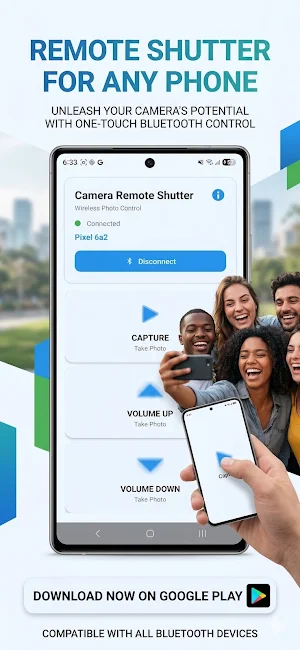
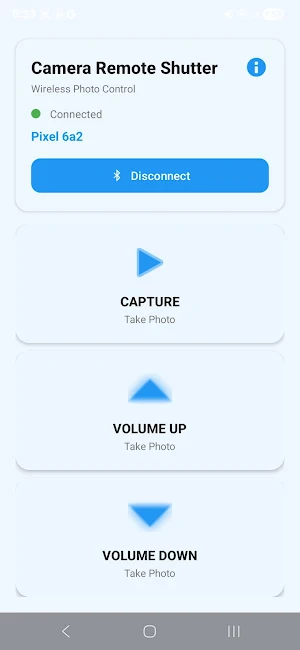
✓ MULTIPLE TRIGGER OPTIONS: Three buttons for different shooting styles
💡 SETUP IN 60 SECONDS
1. Install app on your OLD phone (your remote control)
2. Connect via Bluetooth to your CAMERA phone
3. Open your camera app
4. Start shooting like a pro
🎬 PERFECT FOR CONTENT CREATORS
TikTok creators, YouTubers, Instagram photographers — this is your secret weapon for professional-looking content. No more awkward timer countdowns. No more asking strangers to take your photo. No more missed golden hour shots because you introduced camera shake.
📱 WORKS GREAT WITH
- Samsung Galaxy (S, Note, A series)
- Google Pixel phones
- OnePlus, Xiaomi, Realme
- Motorola, Nokia
- Most Android 9.0+ devices
⚙️ PRO TIP
Enable "Volume button shutter" in your camera settings for instant compatibility. Camera → Settings → Volume Keys → Shutter.
🌟 THE BOTTOM LINE
You already know that every serious photographer needs a wireless shutter. You just haven't wanted to spend $50 on one. Now you don't have to.
Download now. Turn that drawer phone into professional photography equipment. Your shots deserve it.
📸 Stop touching your camera. Start capturing perfection.
You know the frustration. You've set up the perfect astrophotography shot, your camera is perfectly positioned, stars aligned... then you press the shutter button and introduce just enough camera shake to ruin everything.
Professional photographers spend $50-100 on wireless shutters for one reason: camera shake is the silent killer of perfect shots.
🎯 NOW YOU HAVE THAT SAME POWER — FOR FREE
Transform your old phone into a professional wireless camera remote. No cables. No apps to sync. No complicated setup. Just pure Bluetooth simplicity.
⭐ WHEN YOU ABSOLUTELY CANNOT TOUCH YOUR CAMERA
- ASTROPHOTOGRAPHY: 30-second exposures without a single vibration
- WILDLIFE PHOTOGRAPHY: Trigger from 10 meters away, stay hidden
- LIGHT PAINTING: Keep your hands free while controlling the shutter
- MACRO PHOTOGRAPHY: Zero shake = razor-sharp flower details
- LONG EXPOSURES: Waterfalls, light trails, night scenes — perfectly crisp
- GROUP PHOTOS: Finally be IN the photo instead of behind the camera
- SELF-PORTRAITS: Professional results without awkward timer runs
- TIME-LAPSES: Consistent triggering for smooth sequences
🔥 WHY PHOTOGRAPHERS CHOOSE THIS
✓ INSTANT CONNECTION: Pairs in seconds via Bluetooth
✓ ZERO LAG: Shutter fires the moment you press
✓ UNIVERSAL COMPATIBILITY: Works with Samsung, Pixel, OnePlus, Xiaomi & 95% of Android cameras
✓ NO SUBSCRIPTION: Free forever. No ads. No in-app purchases.
✓ BATTERY FRIENDLY: Minimal power consumption
✓ RELIABLE RANGE: Solid connection up to 10 meters
✓ MULTIPLE TRIGGER OPTIONS: Three buttons for different shooting styles
💡 SETUP IN 60 SECONDS
1. Install app on your OLD phone (your remote control)
2. Connect via Bluetooth to your CAMERA phone
3. Open your camera app
4. Start shooting like a pro
🎬 PERFECT FOR CONTENT CREATORS
TikTok creators, YouTubers, Instagram photographers — this is your secret weapon for professional-looking content. No more awkward timer countdowns. No more asking strangers to take your photo. No more missed golden hour shots because you introduced camera shake.
📱 WORKS GREAT WITH
- Samsung Galaxy (S, Note, A series)
- Google Pixel phones
- OnePlus, Xiaomi, Realme
- Motorola, Nokia
- Most Android 9.0+ devices
⚙️ PRO TIP
Enable "Volume button shutter" in your camera settings for instant compatibility. Camera → Settings → Volume Keys → Shutter.
🌟 THE BOTTOM LINE
You already know that every serious photographer needs a wireless shutter. You just haven't wanted to spend $50 on one. Now you don't have to.
Download now. Turn that drawer phone into professional photography equipment. Your shots deserve it.
📸 Stop touching your camera. Start capturing perfection.
What’s new
Version 1.4 · Updated July 7, 2026
🚀 New update available! 📸 Added AUTO mode: set a timer on any shutter button and it fires automatically at your chosen interval, hands-free. 🌙 Improved Night Mode colors so all controls stay clearly visible during astrophotography sessions. ⚙️ Minor bug fixes and performance improvements. Thank you for using our app. Happy shooting!
Alternatives to Camera Remote Shutter
Looking for apps like Camera Remote Shutter? Here are 4 similar Android apps on Google Play. The highest rated is RecallCue: Dementia Clock (4.0/5), and all 4 are free to download.




| App | Rating | Price | Installs | Last updated | Compare |
|---|---|---|---|---|---|
| Camera Remote Shutter | – | $1.19 | 50+ | Jul 7, 2026 | |
| Majik Kids | – | Free | 1,000+ | Sep 28, 2026 | Compare |
| RecallCue: Dementia Clock | 4.0 / 5 | Free | 5,000+ | Oct 1, 2026 | Compare |
| Growlink | 3.6 / 5 | Free | 5,000+ | Mar 30, 2026 | Compare |
| Vive Now | 2.4 / 5 | Free | 5,000+ | Jan 29, 2026 | Compare |