

iCaller Screen - OS 18
Happy Trand Tools Contains ads
iCaller Screen OS 18: Custom dialer, call history, favorites & more
- Downloads
- 928+
- on Google Play
- Price
- Free
- No in-app purchases
- Updated
- May 2
- 2025 · v1.2
Screenshots


About iCaller Screen - OS 18
iCaller Screen - OS 18 is designed to enhance your calling experience with a sleek, intuitive interface and a wide range of customizable features. Whether you’re looking for an efficient dialer, easy access to your contacts, or the ability to personalize your phone settings, iCaller Screen has it all.
Key Features:
📱 Favorites List
Quickly access your most-dialed contacts for faster calling. Keep your frequently used contacts at your fingertips.
📞 Recent Call List
See your incoming, outgoing, and missed calls at a glance. Stay updated on your call history for easy redialing.
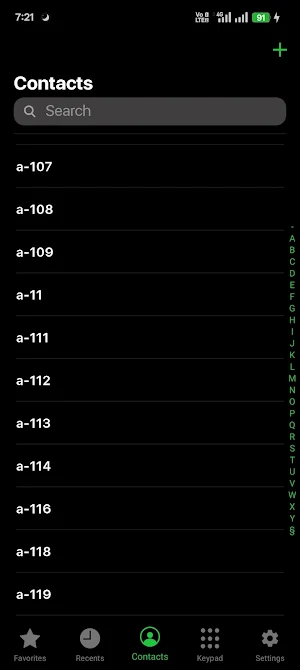
📚 Contact List
Organize and view all your contacts in one place for quick dialing. Never search for a contact again!
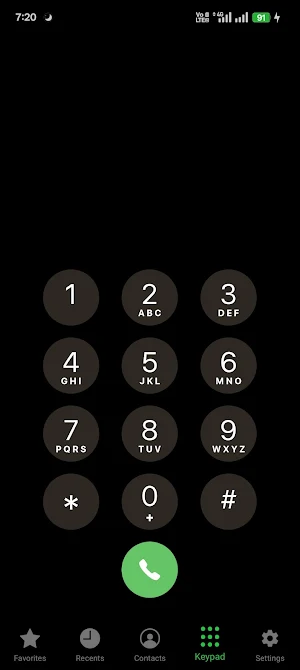
🔢 Keypad/Dialer
Use a responsive keypad for easy manual dialing. Tap numbers and start calls with minimal effort.
⚙️ Customizable Settings
Personalize your app settings to fit your needs:
Language Selection: Choose your preferred language.
Ringtones: Set unique ringtones for calls and notifications.
🔊 Key Sound: Enable or disable key sounds while typing numbers.
🌑 Auto Theme Mode
Automatically switch between Dark Mode for night use and Light Mode for day use. The app adjusts to match your preference.
Permission Required for :
📲 Set as Default Dialer
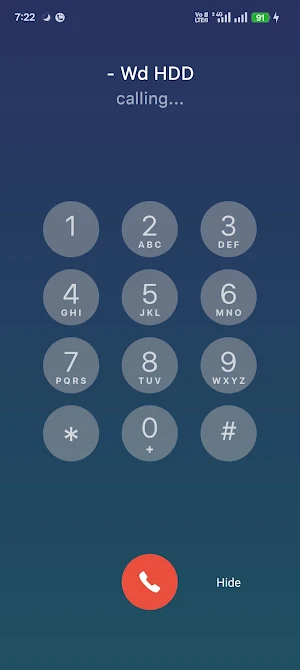
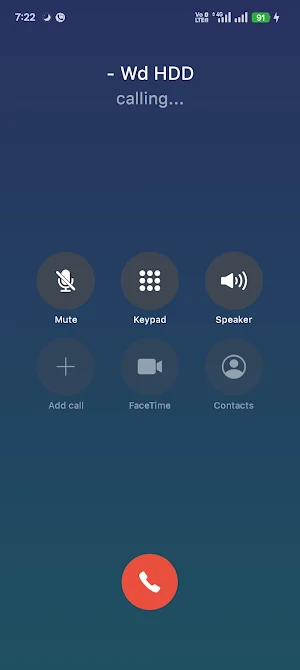
Make iCaller Screen - OS 18 your default dialer for a seamless experience. Manage incoming and outgoing calls with a modern interface.
🔔 Notification Management
Get notified of incoming calls and messages with customizable alerts and sounds.
With iCaller Screen - OS 18, you get full control over your phone’s call interface. The app brings an intuitive and personalized experience to every call. Whether you prefer the light mode during the day or dark mode for evening use, you can tailor it to your preferences. Plus, with options to manage key sounds, ringtones, and notifications, you can fine-tune your calling setup.
Key Features:
📱 Favorites List
Quickly access your most-dialed contacts for faster calling. Keep your frequently used contacts at your fingertips.
📞 Recent Call List
See your incoming, outgoing, and missed calls at a glance. Stay updated on your call history for easy redialing.
📚 Contact List
Organize and view all your contacts in one place for quick dialing. Never search for a contact again!
🔢 Keypad/Dialer
Use a responsive keypad for easy manual dialing. Tap numbers and start calls with minimal effort.
⚙️ Customizable Settings
Personalize your app settings to fit your needs:
Language Selection: Choose your preferred language.
Ringtones: Set unique ringtones for calls and notifications.
🔊 Key Sound: Enable or disable key sounds while typing numbers.
🌑 Auto Theme Mode
Automatically switch between Dark Mode for night use and Light Mode for day use. The app adjusts to match your preference.
Permission Required for :
📲 Set as Default Dialer
Make iCaller Screen - OS 18 your default dialer for a seamless experience. Manage incoming and outgoing calls with a modern interface.
🔔 Notification Management
Get notified of incoming calls and messages with customizable alerts and sounds.
With iCaller Screen - OS 18, you get full control over your phone’s call interface. The app brings an intuitive and personalized experience to every call. Whether you prefer the light mode during the day or dark mode for evening use, you can tailor it to your preferences. Plus, with options to manage key sounds, ringtones, and notifications, you can fine-tune your calling setup.
What’s new
Version 1.2 · Updated May 2, 2025
Language file added
User reviews

lovely
Alternatives to iCaller Screen - OS 18
Looking for apps like iCaller Screen - OS 18? Here are 6 similar Android apps on Google Play. 5 of the 6 are free to download.
-
Halloween Color by Number
-
Santa Color by Number
-
iLock Screen PRO
-
iLauncher OS 18
-
NoteMaster
-
Car Food ASMR Sound
| App | Rating | Price | Installs | Last updated | Compare |
|---|---|---|---|---|---|
| iCaller Screen - OS 18 | – | Free | 500+ | May 2, 2025 | |
| Halloween Color by Number | – | Free | 500+ | – | Compare |
| Santa Color by Number | – | Free | 1,000+ | – | Compare |
| iLock Screen PRO | – | 1.99 USD | 10+ | – | Compare |
| iLauncher OS 18 | – | Free | 10,000+ | May 26, 2025 | Compare |
| NoteMaster | – | Free | 100+ | – | Compare |
| Car Food ASMR Sound | – | Free | 100+ | – | Compare |
Similar apps on Google Play
- Halloween Color by Number
- Santa Color by Number
- iLock Screen PRO
- iLauncher OS 18
- NoteMaster
- Car Food ASMR Sound
- Caller - Phone Contacts Dialer
- Global Stock Market & Indices
- Gujarati - Video Maker
- AI Background Remover Pro
- Business Card Maker
- TV Shows On Tube Vido
- Mandala Coloring Notebook
- CatChat - Random Video Chat
- 4D ShivParvati LiveWallpaperHD
- AppLock - Fingerprint Locker