
Family Guard
Akij iBOS LIMITED Productivity
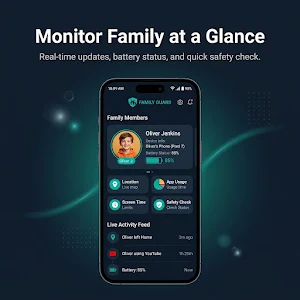
Our app to monitor, block apps, track screen time, and protect your kids online.
- Downloads
- 25K+
- on Google Play
- Price
- Free
- No in-app purchases
- Updated
- Sep 13
- 2026 · v1.5.3
Screenshots
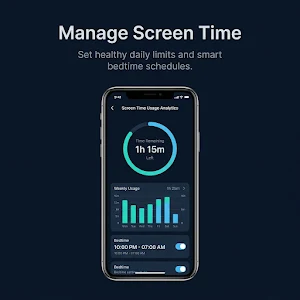


About Family Guard
Welcome to Family Guard
This app designed for modern parents and helps you regulation, guide, and protect your children’s online activity. Whether it’s managing screen time, blocking harmful apps— everything is just a tap away. Take full control of your child’s digital safety with our powerful App.
🔒 Key Features:
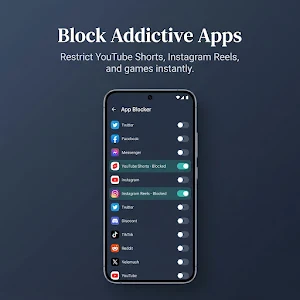
✅ App & Website Blocking – Block unwanted or harmful apps and websites instantly.
✅ Screen Time Control – Set daily limits and build healthy device habits
✅ Activity Reports – Get detailed insights into app usage and behavior.
🔐 AccessibilityService Usage Disclosure (VERY IMPORTANT)
This app uses the AccessibilityService API to enable core parental control features such as app blocking and usage regulation.
Important permissions required by the app:
1. Accessibility Service(BIND_ACCESSIBILITY_SERVICE): This permission is used to block reels and full app block.
How it works:
When a child opens a blocked app (such as social media or entertainment apps), the app automatically detects it and shows a blocking screen to restrict usage.
🔒 Data Safety & Privacy
1. We do NOT collect, store, or share any personal or sensitive user data.
2. We do NOT monitor or capture user input such as passwords, messages, or personal content.
3. Accessibility permission is used strictly for parental control and digital wellbeing purposes only.
User Consent:
1. Accessibility permission is only enabled after explicit user approval.
1. Users can disable this permission at any time from device settings.
This app uses Android's VpnService API to provide parental control and online safety features. The VPN connection is used locally on the device to monitor and filter internet traffic, allowing the app to:
• Block access to inappropriate or restricted websites.
• Filter harmful online content.
• Enforce safe browsing rules configured by parents.
• Apply app and web usage restrictions for child devices.
The VPN service is used solely for parental control and content filtering purposes. The app does not route traffic through external VPN servers or provide anonymous browsing functionality.
👨👩👧 Why Choose This App?
✅ Easy setup and user-friendly interface
✅ Helps build safe and balanced digital habits
✅ Designed for busy parents who want full control without complexity
This app designed for modern parents and helps you regulation, guide, and protect your children’s online activity. Whether it’s managing screen time, blocking harmful apps— everything is just a tap away. Take full control of your child’s digital safety with our powerful App.
🔒 Key Features:
✅ App & Website Blocking – Block unwanted or harmful apps and websites instantly.
✅ Screen Time Control – Set daily limits and build healthy device habits
✅ Activity Reports – Get detailed insights into app usage and behavior.
🔐 AccessibilityService Usage Disclosure (VERY IMPORTANT)
This app uses the AccessibilityService API to enable core parental control features such as app blocking and usage regulation.
Important permissions required by the app:
1. Accessibility Service(BIND_ACCESSIBILITY_SERVICE): This permission is used to block reels and full app block.
How it works:
When a child opens a blocked app (such as social media or entertainment apps), the app automatically detects it and shows a blocking screen to restrict usage.
🔒 Data Safety & Privacy
1. We do NOT collect, store, or share any personal or sensitive user data.
2. We do NOT monitor or capture user input such as passwords, messages, or personal content.
3. Accessibility permission is used strictly for parental control and digital wellbeing purposes only.
User Consent:
1. Accessibility permission is only enabled after explicit user approval.
1. Users can disable this permission at any time from device settings.
This app uses Android's VpnService API to provide parental control and online safety features. The VPN connection is used locally on the device to monitor and filter internet traffic, allowing the app to:
• Block access to inappropriate or restricted websites.
• Filter harmful online content.
• Enforce safe browsing rules configured by parents.
• Apply app and web usage restrictions for child devices.
The VPN service is used solely for parental control and content filtering purposes. The app does not route traffic through external VPN servers or provide anonymous browsing functionality.
👨👩👧 Why Choose This App?
✅ Easy setup and user-friendly interface
✅ Helps build safe and balanced digital habits
✅ Designed for busy parents who want full control without complexity
What’s new
Version 1.5.3 · Updated September 13, 2026
+ Child can't uninstall the app Our continuous effort is to improve user experience.
User reviews

GOPAL Raj good for app real
Alternatives to Family Guard
Looking for apps like Family Guard? Here are 5 similar Android apps on Google Play. All of them are free to download.





| App | Rating | Price | Installs | Last updated | Compare |
|---|---|---|---|---|---|
| Family Guard | – | Free | 10,000+ | Sep 13, 2026 | |
| TRAVELAIZER - AI Tour Creator | – | Free | 5,000+ | Aug 28, 2025 | Compare |
| DAMAC 360 | – | Free | 10,000+ | Sep 29, 2026 | Compare |
| Vittae | – | Free | 5,000+ | Jul 10, 2026 | Compare |
| Orchard Church - Murrieta | – | Free | 1,000+ | Sep 14, 2026 | Compare |
| Hamilton Aquatics | – | Free | 10,000+ | Sep 2, 2026 | Compare |
Compare Family Guard with the top alternatives: ratings, updates, ASO score and keyword gaps →