
Control Center iOS 17
iApp World Personalization Contains ads
Convert Your Android Phone to iPhone
- Rating
- 4.2
- 125 ratings
- Downloads
- 10K+
- on Google Play
- Price
- Free
- No in-app purchases
- Updated
- Apr 1
- 2024 · v1.0
Screenshots
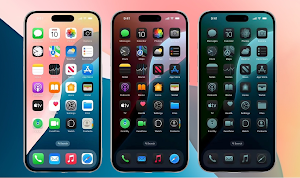
About Control Center iOS 17
Bring the familiar iPhone experience to your Android with Center OS17 - Control Center!
Transform your phone with a sleek and intuitive launcher inspired by iPhone's design. Center OS17 - Control Center goes beyond aesthetics, offering features to simplify and personalize your Android experience.
Unleash the full potential of your phone:
Authentic iOS Look & Feel: Immerse yourself in a familiar and polished design.
Enhanced Functionality: Enjoy features inspired by iPhone, like a convenient Control Center and easy access to your favorite apps.
Personalized Experience: Customize your wallpaper just like on an iPhone for a truly unique look.
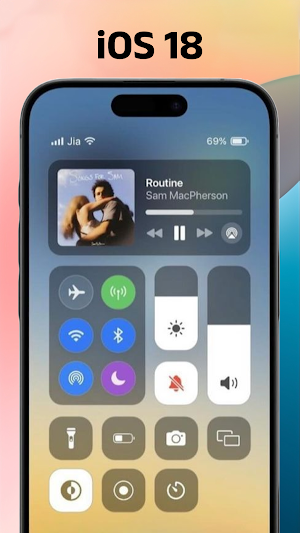
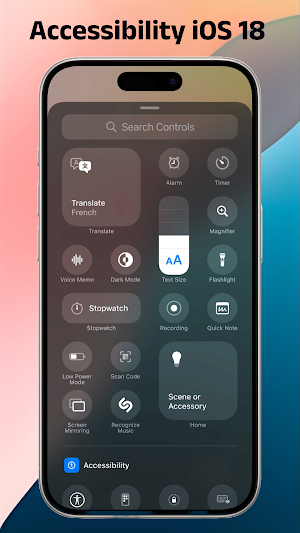
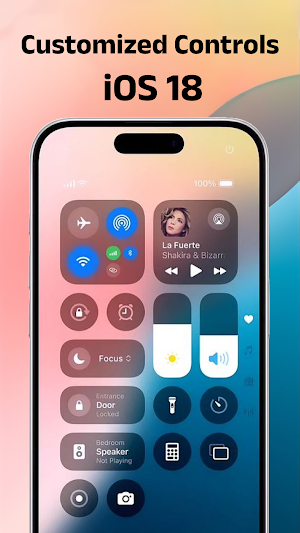
With Control Center, you can quickly access multiple settings and apps.
- Airplane Mode: Use Airplane Mode to instantly turn off Bluetooth, Wi-Fi, and cellular connections on your android device.
- Wi-Fi: Turn on Wi-Fi to browse the web, stream music, download movies, and more.
- Bluetooth: Connect to headphones, car kits, wireless keyboards, and other Bluetooth-enabled devices.
- Do Not Disturb: Silence calls, alerts, and notifications that you receive while your device is locked.
- Portrait Orientation Lock: Keep your screen from rotating when you move your device.
- Adjust brightness: Adjust the brightness of your display from any screen.
- Flashlight: The LED flash on your camera doubles as a flashlight, so you can get extra light when you need it.
- Alarms and Timer: Set an alarm, timer, or stopwatch, or check the time in another country or region.
- Calculator: Tap numbers and functions in Calculator, just like a standard calculator.
- Camera: Never miss a moment to take a picture with quick access to your camera.
- Control audio: From here, you can quickly play, pause, and control volume of your favorite song, podcast, and more.
- Record Screen: Record any action in your phone. (Support android 5.0 above only)
- Screenshot: Capture screen (Support android 5.0 above only)
Permissions containers by app:
+ CAMERA: To open camera in your phone from the lock screen
+ READ_PHONE_STATE: To turn off lock screen while calling.
+ NOTIFICATION ACCESS: To get notifications in your phone.
+ READ/WRITE_EXTERNAL_STORAGE: To download and save more wallpapers.
+ DRAW OVER SCREEN: To show Lock Screen & Notification in over all apps.
+ QUERY_ALL_PACKAGES: To use this permission, your app must fall within permitted uses below, and have a core purpose to search for all apps on the device.
+ BIND_ACCESSIBILITY_SERVICE to allow apps to draw on phone's lock screen and status bar. The app needs to use this permission to open the iLock by swiping from the top left edge of the screen and commit not to collect any other information. We do not sell, trade, or otherwise transfer your personally identifiable information to outside parties.
With this app, you can customize more style, such as size, color, position, vibration and more like to iOS.
Download Center OS17 - Control Center today and elevate your Android experience!
Transform your phone with a sleek and intuitive launcher inspired by iPhone's design. Center OS17 - Control Center goes beyond aesthetics, offering features to simplify and personalize your Android experience.
Unleash the full potential of your phone:
Authentic iOS Look & Feel: Immerse yourself in a familiar and polished design.
Enhanced Functionality: Enjoy features inspired by iPhone, like a convenient Control Center and easy access to your favorite apps.
Personalized Experience: Customize your wallpaper just like on an iPhone for a truly unique look.
With Control Center, you can quickly access multiple settings and apps.
- Airplane Mode: Use Airplane Mode to instantly turn off Bluetooth, Wi-Fi, and cellular connections on your android device.
- Wi-Fi: Turn on Wi-Fi to browse the web, stream music, download movies, and more.
- Bluetooth: Connect to headphones, car kits, wireless keyboards, and other Bluetooth-enabled devices.
- Do Not Disturb: Silence calls, alerts, and notifications that you receive while your device is locked.
- Portrait Orientation Lock: Keep your screen from rotating when you move your device.
- Adjust brightness: Adjust the brightness of your display from any screen.
- Flashlight: The LED flash on your camera doubles as a flashlight, so you can get extra light when you need it.
- Alarms and Timer: Set an alarm, timer, or stopwatch, or check the time in another country or region.
- Calculator: Tap numbers and functions in Calculator, just like a standard calculator.
- Camera: Never miss a moment to take a picture with quick access to your camera.
- Control audio: From here, you can quickly play, pause, and control volume of your favorite song, podcast, and more.
- Record Screen: Record any action in your phone. (Support android 5.0 above only)
- Screenshot: Capture screen (Support android 5.0 above only)
Permissions containers by app:
+ CAMERA: To open camera in your phone from the lock screen
+ READ_PHONE_STATE: To turn off lock screen while calling.
+ NOTIFICATION ACCESS: To get notifications in your phone.
+ READ/WRITE_EXTERNAL_STORAGE: To download and save more wallpapers.
+ DRAW OVER SCREEN: To show Lock Screen & Notification in over all apps.
+ QUERY_ALL_PACKAGES: To use this permission, your app must fall within permitted uses below, and have a core purpose to search for all apps on the device.
+ BIND_ACCESSIBILITY_SERVICE to allow apps to draw on phone's lock screen and status bar. The app needs to use this permission to open the iLock by swiping from the top left edge of the screen and commit not to collect any other information. We do not sell, trade, or otherwise transfer your personally identifiable information to outside parties.
With this app, you can customize more style, such as size, color, position, vibration and more like to iOS.
Download Center OS17 - Control Center today and elevate your Android experience!
User reviews

Execellent

Really amazing app.Keep it up💯 but the ads though they are really are an issue .Can you work on that.

I cant buy an iphone but i have a android phone now its a new iphone bcs of this app

Wow

Great app others should try it

Nice
Alternatives to Control Center iOS 17
Looking for apps like Control Center iOS 17? Here are 5 similar Android apps on Google Play. The highest rated is xControl iCenter-iOS18 (5.0/5), and all 5 are free to download.
-
iNotification iOS Notification 4.2
-
xControl iCenter-iOS18 5.0
-
Paint by Number: Color Game 2.3
-
Battery Charging Animation
-
iDialer : iCall, Phone Dialer
| App | Rating | Price | Installs | Last updated | Compare |
|---|---|---|---|---|---|
| Control Center iOS 17 | 4.2 / 5 | Free | 10,000+ | Apr 1, 2024 | |
| iNotification iOS Notification | 4.2 / 5 | Free | 10,000+ | May 17, 2023 | Compare |
| xControl iCenter-iOS18 | 5.0 / 5 | Free | 5,000+ | Jul 3, 2024 | Compare |
| Paint by Number: Color Game | 2.3 / 5 | Free | 1,000+ | Jun 8, 2024 | Compare |
| Battery Charging Animation | – | Free | 100+ | Jul 19, 2024 | Compare |
| iDialer : iCall, Phone Dialer | – | Free | 5,000+ | May 30, 2024 | Compare |