
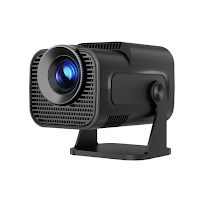
HY320 Mini Projector & Remote
Jonty Apps Tools Contains ads
Control HY320 mini projector with remote features and simple connection.
- Downloads
- 16.7K+
- on Google Play
- Price
- Free
- No in-app purchases
- Updated
- Apr 14
- 2026 · v1.0.0
Screenshots
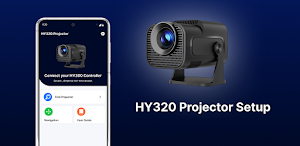
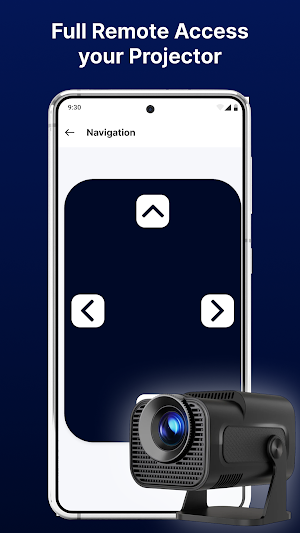
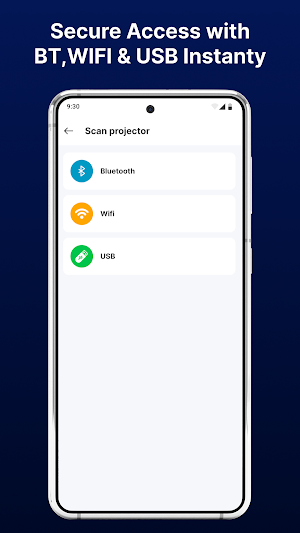
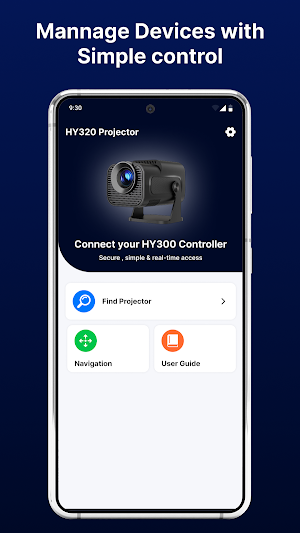
About HY320 Mini Projector & Remote
HY320 Mini Projector & Remote is a companion application designed to help users connect and manage compatible HY320 mini projector devices using an Android phone. The app provides a simple interface to access remote-style controls, explore media options, and manage supported projector features.
With an easy setup process and a clean layout, users can connect their projector using supported connection methods and interact with basic controls from their device. The app is built for users who want a straightforward way to manage their projector without relying only on a physical remote.
Whether you are watching videos, viewing photos, or adjusting settings, HY320 Mini Projector & Remote offers a convenient way to interact with your projector.
Key Features
Remote Control Interface
Use your phone as a virtual remote to access supported projector controls such as navigation, volume, and input selection.
Device Connection Options
Connect to compatible projector devices using supported methods such as WiFi, Bluetooth, or manual setup (depending on device support).
Media Access
Browse and open media files such as videos, images, and audio from your device.
Simple Navigation
Clean and organized interface designed for easy control and quick access.
Device Detection
View available compatible devices and connect through a guided process.
Lightweight & Easy to Use
Designed with a focus on simple controls and essential features.
Why Use HY320 Mini Projector & Remote?
• Easy projector connection and setup
• Simple remote control interface
• Access media from your device
• Clean and user-friendly layout
• Designed for compatible HY320 projector devices
• Suitable for everyday projector use
This app provides a convenient way to access and manage projector features from your Android device.
How to Get Started
Install the app
Turn on your projector
Connect using a supported method
Select your device
Start using remote features
Important Information
HY320 Mini Projector & Remote is a companion application and does not replace built-in projector systems.
Feature availability may vary depending on your projector model, connection type, and device compatibility.
Disclaimer
This application is an independent third-party app and is not affiliated with or endorsed by any official projector manufacturer.
All trademarks and product names are the property of their respective owners and are used for compatibility reference only.
With an easy setup process and a clean layout, users can connect their projector using supported connection methods and interact with basic controls from their device. The app is built for users who want a straightforward way to manage their projector without relying only on a physical remote.
Whether you are watching videos, viewing photos, or adjusting settings, HY320 Mini Projector & Remote offers a convenient way to interact with your projector.
Key Features
Remote Control Interface
Use your phone as a virtual remote to access supported projector controls such as navigation, volume, and input selection.
Device Connection Options
Connect to compatible projector devices using supported methods such as WiFi, Bluetooth, or manual setup (depending on device support).
Media Access
Browse and open media files such as videos, images, and audio from your device.
Simple Navigation
Clean and organized interface designed for easy control and quick access.
Device Detection
View available compatible devices and connect through a guided process.
Lightweight & Easy to Use
Designed with a focus on simple controls and essential features.
Why Use HY320 Mini Projector & Remote?
• Easy projector connection and setup
• Simple remote control interface
• Access media from your device
• Clean and user-friendly layout
• Designed for compatible HY320 projector devices
• Suitable for everyday projector use
This app provides a convenient way to access and manage projector features from your Android device.
How to Get Started
Install the app
Turn on your projector
Connect using a supported method
Select your device
Start using remote features
Important Information
HY320 Mini Projector & Remote is a companion application and does not replace built-in projector systems.
Feature availability may vary depending on your projector model, connection type, and device compatibility.
Disclaimer
This application is an independent third-party app and is not affiliated with or endorsed by any official projector manufacturer.
All trademarks and product names are the property of their respective owners and are used for compatibility reference only.
User reviews

Good aas
Alternatives to HY320 Mini Projector & Remote
Looking for apps like HY320 Mini Projector & Remote? Here are 5 similar Android apps on Google Play. The highest rated is Clim8 (4.4/5), and all 5 are free to download.



| App | Rating | Price | Installs | Last updated | Compare |
|---|---|---|---|---|---|
| HY320 Mini Projector & Remote | – | Free | 10,000+ | Apr 14, 2026 | |
| Keto Diet App & Macros Tracker | 3.8 / 5 | Free | 5,000+ | Mar 7, 2025 | Compare |
| iRISCO | 2.6 / 5 | Free | 500,000+ | May 10, 2026 | Compare |
| Clim8 | 4.4 / 5 | Free | 10,000+ | Aug 19, 2026 | Compare |
| iLink | 2.7 / 5 | Free | 1,000,000+ | Oct 10, 2025 | Compare |
| Universal Remote for Smart TV | 2.7 / 5 | Free | 1,000,000+ | Aug 10, 2026 | Compare |