

hsbView
hsbcad BVBA Tools
Shop drawings on-the-go: access live project data anywhere with hsbView
- Downloads
- 39+
- on Google Play
- Price
- Free
- No in-app purchases
- Updated
- Aug 4
- 2026 · v1.1.13
Screenshots


About hsbView
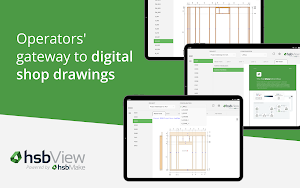
hsbView: your shop drawings, anywhere.
For the best experience, we recommend Samsung S-Series tablets.
Leave your stacks of printed shop drawings behind. With hsbView, you can instantly access the latest digital shop drawings and project data for your offsite construction projects, right from your tablet. Whether you’re on the factory floor, in the design office, or on the go, hsbView puts your project files in your hands.
Designed for offsite manufacturers (with efficiency gains for operators and designers), hsbView connects seamlessly to your cloud storage, giving you live, accurate information whenever you need it. No more outdated plans. No more wasted time.
Key Features:
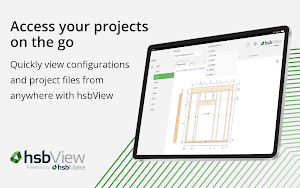
- Instant access to shop drawings: View the most up-to-date technical information from anywhere.
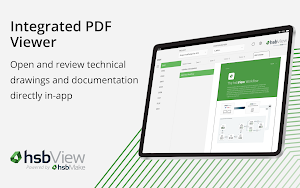
- Integrated PDF viewer: Open and review designer-created PDF files directly within the app.
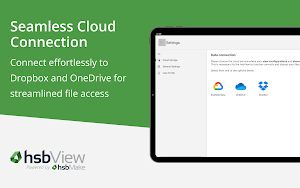
- Cloud storage integration: Connect effortlessly to Dropbox and OneDrive for streamlined file access.
- Element navigation: Explore project components such as walls, floors, and roofs with ease.
- Project-wide visibility – Access all your projects and configurations from a single place.
- No desktop required – All you need is your tablet, Wi-Fi connection, and an hsbView license.
Why hsbView?
- Boost efficiency: Reduce errors and delays caused by outdated printed drawings.
- Save time: With hsbView, designers don’t have to spend time creating manufacturing drawings.
- Stay connected: Operators can access and view the same live data as the design office from the factory.
How It Works:
- Log in with your myhsbcad account.
- Connect to your preferred cloud provider (Dropbox or OneDrive).
- Open hsbView to see all your projects and configurations.
- View, navigate, and zoom in on technical elements and PDF documents instantly.
Perfect for:
- Offsite factory operators needing up-to-date shop drawings.
- Designers and engineers collaborating with production teams.
- Teams looking to transition to a fully digital workflow.
Subscription
An active hsbView license is required to use the app. To request a license, please contact us at https://www.hsbcad.com/contact.
With hsbView, your shop drawing data is always at your fingertips. Download today and step into a faster, smarter, paper-free way of working.
For the best experience, we recommend Samsung S-Series tablets.
Leave your stacks of printed shop drawings behind. With hsbView, you can instantly access the latest digital shop drawings and project data for your offsite construction projects, right from your tablet. Whether you’re on the factory floor, in the design office, or on the go, hsbView puts your project files in your hands.
Designed for offsite manufacturers (with efficiency gains for operators and designers), hsbView connects seamlessly to your cloud storage, giving you live, accurate information whenever you need it. No more outdated plans. No more wasted time.
Key Features:
- Instant access to shop drawings: View the most up-to-date technical information from anywhere.
- Integrated PDF viewer: Open and review designer-created PDF files directly within the app.
- Cloud storage integration: Connect effortlessly to Dropbox and OneDrive for streamlined file access.
- Element navigation: Explore project components such as walls, floors, and roofs with ease.
- Project-wide visibility – Access all your projects and configurations from a single place.
- No desktop required – All you need is your tablet, Wi-Fi connection, and an hsbView license.
Why hsbView?
- Boost efficiency: Reduce errors and delays caused by outdated printed drawings.
- Save time: With hsbView, designers don’t have to spend time creating manufacturing drawings.
- Stay connected: Operators can access and view the same live data as the design office from the factory.
How It Works:
- Log in with your myhsbcad account.
- Connect to your preferred cloud provider (Dropbox or OneDrive).
- Open hsbView to see all your projects and configurations.
- View, navigate, and zoom in on technical elements and PDF documents instantly.
Perfect for:
- Offsite factory operators needing up-to-date shop drawings.
- Designers and engineers collaborating with production teams.
- Teams looking to transition to a fully digital workflow.
Subscription
An active hsbView license is required to use the app. To request a license, please contact us at https://www.hsbcad.com/contact.
With hsbView, your shop drawing data is always at your fingertips. Download today and step into a faster, smarter, paper-free way of working.
What’s new
Version 1.1.13 · Updated August 4, 2026
- Update licensing - Increase performance by caching files in memory
Alternatives to hsbView
Looking for apps like hsbView? Here are 6 similar Android apps on Google Play. All of them are free to download.






| App | Rating | Price | Installs | Last updated | Compare |
|---|---|---|---|---|---|
| hsbView | – | Free | 10+ | Aug 4, 2026 | |
| Veloso NET Móvel | – | Free | 10,000+ | Oct 15, 2026 | Compare |
| Vard Pulse Track | – | Free | 5+ | Apr 2, 2026 | Compare |
| Social Tunnel | – | Free | 1,000+ | – | Compare |
| Brána Sea | – | Free | 10+ | Nov 19, 2025 | Compare |
| UBC Mobile | – | Free | 10,000+ | Jul 9, 2026 | Compare |
| KK Hairstudio | – | Free | 100+ | Mar 9, 2026 | Compare |
Compare hsbView with the top alternatives: ratings, updates, ASO score and keyword gaps →
Similar apps on Google Play
- Veloso NET Móvel
- Vard Pulse Track
- Social Tunnel
- Brána Sea
- UBC Mobile
- KK Hairstudio
- GEWOSIE
- Chess Clock - Game Timer
- Azirrigation
- CMBM
- BAZNAS BAZIS - Zakat & Donasi
- Go Green BMS
- Motor Noise Analyzer
- N2ta
- ACTA
- smaliaスマートリモコン
- evodo - Sync
- AgriHMA - Ứng dụng nông nghiệp
- Groq Ninja
- Premier Super App
- Ambient Sound
- Spendly: Budget & Expense
- Flashlight & Flash Alert
- Dadores de Sangue
- FastShare