
AR Draw Sketch - Step by step
Art & Design Contains ads
Draw sketch, sketch on your phone, Step-by-Step tutorials
- Downloads
- 1K+
- on Google Play
- Price
- Free
- No in-app purchases
- Updated
- Jul 9
- 2024
Screenshots


About AR Draw Sketch - Step by step
Draw sketch, sketch on your phone, Step-by-step drawing tutorials
AR Draw Sketch - Step By Step: Sketch & Paint, AR Draw Sketch app, draw sketch app, AR Draw Sketch: Sketch & Paint, sketch on your phone
Unleash your creativity with AR Draw Sketch: Sketch & Paint, The most innovative, advanced, and powerful VR sketching app!
Whether you're an amateur or an experienced professional, AR Draw Sketch: Sketch & Paint will transform your ideas and experience into more captivating and attractive artworks than ever before🔥
AR Draw Sketch: Sketch & Paint
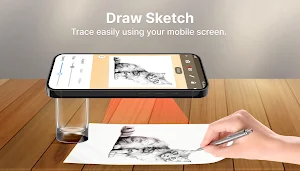
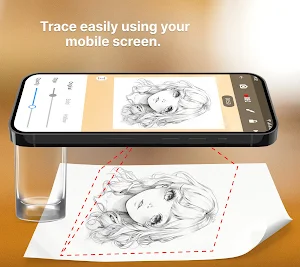
● Use your camera 📸 to display your drawings onto any screens. AR Draw Sketch helps you draw directly into the real world in a lively and realistic manner.
● AR Draw Sketch: Sketch & Paint offers a countless exciting themes such as anime, nature, cars 🚛, vehicles 🏍️, chibi, manga etc.,
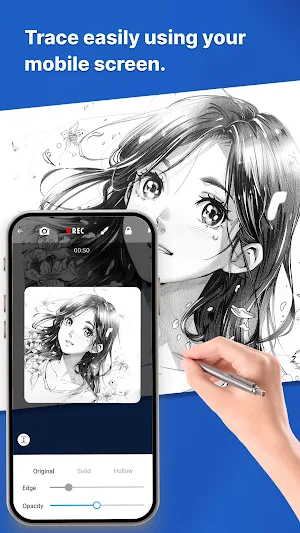
● Diverse professional drawing tools allowing you to easily express your artistic personality with customizable sizes, opacity, and colors for the perfect strokes ✨.
● Besides drawing tools, AR Draw Sketch also provides a rich color palette with hundreds of different shades, allowing you to choose and combine freely and create the most unique visual effects.
● The user-friendly interface of the AR Draw Sketch app makes it easy to share your artwork with your friends and the artist community, then explore, and get inspired by fellow enthusiasts.
● Draw and sketch anytime, anywhere with AR Draw Sketch without needing an internet connection.
● Multi-Language Support: The AR Draw Sketch app supports multiple languages, making it easy to use no matter where you are in the world.
● AR Draw Sketch promotes your creativity, unleashes your imagination, and artistic potential within yourself. Unlike traditional drawing, it is unrestricted by space and materials
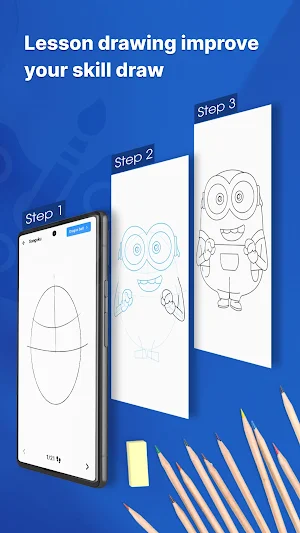
Step-by-step drawing tutorials
● Step-by-Step Tutorials: Follow easy-to-understand tutorials that guide you through drawing various subjects
● User-Friendly Interface: Enjoy a seamless experience with our intuitive and easy-to-navigate design.
With AR Draw Sketch: Sketch & Paint, the drawing space is limitless - the world is your canvas. 🏜️.
📢 Let’s download AR draw sketch: sketch & paint now to experience the perfect blend of traditional drawing and modern technology, turning the world around you into a beautiful painting!
AR Draw Sketch - Step By Step: Sketch & Paint, AR Draw Sketch app, draw sketch app, AR Draw Sketch: Sketch & Paint, sketch on your phone
Unleash your creativity with AR Draw Sketch: Sketch & Paint, The most innovative, advanced, and powerful VR sketching app!
Whether you're an amateur or an experienced professional, AR Draw Sketch: Sketch & Paint will transform your ideas and experience into more captivating and attractive artworks than ever before🔥
AR Draw Sketch: Sketch & Paint
● Use your camera 📸 to display your drawings onto any screens. AR Draw Sketch helps you draw directly into the real world in a lively and realistic manner.
● AR Draw Sketch: Sketch & Paint offers a countless exciting themes such as anime, nature, cars 🚛, vehicles 🏍️, chibi, manga etc.,
● Diverse professional drawing tools allowing you to easily express your artistic personality with customizable sizes, opacity, and colors for the perfect strokes ✨.
● Besides drawing tools, AR Draw Sketch also provides a rich color palette with hundreds of different shades, allowing you to choose and combine freely and create the most unique visual effects.
● The user-friendly interface of the AR Draw Sketch app makes it easy to share your artwork with your friends and the artist community, then explore, and get inspired by fellow enthusiasts.
● Draw and sketch anytime, anywhere with AR Draw Sketch without needing an internet connection.
● Multi-Language Support: The AR Draw Sketch app supports multiple languages, making it easy to use no matter where you are in the world.
● AR Draw Sketch promotes your creativity, unleashes your imagination, and artistic potential within yourself. Unlike traditional drawing, it is unrestricted by space and materials
Step-by-step drawing tutorials
● Step-by-Step Tutorials: Follow easy-to-understand tutorials that guide you through drawing various subjects
● User-Friendly Interface: Enjoy a seamless experience with our intuitive and easy-to-navigate design.
With AR Draw Sketch: Sketch & Paint, the drawing space is limitless - the world is your canvas. 🏜️.
📢 Let’s download AR draw sketch: sketch & paint now to experience the perfect blend of traditional drawing and modern technology, turning the world around you into a beautiful painting!
Alternatives to AR Draw Sketch - Step by step
Looking for apps like AR Draw Sketch - Step by step? Here are 6 similar Android apps on Google Play. The highest rated is Photo Frame - Photo Collage (4.7/5), and all 6 are free to download.
-
Blood pressure - Blood Sugar 4.1
-
Smart lock screen 4.3
-
Blood pressure - Heart rate 4.2
-
Lock Screen 4.1
-
Photo Frame - Photo Collage 4.7
-
Photo Collage – Photo Frames 4.6
| App | Rating | Price | Installs | Last updated | Compare |
|---|---|---|---|---|---|
| AR Draw Sketch - Step by step | – | Free | 1,000+ | Jul 9, 2024 | |
| Blood pressure - Blood Sugar | 4.1 / 5 | Free | 5,000,000+ | Sep 18, 2026 | Compare |
| Smart lock screen | 4.3 / 5 | Free | 5,000,000+ | Oct 16, 2026 | Compare |
| Blood pressure - Heart rate | 4.2 / 5 | Free | 1,000,000+ | Aug 22, 2026 | Compare |
| Lock Screen | 4.1 / 5 | Free | 10,000,000+ | Aug 5, 2026 | Compare |
| Photo Frame - Photo Collage | 4.7 / 5 | Free | 10,000,000+ | Aug 3, 2026 | Compare |
| Photo Collage – Photo Frames | 4.6 / 5 | Free | 5,000,000+ | Oct 7, 2026 | Compare |
Similar apps on Google Play
- Blood pressure - Blood Sugar
- Smart lock screen
- Blood pressure - Heart rate
- Lock Screen
- Photo Frame - Photo Collage
- Photo Collage – Photo Frames
- Sticker Maker for WhatsApp
- Family photo frame
- Video downloader - 2K
- Lock screen live wallpaper
- Emoji merge - Emoji game
- lock screen - smart lock
- Don't touch my phone
- Music player, Mp3 player
- Voice Recorder
- Video Maker – Video Editor
- AR Draw Sketch - Step by step