
CamScan PDF QR OCR Tanpa Iklan
HerysGroup Tools Contains ads
Scan documents, ID cards, and PDFs quickly. OCR text, signatures, watermarks, and passwords.
- Downloads
- 96+
- on Google Play
- Price
- Free
- No in-app purchases
- Updated
- Aug 4
- 2026 · v5.2
Screenshots
About CamScan PDF QR OCR Tanpa Iklan
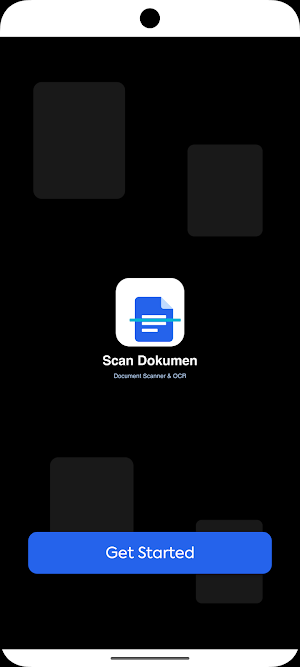
CamScan or Document Scan — A versatile document scanner app for Android. Turn your phone into a pocket scanner: scan documents, ID cards, business cards, receipts, or handwritten notes in seconds. Scans are automatically cropped, straightened, and cleared for printing or sharing.
KEY FEATURES
• Fast Document Scan — Automatic edge detection with smart crop and perspective correction. Batch mode for scanning multiple pages at once.
• Smart Filters — Original, Color, OCV Black, Sharp Black, Brightness, Contrast, Saturation, Exposure — all the professional finishing touches in one tap.
• KTP / ID Card Scanner — Special single-sided or double-sided modes, instantly organized for A4 printing.
• OCR (Text Recognition) — Extract text from photos or documents, copy, edit, and share. Supports Indonesian & English.
• Digital Signature — Create, save, and paste signatures into PDF documents. Supports image and text signatures with a choice of fonts.
• Watermark & Annotation — Add text or image watermarks, highlights, stamps, or notes directly to documents.
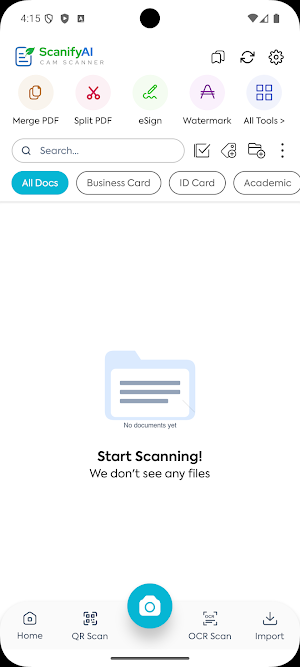
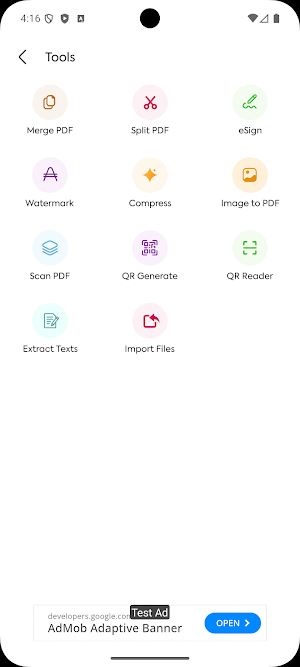
• Comprehensive PDF Tools — Merge PDFs, split PDFs, compress file size, rearrange pages, convert images to PDF, and extract pages.
• Password Protection — Lock PDFs with a password before sharing to keep sensitive documents safe.
• QR Code Generator & Scanner — Create QR codes for URLs, text, contacts, locations, phone numbers, or SMS. Just point the camera at the built-in QR scanner.
• Document Management — Custom folders & tags, favorites, grid/list view order, quick search, and a trash can for file recovery.
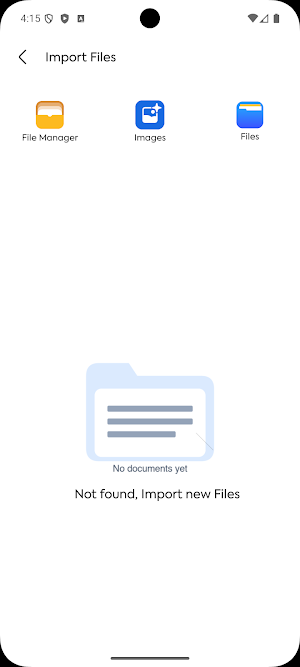
• Easy Share — Send as PDF, image, or email; import from gallery or file manager.
• Dark Mode — Consistent light and dark interface, comfortable to use day and night.
• Privacy Guaranteed — Files are processed locally on your device. No automatic uploads to the cloud.
DAILY USES
• Students: Scan lecture notes, books, or practice questions into neat PDFs.
• Office workers: Digitize contracts, receipts, or important documents without the need for a scanner.
• MSMEs & entrepreneurs: Manage invoices, ID cards, tax identification numbers, and customer documents in one app.
• Freelancers: Sign digital contracts anywhere without a printer.
• Families: Archive household documents, certificates, warranty cards, and prescriptions.
WHY SCAN DOCUMENTS?
• Modern interface with a Material Design theme and bright, eye-pleasing colors.
• Lightweight, fast, and battery-efficient.
• Sharp and accurate scans thanks to automatic edge detection.
• All essential features with no hidden costs.
SUPPORT
Questions, suggestions, or bug reports? Email us at [email protected] — we respond quickly.
Download now and turn your phone into a professional scanner.
KEY FEATURES
• Fast Document Scan — Automatic edge detection with smart crop and perspective correction. Batch mode for scanning multiple pages at once.
• Smart Filters — Original, Color, OCV Black, Sharp Black, Brightness, Contrast, Saturation, Exposure — all the professional finishing touches in one tap.
• KTP / ID Card Scanner — Special single-sided or double-sided modes, instantly organized for A4 printing.
• OCR (Text Recognition) — Extract text from photos or documents, copy, edit, and share. Supports Indonesian & English.
• Digital Signature — Create, save, and paste signatures into PDF documents. Supports image and text signatures with a choice of fonts.
• Watermark & Annotation — Add text or image watermarks, highlights, stamps, or notes directly to documents.
• Comprehensive PDF Tools — Merge PDFs, split PDFs, compress file size, rearrange pages, convert images to PDF, and extract pages.
• Password Protection — Lock PDFs with a password before sharing to keep sensitive documents safe.
• QR Code Generator & Scanner — Create QR codes for URLs, text, contacts, locations, phone numbers, or SMS. Just point the camera at the built-in QR scanner.
• Document Management — Custom folders & tags, favorites, grid/list view order, quick search, and a trash can for file recovery.
• Easy Share — Send as PDF, image, or email; import from gallery or file manager.
• Dark Mode — Consistent light and dark interface, comfortable to use day and night.
• Privacy Guaranteed — Files are processed locally on your device. No automatic uploads to the cloud.
DAILY USES
• Students: Scan lecture notes, books, or practice questions into neat PDFs.
• Office workers: Digitize contracts, receipts, or important documents without the need for a scanner.
• MSMEs & entrepreneurs: Manage invoices, ID cards, tax identification numbers, and customer documents in one app.
• Freelancers: Sign digital contracts anywhere without a printer.
• Families: Archive household documents, certificates, warranty cards, and prescriptions.
WHY SCAN DOCUMENTS?
• Modern interface with a Material Design theme and bright, eye-pleasing colors.
• Lightweight, fast, and battery-efficient.
• Sharp and accurate scans thanks to automatic edge detection.
• All essential features with no hidden costs.
SUPPORT
Questions, suggestions, or bug reports? Email us at [email protected] — we respond quickly.
Download now and turn your phone into a professional scanner.
What’s new
Version 5.2 · Updated August 4, 2026
api level 36
Alternatives to CamScan PDF QR OCR Tanpa Iklan
Looking for apps like CamScan PDF QR OCR Tanpa Iklan? Here are 6 similar Android apps on Google Play. The highest rated is Genius Scan - PDF Scanner (4.9/5), and all 6 are free to download.
-
Genius Scan - PDF Scanner 4.9
-
Smallpdf: Scanner & PDF Editor 4.5
-
Tiny Scanner - PDF Scanner App 4.6
-
PDF Scanner Plus - Doc Scanner 4.6
-
CS PDF Reader - PDF Editor 4.5
-
vFlat Scan - PDF Scanner, OCR 4.6
| App | Rating | Price | Installs | Last updated | Compare |
|---|---|---|---|---|---|
| CamScan PDF QR OCR Tanpa Iklan | – | Free | 50+ | Aug 4, 2026 | |
| Genius Scan - PDF Scanner | 4.9 / 5 | Free | 10,000,000+ | Oct 19, 2026 | Compare |
| Smallpdf: Scanner & PDF Editor | 4.5 / 5 | Free | 5,000,000+ | Oct 7, 2026 | Compare |
| Tiny Scanner - PDF Scanner App | 4.6 / 5 | Free | 10,000,000+ | Jul 29, 2026 | Compare |
| PDF Scanner Plus - Doc Scanner | 4.6 / 5 | Free | 1,000,000+ | Oct 12, 2026 | Compare |
| CS PDF Reader - PDF Editor | 4.5 / 5 | Free | 10,000,000+ | Sep 4, 2026 | Compare |
| vFlat Scan - PDF Scanner, OCR | 4.6 / 5 | Free | 10,000,000+ | Sep 30, 2026 | Compare |