
Clickinggg
HuangChuang Tools
Auto tap single or multiple points with scripts and flexible settings
- Downloads
- 8+
- on Google Play
- Price
- Free
- No in-app purchases
- Updated
- May 8
- 2026 · v1.2
Screenshots

About Clickinggg
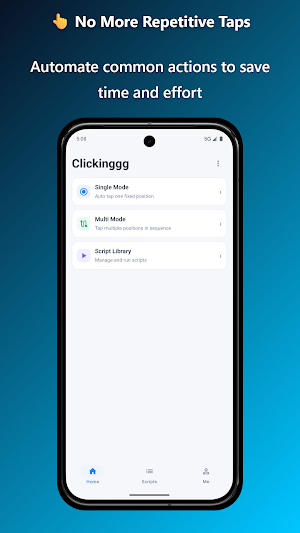
Clickinggg is a lightweight and easy-to-use auto tap tool designed for repeated taps, fast actions, and workflow execution.
It supports both single-point and multi-point modes:
- Single-point mode: tap continuously at one fixed location
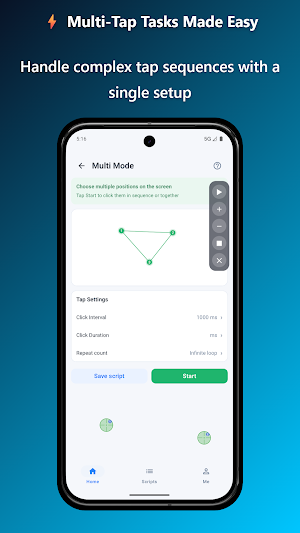
- Multi-point mode: tap multiple points in sequence
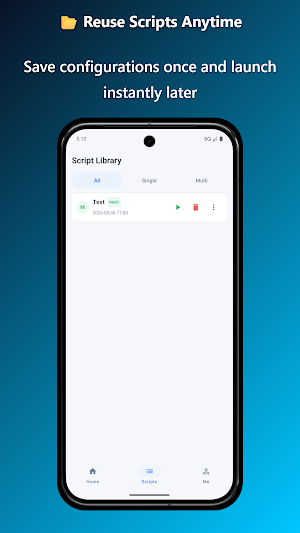
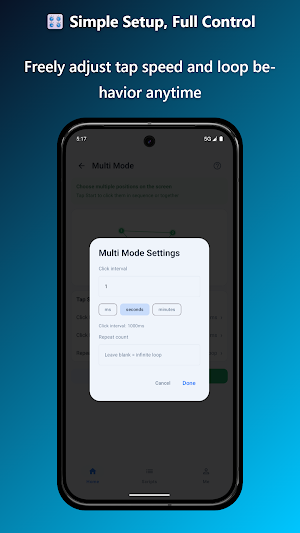
You can customize the tap interval and repeat count, quickly pick tap positions with the floating window, and save current settings as scripts for later reuse.
Key features:
- Single-point and multi-point tapping
- Floating window point selection
- Custom tap interval
- Custom repeat count
- Script saving and management
- Clean and simple interface
[AccessibilityService API Disclosure]
This app uses the AccessibilityService API only for user-initiated auto-tap actions (single-point/multi-point task execution) and task control. The service is manually enabled by the user in system settings and can be turned off at any time.
Accessibility capabilities are used only to perform user-configured tap actions. The app does not read, collect, store, or upload chat content, typed text, passwords, payment data, or other sensitive personal information. It is not used for advertising/marketing, bypassing Android security controls, or unauthorized remote control.
Users can stop or end tasks at any time through in-app floating controls. The app runs auto-tap actions only after explicit user action.
It supports both single-point and multi-point modes:
- Single-point mode: tap continuously at one fixed location
- Multi-point mode: tap multiple points in sequence
You can customize the tap interval and repeat count, quickly pick tap positions with the floating window, and save current settings as scripts for later reuse.
Key features:
- Single-point and multi-point tapping
- Floating window point selection
- Custom tap interval
- Custom repeat count
- Script saving and management
- Clean and simple interface
[AccessibilityService API Disclosure]
This app uses the AccessibilityService API only for user-initiated auto-tap actions (single-point/multi-point task execution) and task control. The service is manually enabled by the user in system settings and can be turned off at any time.
Accessibility capabilities are used only to perform user-configured tap actions. The app does not read, collect, store, or upload chat content, typed text, passwords, payment data, or other sensitive personal information. It is not used for advertising/marketing, bypassing Android security controls, or unauthorized remote control.
Users can stop or end tasks at any time through in-app floating controls. The app runs auto-tap actions only after explicit user action.
What’s new
Version 1.2 · Updated May 8, 2026
- Improved foreground service stability for better continuity across apps - Refined specialUse foreground service declaration for compliance - Enhanced floating control panel interactions for smoother start/stop actions - Improved auto-click workflow and error handling to reduce interruptions - Fixed known issues and improved overall performance and compatibility
Alternatives to Clickinggg
Looking for apps like Clickinggg? Here are 5 similar Android apps on Google Play. All of them are free to download.
-
SaveSprout: No Spend Challenge
-
BottleMe
-
Hong Kong Transit Guide
-
GoldScope
-
FixPhoto: Duplicate Cleaner
| App | Rating | Price | Installs | Last updated | Compare |
|---|---|---|---|---|---|
| Clickinggg | – | Free | 5+ | May 8, 2026 | |
| SaveSprout: No Spend Challenge | – | Free | 10+ | – | Compare |
| BottleMe | – | Free | 10+ | – | Compare |
| Hong Kong Transit Guide | – | Free | 5+ | May 25, 2026 | Compare |
| GoldScope | – | Free | 1+ | – | Compare |
| FixPhoto: Duplicate Cleaner | – | Free | 100+ | Sep 24, 2026 | Compare |
Compare Clickinggg with the top alternatives: ratings, updates, ASO score and keyword gaps →