

Huawei FreeBuds 5i & Connect
Hani Codes Lab Personalization Contains ads
Fast Bluetooth connect, pair & manage app for Huawei FreeBuds & Apple AirPods
- Downloads
- 500+
- on Google Play
- Price
- Free
- No in-app purchases
- Updated
- Jul 22
- 2026 · v1.0.2
Screenshots

About Huawei FreeBuds 5i & Connect
Experience seamless connectivity with the Huawei FreeBuds 5i & Connect app. Designed specifically for Android users, this premium Bluetooth companion takes the hassle out of pairing and managing your high-end wireless earbuds, especially the Huawei FreeBuds 5i.
Unlike generic Bluetooth scanners that are confusing to use, our app provides a clean, straightforward, and native-feeling experience tailored to quickly identify and connect with your premium earbuds. Whether you are listening to music, taking important calls, or watching videos, we ensure your setup process is fast, smooth, and effortless.
🌟 Key Features:
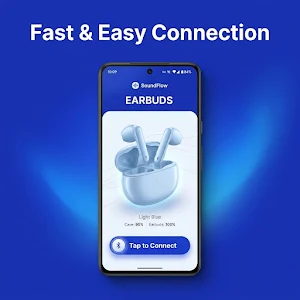
• Fast & Easy Pairing: Connect your Huawei FreeBuds 5i and other compatible earbuds to your Android device in just a few seconds.
• Clean & Intuitive Interface: A beautiful, easy-to-navigate design built specifically for Android users—no confusing menus.
• Quick Device Detection: Instantly scans and locates your Bluetooth earbuds without requiring complex configurations.
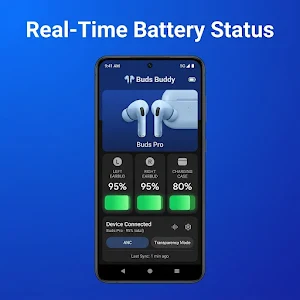
• Stable Connection Manager: Helps you establish and maintain a consistent Bluetooth link for uninterrupted audio.
• Lightweight & Efficient: Consumes minimal battery and storage space on your smartphone.
🎧 Wide Compatibility:
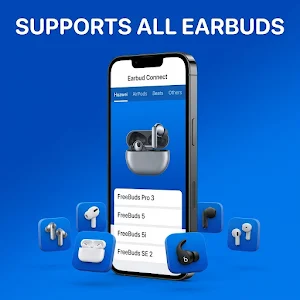
While this app is highly optimized for the Huawei FreeBuds 5i, our smart Bluetooth manager also extends its premium support to other high-end devices, including:
Huawei Series:
• Huawei FreeBuds 5i & 6i
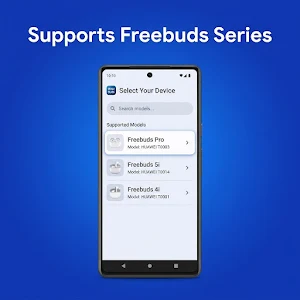
• Huawei FreeBuds 4, 4i & 4E
• Huawei FreeBuds SE & SE 2
• Huawei FreeBuds Pro 2 & 3
• Huawei FreeLace series
Apple AirPods Series:
• AirPods (2nd & 3rd Generation)
• AirPods Pro (1st & 2nd Generation)
Beats Series:
• Beats Studio Buds
• Beats Fit Pro
⚙️ How to Use:
1. Enable Bluetooth on your Android device.
2. Open the Connect App.
3. Open your earbuds case to initiate pairing mode.
4. Select your earbuds brand from the top menu, then tap your device on the scanning screen.
5. You are connected and ready to go!
[Disclaimer - IMPORTANT]
This application is an independent third-party utility tool developed to assist users with Bluetooth connectivity.
This app is NOT affiliated with, endorsed by, sponsored by, or officially connected to Huawei Technologies Co., Ltd., Apple Inc., or Beats Electronics LLC.
The names "Huawei", "FreeBuds", "Apple", "AirPods", and "Beats" are registered trademarks of their respective owners. They are used in this app listing strictly for compatibility reference purposes under fair use guidelines.
Unlike generic Bluetooth scanners that are confusing to use, our app provides a clean, straightforward, and native-feeling experience tailored to quickly identify and connect with your premium earbuds. Whether you are listening to music, taking important calls, or watching videos, we ensure your setup process is fast, smooth, and effortless.
🌟 Key Features:
• Fast & Easy Pairing: Connect your Huawei FreeBuds 5i and other compatible earbuds to your Android device in just a few seconds.
• Clean & Intuitive Interface: A beautiful, easy-to-navigate design built specifically for Android users—no confusing menus.
• Quick Device Detection: Instantly scans and locates your Bluetooth earbuds without requiring complex configurations.
• Stable Connection Manager: Helps you establish and maintain a consistent Bluetooth link for uninterrupted audio.
• Lightweight & Efficient: Consumes minimal battery and storage space on your smartphone.
🎧 Wide Compatibility:
While this app is highly optimized for the Huawei FreeBuds 5i, our smart Bluetooth manager also extends its premium support to other high-end devices, including:
Huawei Series:
• Huawei FreeBuds 5i & 6i
• Huawei FreeBuds 4, 4i & 4E
• Huawei FreeBuds SE & SE 2
• Huawei FreeBuds Pro 2 & 3
• Huawei FreeLace series
Apple AirPods Series:
• AirPods (2nd & 3rd Generation)
• AirPods Pro (1st & 2nd Generation)
Beats Series:
• Beats Studio Buds
• Beats Fit Pro
⚙️ How to Use:
1. Enable Bluetooth on your Android device.
2. Open the Connect App.
3. Open your earbuds case to initiate pairing mode.
4. Select your earbuds brand from the top menu, then tap your device on the scanning screen.
5. You are connected and ready to go!
[Disclaimer - IMPORTANT]
This application is an independent third-party utility tool developed to assist users with Bluetooth connectivity.
This app is NOT affiliated with, endorsed by, sponsored by, or officially connected to Huawei Technologies Co., Ltd., Apple Inc., or Beats Electronics LLC.
The names "Huawei", "FreeBuds", "Apple", "AirPods", and "Beats" are registered trademarks of their respective owners. They are used in this app listing strictly for compatibility reference purposes under fair use guidelines.
Alternatives to Huawei FreeBuds 5i & Connect
Looking for apps like Huawei FreeBuds 5i & Connect? Here are 6 similar Android apps on Google Play. All of them are free to download.
-
Americaloc GL300W Tracker
-
AirTag Scanner : Find & Track
-
My Car: Maintenance & Fuel
-
LandAirSea 54 GPS Traccar
-
Edge Lighting – LED Border
-
Find My Car
| App | Rating | Price | Installs | Last updated | Compare |
|---|---|---|---|---|---|
| Huawei FreeBuds 5i & Connect | – | Free | 500+ | Jul 22, 2026 | |
| Americaloc GL300W Tracker | – | Free | 10+ | – | Compare |
| AirTag Scanner : Find & Track | – | Free | 50+ | Sep 3, 2026 | Compare |
| My Car: Maintenance & Fuel | – | Free | 100+ | Oct 20, 2026 | Compare |
| LandAirSea 54 GPS Traccar | – | Free | 100+ | Sep 2, 2026 | Compare |
| Edge Lighting – LED Border | – | Free | 500+ | Aug 13, 2026 | Compare |
| Find My Car | – | Free | 50+ | Aug 28, 2026 | Compare |
Similar apps on Google Play
- Americaloc GL300W Tracker
- AirTag Scanner : Find & Track
- My Car: Maintenance & Fuel
- LandAirSea 54 GPS Traccar
- Edge Lighting – LED Border
- Find My Car
- Create Apple ID Switch Helper
- Six Pack in 30 Days - Home Fit
- Equalizer Pro & Bass Booster
- Smart Gps : Spytec GPS GL300
- Voice Changer AI:Sound Effects
- Electricity Cost Calculator
- Plant Doctor–Plant Care Expert
- Drone Tools : DJI Mavic & Mini
- Sync - Huawei Watch GT6 App
- EQ PRO: Bass Booster & Volume
- Dog Walk Tracker
- Tracker Detect
- Ultra Pro: Watch Faces & Tools
- مُبلِّغ - دليل الدُعاة
- Monthly Pay: Payment Tracker
- SupAlert–Subscription Tracker