

TraBox: Screen Translator
Tun Tran Education In-app purchases Contains ads
10x your language learning by translating and saving words on any screen.
- Downloads
- 70+
- on Google Play
- Price
- Free
- In-app purchases
- Updated
- Feb 4
- 2026 · v1.0.6
Screenshots


About TraBox: Screen Translator
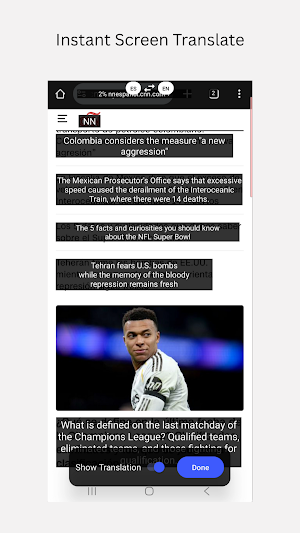
If you just need a simple tool to translate anything on your screen (games, comics, social media posts, documents...): this is it.
If you need a tool to 10x your productivity in language learning: this is exactly what you’ve been looking for.
=======
The Story Behind TraBox :
Hi! You can call me Alder. Since I was a young student, I’ve been obsessed with learning productivity—especially when it comes to mastering a foreign language like English.
Every day, I consume tons of English content on my phone: reading books, news, or scrolling through Facebook and Twitter. To be honest, constantly switching to a dictionary app was a pain. Even when I did look up a word, I’d quickly forget it unless I manually noted it down or copied it into a flashcard app like Quizlet for later practice. Sometimes, cultural nuances made it impossible to understand the full meaning even with a dictionary.
I dreamed of a tool that could solve all these problems at once. After years of searching without finding anything that hit the mark, I decided to build it myself. I truly believe that if this tool helped me master English, it will be just as effective for you in learning any other language.
How the App Works:
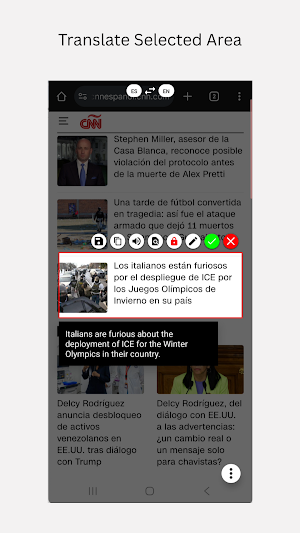
Step 1: Translate any word or sentence directly on your screen.
Step 2: Save the definition and phonetics into the app instantly.
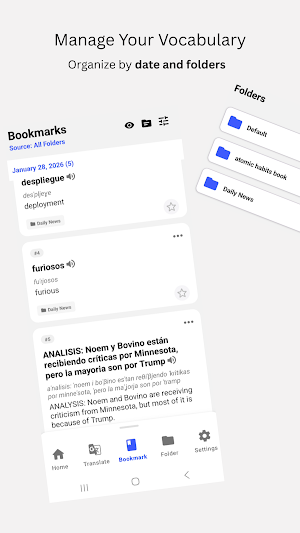
Step 3: Organize your vocabulary by date or custom folders.
Step 4: Practice daily to ensure long-term memory.
Designed by a Learner, for Learners:
1. Context-Aware Translation
Meaning is extracted based on the specific context of your sentence. This ensures the translation is always accurate and relevant to what you are reading.
2. One-Tap Save
With just one click, you can save four essential elements: the phrase, phonetics (including word and sentence stress), the definition, and a screenshot of the area you selected. This visual context helps you remember why you saved the word in the first place. Best of all, everything is stored offline on your device, so you have full control over your data.
3. Effortless Organization
Imagine reading "Atomic Habits" by James Clear. You can translate and save every new phrase into a dedicated folder named "Atomic Habits." This keeps your learning organized and prevents words from different books from getting mixed up. Of course, you can also view your entire collection chronologically if you prefer. Your "knowledge treasury" is managed exactly how you want it.
4. Effective Practice Modes
Smart Flashcards: With one tap, prioritize the words you practice least or focus only on the ones you’ve missed.
"Cover-up" List Mode: Practice directly on your vocabulary list by hiding the meanings. I find this method offers a unique type of efficiency compared to traditional flashcards.
5. AI-Powered Accuracy Everything is translated and fine-tuned by AI, providing much higher quality and more natural results than standard Google Translate.
6. No Login Required Start learning immediately without the hassle of creating an account.
I sincerely hope this small tool significantly boosts your learning productivity in the coming days.
If you have any questions while using TraBox, please reach out via email at: [email protected]. I’ll support you as soon as I can!
=====
PRIVACY POLICY
https://docs.google.com/document/d/1iuM0D9kXyytqaLCOYleLDm5HmZGgTzajm7oY54EqxE8/edit?usp=sharing
TERMS OF USE (EULA)
https://docs.google.com/document/d/145GdRC3W4KgXTmWK3k9hLxvrYNy_CyaScS203G4fhZ0/edit?usp=sharing
If you need a tool to 10x your productivity in language learning: this is exactly what you’ve been looking for.
=======
The Story Behind TraBox :
Hi! You can call me Alder. Since I was a young student, I’ve been obsessed with learning productivity—especially when it comes to mastering a foreign language like English.
Every day, I consume tons of English content on my phone: reading books, news, or scrolling through Facebook and Twitter. To be honest, constantly switching to a dictionary app was a pain. Even when I did look up a word, I’d quickly forget it unless I manually noted it down or copied it into a flashcard app like Quizlet for later practice. Sometimes, cultural nuances made it impossible to understand the full meaning even with a dictionary.
I dreamed of a tool that could solve all these problems at once. After years of searching without finding anything that hit the mark, I decided to build it myself. I truly believe that if this tool helped me master English, it will be just as effective for you in learning any other language.
How the App Works:
Step 1: Translate any word or sentence directly on your screen.
Step 2: Save the definition and phonetics into the app instantly.
Step 3: Organize your vocabulary by date or custom folders.
Step 4: Practice daily to ensure long-term memory.
Designed by a Learner, for Learners:
1. Context-Aware Translation
Meaning is extracted based on the specific context of your sentence. This ensures the translation is always accurate and relevant to what you are reading.
2. One-Tap Save
With just one click, you can save four essential elements: the phrase, phonetics (including word and sentence stress), the definition, and a screenshot of the area you selected. This visual context helps you remember why you saved the word in the first place. Best of all, everything is stored offline on your device, so you have full control over your data.
3. Effortless Organization
Imagine reading "Atomic Habits" by James Clear. You can translate and save every new phrase into a dedicated folder named "Atomic Habits." This keeps your learning organized and prevents words from different books from getting mixed up. Of course, you can also view your entire collection chronologically if you prefer. Your "knowledge treasury" is managed exactly how you want it.
4. Effective Practice Modes
Smart Flashcards: With one tap, prioritize the words you practice least or focus only on the ones you’ve missed.
"Cover-up" List Mode: Practice directly on your vocabulary list by hiding the meanings. I find this method offers a unique type of efficiency compared to traditional flashcards.
5. AI-Powered Accuracy Everything is translated and fine-tuned by AI, providing much higher quality and more natural results than standard Google Translate.
6. No Login Required Start learning immediately without the hassle of creating an account.
I sincerely hope this small tool significantly boosts your learning productivity in the coming days.
If you have any questions while using TraBox, please reach out via email at: [email protected]. I’ll support you as soon as I can!
=====
PRIVACY POLICY
https://docs.google.com/document/d/1iuM0D9kXyytqaLCOYleLDm5HmZGgTzajm7oY54EqxE8/edit?usp=sharing
TERMS OF USE (EULA)
https://docs.google.com/document/d/145GdRC3W4KgXTmWK3k9hLxvrYNy_CyaScS203G4fhZ0/edit?usp=sharing
What’s new
Version 1.0.6 · Updated February 4, 2026
Initial Release of TraBox: 1. Direct screen text translation. 2. Save and organize new vocabulary. 3. Flashcard practice modes for better retention. 4. Optimized for a smooth and fast user experience.
Alternatives to TraBox: Screen Translator
Looking for apps like TraBox: Screen Translator? Here are 6 similar Android apps on Google Play. The highest rated is Az Fundamentals AZ-900 2026 (3.8/5), and all 6 are free to download.
-
Az Fundamentals AZ-900 2026 3.8
-
CompTIA CySA CS0-003 Exam 2026 2.2
-
CompTIA Linux+ XK0-006 2026
-
SC-200 Exam 2026
-
AI-900 Exam 2026
-
PSPO 1 Exam 2026
| App | Rating | Price | Installs | Last updated | Compare |
|---|---|---|---|---|---|
| TraBox: Screen Translator | – | Free | 50+ | Feb 4, 2026 | |
| Az Fundamentals AZ-900 2026 | 3.8 / 5 | Free | 10,000+ | Jul 6, 2026 | Compare |
| CompTIA CySA CS0-003 Exam 2026 | 2.2 / 5 | Free | 1,000+ | – | Compare |
| CompTIA Linux+ XK0-006 2026 | – | Free | 10+ | – | Compare |
| SC-200 Exam 2026 | – | Free | 100+ | Mar 24, 2026 | Compare |
| AI-900 Exam 2026 | – | Free | 50+ | Mar 21, 2026 | Compare |
| PSPO 1 Exam 2026 | – | Free | 10+ | Mar 19, 2026 | Compare |
Similar apps on Google Play
- Az Fundamentals AZ-900 2026
- CompTIA CySA CS0-003 Exam 2026
- CompTIA Linux+ XK0-006 2026
- SC-200 Exam 2026
- AI-900 Exam 2026
- PSPO 1 Exam 2026
- AWS AIF-C01 Exam 2026
- Az AZ-700 Exam 2026
- AWS MLA-C01 Exam 2026
- Easy Japanese News: N5-N3
- Pro Cloud Architect Exam 2024
- HashiCorp Consul Exam In 2024
- CCSP Exam 2026
- CompTIA Cloud+ CV0-004 2026
- CompTIA PenTest+ PT0-002 2024
- Exam PL-900 180-Questions 2026
- SC-900 Exam 220-Questions 2026
- DP-300 Exam 2026
- Java SE 8 1Z0-808 Exam 2024
- MS-500 Exam 370-Questions 2026
- HashiCorp Vault Associate 2022
- Az Data Fundamentals DP-900
- ServiceNow System Admin Exam
- Python Institute PCEP-30-02
- CCDAK Exam 2024
- Tableau Desktop Specialist
- Comptia Server+ SK0-005 2026
- Disciplined Agile Scrum Master
- Snowflake SnowPro Core Exam
- Salesforce Admin 180-Questions
- ISTQB Foundation Level 2026
- CAPM 300-questions Exam 2026
- Professional Scrum Master II
- CompTIA Tech+ FC0-U71 2026
- SAP-C02 Exam 160-Question 2026
- CompTIA Network+ (N10-009)
- Professional VMware vSphere 7x
- MS-900 Exam 206-Questions 2026
- AZ-400 Exam 2026
- Cisco CCNP SCOR 350-701 2026
- Associate Cloud Engineer 2026
- AWS Cert DevOps DOP-C02 2026
- AWS Certified Machine Learning
- Az Security AZ-500 Exam
- Comptia A+ Core 2 220-1202
- AWS Cert Security SCS-C03 2026
- Cisco CBROPS 200-201 2024
- CCNA 200-301 Exam 2022
- Az Fundamentals AZ-900 2024
- Cloud Practitioner Exam 2025
- CISSP Exam 2026
- Cisco DevNet Associate 200-901
- Comptia A+ Core 1 (220-1201)
- AWS SysOps Admin (SOA-C03)
- DP-203 Exam 2026
- Az Developer AZ-204 2026
- PMI Agile Cert Practitioner
- CISM 160-Questions Exam 2026
- CEH V13 Exam 2026
- AWS SAA-C03 2026
- AWS DVA-C02 390-Questions 2026
- CompTIA Security+ Exam 2026
- Exam DA-100: Analyze Power BI
- AZ-104 Exam 2026
- CCNA 200-301 v1.1 Exam 2026
- CCNP ENCOR 350-401 & Tricks
- CLFC02 Cloud Practitioner 2026