
File Converter & Compressor
Hamdaan Studio Productivity
Convert & compress PDF, video, image & audio offline. Free, fast, no watermarks
- Downloads
- 100+
- on Google Play
- Price
- Free
- No in-app purchases
- Updated
- Sep 3
- 2026 · v1.0.3
Screenshots


About File Converter & Compressor
File Converter & Compressor is the all-in-one offline toolkit to convert, compress, resize, and process PDF, video, image, audio, and documents — right on your Android device. No internet required. No watermarks. No account needed. Your files stay 100% private.
🔄 PDF Converter & PDF Compressor
The most complete set of PDF tools on Android — free and offline:
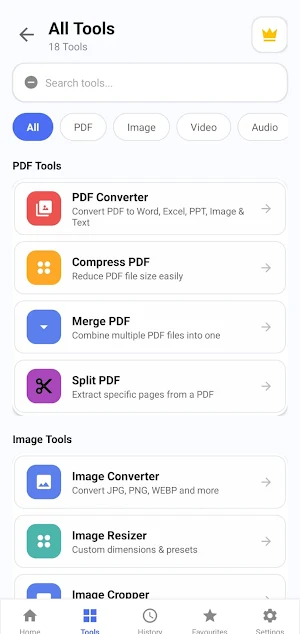
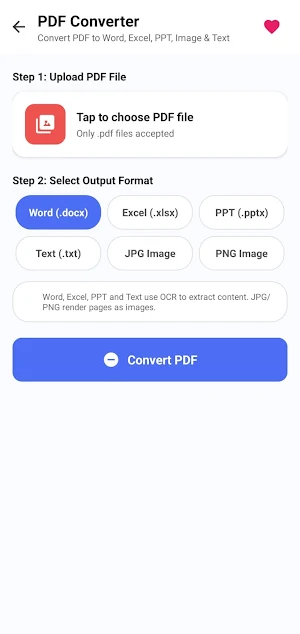
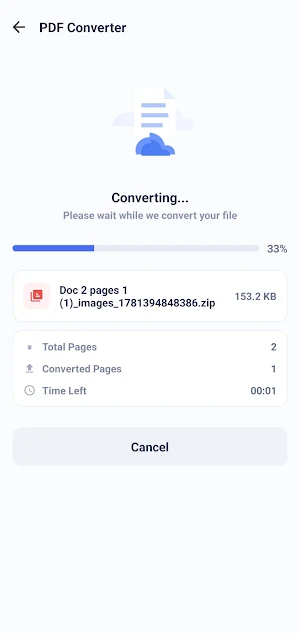
• PDF Converter – Convert PDF to Word, Excel, PowerPoint, images, and text
• Compress PDF – Reduce PDF file size instantly for easy email and cloud sharing
• Merge PDF – Combine multiple PDF files into one clean document in seconds
• Split PDF – Extract specific pages or split large PDFs by range
• OCR Text Extractor – Scan and copy editable text from any PDF or image
🖼️ Image Converter & Image Compressor
Stop juggling five apps — File Converter & Compressor handles every image task:
• Image Converter – Convert between JPG, PNG, WEBP, BMP, GIF and more in seconds
• Image Resizer – Custom dimensions, batch resize, and presets for every platform
• Image Cropper – Crop images with 16:9, 9:16, 4:3, 1:1 aspect ratio precision
• Social Media Resizer – Perfect image dimensions for Instagram, YouTube, TikTok, Facebook
• Watermark Adder – Stamp text or logo onto any photo with custom opacity
• PNG Optimizer – Losslessly compress PNG image size — zero quality loss
🎬 Video Converter & Video Compressor
• Video Converter – Convert video between MP4, AVI, MKV, MOV, WEBM — full quality control
• Extract Audio – Rip MP3, AAC, or WAV audio from any video file instantly
• Compress Video – Reduce video file size for WhatsApp, email, and upload
🎵 Audio Converter
• Audio Converter – Convert between MP3, AAC, WAV, OGG, FLAC, M4A in seconds
• All audio conversion is 100% offline — no upload, no account required
📄 Document Converter
• Document Converter – DOCX, TXT, RTF to PDF and back — fully offline
• OCR & Text Suite – Extract, edit and copy text from scanned images and documents
🔧 File Utilities
• File Compressor – Compress any file to save storage or share faster
• Metadata Cleaner – Strip EXIF and privacy data from photos before sharing
• Hash Checker – Verify file integrity with MD5, SHA-1 and SHA-256
• Batch File Renamer – Rename multiple files at once with smart patterns
✅ Why Choose File Converter & Compressor?
• 100% Offline — convert and compress PDF, video, image, and audio with no internet
• No Watermarks — ever, on any output file, in any format
• No Account Required — no sign-up, no login, no cloud upload
• Privacy First — your files never leave your device
• Fast Processing — convert and compress files in seconds on any Android
• Beginner-Friendly — clean, simple interface anyone can use immediately
• Lightweight App — small size, minimal storage footprint on your device
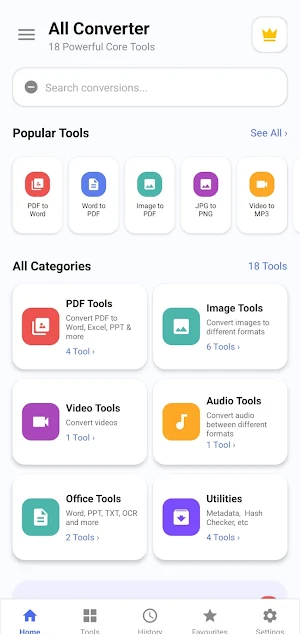
• 18 Powerful Tools — PDF, video, image, audio, document, and file tools in one app
📱 How to Use
1. Open the app and tap any tool from the home screen
2. Select your PDF, video, image, or audio file
3. Choose your output format or compression level
4. Tap Convert or Compress — done in seconds
5. Save or share your output file instantly
Whether you need to convert a PDF to Word, compress a video for WhatsApp, convert JPG to PNG, extract MP3 audio from a video, resize images for Instagram, or merge PDF files for work — File Converter & Compressor handles it all instantly, offline, and for free.
Download File Converter & Compressor today — the fast, secure, offline toolkit for every PDF, video, image, and audio task on Android.
🔄 PDF Converter & PDF Compressor
The most complete set of PDF tools on Android — free and offline:
• PDF Converter – Convert PDF to Word, Excel, PowerPoint, images, and text
• Compress PDF – Reduce PDF file size instantly for easy email and cloud sharing
• Merge PDF – Combine multiple PDF files into one clean document in seconds
• Split PDF – Extract specific pages or split large PDFs by range
• OCR Text Extractor – Scan and copy editable text from any PDF or image
🖼️ Image Converter & Image Compressor
Stop juggling five apps — File Converter & Compressor handles every image task:
• Image Converter – Convert between JPG, PNG, WEBP, BMP, GIF and more in seconds
• Image Resizer – Custom dimensions, batch resize, and presets for every platform
• Image Cropper – Crop images with 16:9, 9:16, 4:3, 1:1 aspect ratio precision
• Social Media Resizer – Perfect image dimensions for Instagram, YouTube, TikTok, Facebook
• Watermark Adder – Stamp text or logo onto any photo with custom opacity
• PNG Optimizer – Losslessly compress PNG image size — zero quality loss
🎬 Video Converter & Video Compressor
• Video Converter – Convert video between MP4, AVI, MKV, MOV, WEBM — full quality control
• Extract Audio – Rip MP3, AAC, or WAV audio from any video file instantly
• Compress Video – Reduce video file size for WhatsApp, email, and upload
🎵 Audio Converter
• Audio Converter – Convert between MP3, AAC, WAV, OGG, FLAC, M4A in seconds
• All audio conversion is 100% offline — no upload, no account required
📄 Document Converter
• Document Converter – DOCX, TXT, RTF to PDF and back — fully offline
• OCR & Text Suite – Extract, edit and copy text from scanned images and documents
🔧 File Utilities
• File Compressor – Compress any file to save storage or share faster
• Metadata Cleaner – Strip EXIF and privacy data from photos before sharing
• Hash Checker – Verify file integrity with MD5, SHA-1 and SHA-256
• Batch File Renamer – Rename multiple files at once with smart patterns
✅ Why Choose File Converter & Compressor?
• 100% Offline — convert and compress PDF, video, image, and audio with no internet
• No Watermarks — ever, on any output file, in any format
• No Account Required — no sign-up, no login, no cloud upload
• Privacy First — your files never leave your device
• Fast Processing — convert and compress files in seconds on any Android
• Beginner-Friendly — clean, simple interface anyone can use immediately
• Lightweight App — small size, minimal storage footprint on your device
• 18 Powerful Tools — PDF, video, image, audio, document, and file tools in one app
📱 How to Use
1. Open the app and tap any tool from the home screen
2. Select your PDF, video, image, or audio file
3. Choose your output format or compression level
4. Tap Convert or Compress — done in seconds
5. Save or share your output file instantly
Whether you need to convert a PDF to Word, compress a video for WhatsApp, convert JPG to PNG, extract MP3 audio from a video, resize images for Instagram, or merge PDF files for work — File Converter & Compressor handles it all instantly, offline, and for free.
Download File Converter & Compressor today — the fast, secure, offline toolkit for every PDF, video, image, and audio task on Android.
What’s new
Version 1.0.3 · Updated September 3, 2026
🎉 Major update! We've grown from 18 to 56 powerful tools — PDF, image, audio, video, document, and utility tools all in one app. 🌍 Now available in 30 languages, including Spanish, Hindi, Arabic, French, German, Japanese, Chinese, and many more — pick your language in Settings. Thanks for using Universal Converter! More tools and languages coming soon.
Alternatives to File Converter & Compressor
Looking for apps like File Converter & Compressor? Here are 6 similar Android apps on Google Play. The highest rated is FAX Desk: Send Fax from Phone (4.6/5), and all 6 are free to download.
-
RICOH Smart Device Connector 3.2
-
Falcon PDF - Editor & Tools 4.2
-
PDF Merge: Scan, Sign & Edit 3.9
-
FAX Desk: Send Fax from Phone 4.6
-
Mobi PDF・Editor・Scanner・Reader 4.4
-
Smallpdf: Scanner & PDF Editor 4.4
| App | Rating | Price | Installs | Last updated | Compare |
|---|---|---|---|---|---|
| File Converter & Compressor | – | Free | 100+ | Sep 3, 2026 | |
| RICOH Smart Device Connector | 3.2 / 5 | Free | 1,000,000+ | Jul 21, 2026 | Compare |
| Falcon PDF - Editor & Tools | 4.2 / 5 | Free | 1,000,000+ | Oct 21, 2026 | Compare |
| PDF Merge: Scan, Sign & Edit | 3.9 / 5 | Free | 5,000,000+ | Feb 2, 2026 | Compare |
| FAX Desk: Send Fax from Phone | 4.6 / 5 | Free | 10,000+ | Dec 19, 2025 | Compare |
| Mobi PDF・Editor・Scanner・Reader | 4.4 / 5 | Free | 10,000,000+ | Oct 19, 2026 | Compare |
| Smallpdf: Scanner & PDF Editor | 4.4 / 5 | Free | 5,000,000+ | Oct 7, 2026 | Compare |