

SMT Controller
GUNPOWERDEV Tools In-app purchases
Remotely control SMT shooting training equipment with your smartphone. Supports real-time screen streaming and touch control.
- Downloads
- 258+
- on Google Play
- Price
- Free
- In-app purchases
- Updated
- Sep 23
- 2026 · v1.0.12
Screenshots


About SMT Controller
SMT Controller is a dedicated remote control app for SMT equipment.
[Key Features]
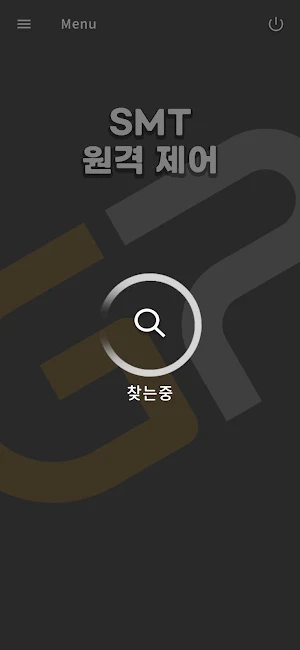
◆ Bluetooth Device Search
Automatically searches for SMT equipment near your smartphone and allows for easy connection.
◆ Real-Time Screen Streaming
View your SMT equipment screen in real time on your smartphone.
◆ Touch Remote Control
Control your SMT equipment remotely by touching the smartphone screen.
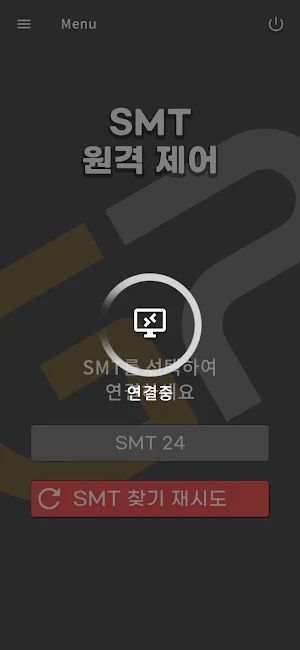
◆ Easy Connection
Find devices via Bluetooth and automatically connect via Wi-Fi. You can use it right away without any complicated setup.
【How to Use】
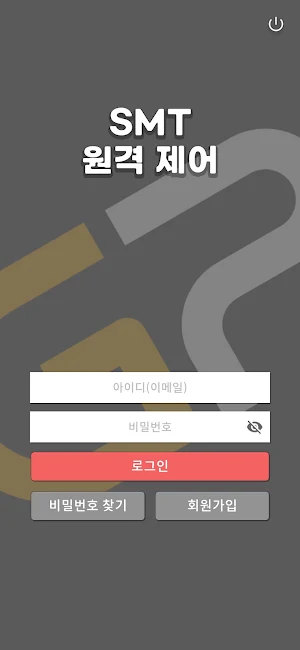
1. Launch the app and log in.
2. Turn on the SMT device.
3. Search for nearby SMT devices via Bluetooth.
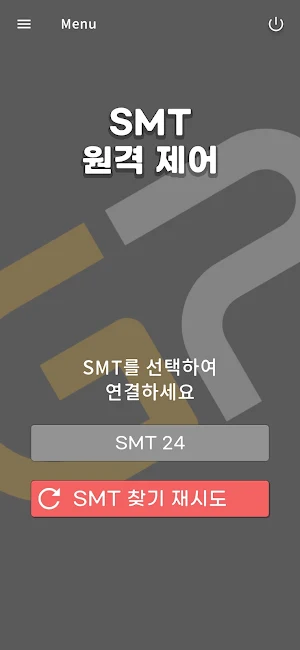
4. Select the desired device and connect.
5. View the screen in real time and control it with a touch.
【Requirements】
- SMT shooting training equipment required (sold separately)
- Bluetooth and Wi-Fi-enabled smartphone
- Internet connection required
【Permission Information】
- Location permission: Required for searching for Bluetooth devices.
- Bluetooth permission: Required for connecting to the SMT device.
※ Some features of this app are only available without an SMT device.
[Key Features]
◆ Bluetooth Device Search
Automatically searches for SMT equipment near your smartphone and allows for easy connection.
◆ Real-Time Screen Streaming
View your SMT equipment screen in real time on your smartphone.
◆ Touch Remote Control
Control your SMT equipment remotely by touching the smartphone screen.
◆ Easy Connection
Find devices via Bluetooth and automatically connect via Wi-Fi. You can use it right away without any complicated setup.
【How to Use】
1. Launch the app and log in.
2. Turn on the SMT device.
3. Search for nearby SMT devices via Bluetooth.
4. Select the desired device and connect.
5. View the screen in real time and control it with a touch.
【Requirements】
- SMT shooting training equipment required (sold separately)
- Bluetooth and Wi-Fi-enabled smartphone
- Internet connection required
【Permission Information】
- Location permission: Required for searching for Bluetooth devices.
- Bluetooth permission: Required for connecting to the SMT device.
※ Some features of this app are only available without an SMT device.
What’s new
Version 1.0.12 · Updated September 23, 2026
- Change in-app purchase currency from Credits to GP. - Fixed an issue where some Android devices could not find Bluetooth devices.
Alternatives to SMT Controller
Looking for apps like SMT Controller? Here are 6 similar Android apps on Google Play. All of them are free to download.





| App | Rating | Price | Installs | Last updated | Compare |
|---|---|---|---|---|---|
| SMT Controller | – | Free | 100+ | Sep 23, 2026 | |
| My Employee App | – | Free | 10,000+ | Oct 9, 2026 | Compare |
| Aim On Screen | – | Free | 50,000+ | Jul 22, 2026 | Compare |
| CalcGenius | – | Free | 5+ | Jan 1, 2026 | Compare |
| Comtarsia Authenticator | – | Free | 10+ | Oct 19, 2026 | Compare |
| KINGSTAR HEALTH | – | Free | 500+ | Jul 28, 2022 | Compare |
| ZIMO App | – | Free | 100+ | Oct 16, 2026 | Compare |
Compare SMT Controller with the top alternatives: ratings, updates, ASO score and keyword gaps →
Similar apps on Google Play
- My Employee App
- Aim On Screen
- CalcGenius
- Comtarsia Authenticator
- KINGSTAR HEALTH
- ZIMO App
- Kaujalgi Sakh
- AETVITA Solar
- DeskDroid Explorer
- Miluz
- Trustjet
- LifeFitness
- PDF Merger – Combine PDF Files
- Calculator Vault: Photo Hider
- FAP Auto
- Noise Meter: dB Level
- VoyeTV - Digital Signage
- HealthJournal
- Boie Gas-App
- iOT
- Aaklan
- LS TreeMind
- FTE Courier
- Identify Anything · Orvik AI
- PC Mouse