

Focus Blocker: App Blocker
Gravity point Productivity In-app purchases
Block distracting apps and take control of your focus time.
- Rating
- 4.4
- 10 ratings
- Downloads
- 18.3K+
- on Google Play
- Price
- Free
- In-app purchases
- Updated
- Sep 18
- 2026 · v1.0.53
Screenshots


About Focus Blocker: App Blocker
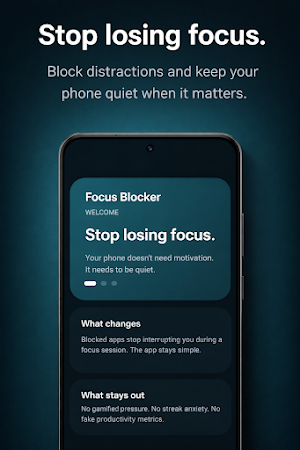
Focus Blocker helps you stay focused by blocking distracting apps during scheduled or manual focus sessions.
Whether you want to study, work, or simply reduce screen distractions, Focus Blocker gives you full control over when and how apps can be used.
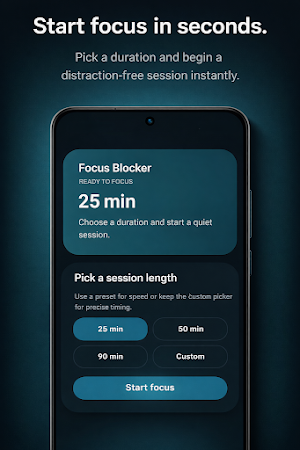
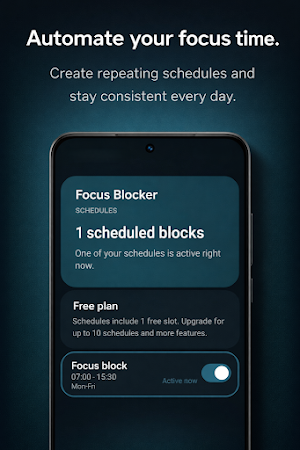
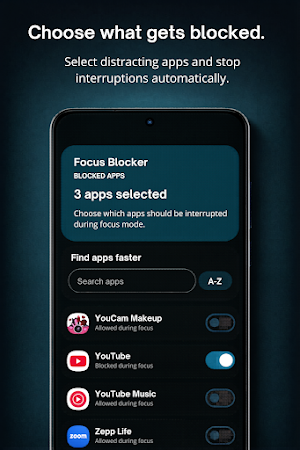
Create custom schedules or start a focus session instantly. When a blocked app is opened during an active session, Focus Blocker immediately prevents access and displays a blocking screen.
Key Features
• Block selected apps during focus sessions
• Manual focus mode — start anytime
• Scheduled focus sessions
• Hard and soft blocking modes
• Simple and distraction-free interface
• Fast and reliable blocking
• No advertisements
Designed for real focus
Focus Blocker is built for people who want fewer distractions and more control over their time.
Use it for:
• Studying without interruptions
• Deep work sessions
• Reducing social media usage
• Building better digital habits
• Improving daily productivity
Permissions Explained
Usage Access permission is used only to detect when a selected app is opened so it can be blocked during an active focus session.
Display over other apps (overlay) permission is used only to show the blocking screen on top of restricted apps.
The app does not capture screen content or monitor user activity beyond blocking enforcement.
Privacy and Data
Focus Blocker does not require user accounts and does not collect personally identifiable information such as names, contacts, or messages.
All user-defined data such as blocked apps and schedules remains stored locally on your device.
Focus Blocker uses Firebase Analytics to collect anonymous usage statistics. This helps improve app reliability, usability, and performance.
Focus Blocker:
• does not sell personal data
• does not display advertisements
• does not track personal identity
• does not transmit personal data outside the device
Anonymous usage data may be processed by trusted service providers such as Google Firebase Analytics.
Whether you want to study, work, or simply reduce screen distractions, Focus Blocker gives you full control over when and how apps can be used.
Create custom schedules or start a focus session instantly. When a blocked app is opened during an active session, Focus Blocker immediately prevents access and displays a blocking screen.
Key Features
• Block selected apps during focus sessions
• Manual focus mode — start anytime
• Scheduled focus sessions
• Hard and soft blocking modes
• Simple and distraction-free interface
• Fast and reliable blocking
• No advertisements
Designed for real focus
Focus Blocker is built for people who want fewer distractions and more control over their time.
Use it for:
• Studying without interruptions
• Deep work sessions
• Reducing social media usage
• Building better digital habits
• Improving daily productivity
Permissions Explained
Usage Access permission is used only to detect when a selected app is opened so it can be blocked during an active focus session.
Display over other apps (overlay) permission is used only to show the blocking screen on top of restricted apps.
The app does not capture screen content or monitor user activity beyond blocking enforcement.
Privacy and Data
Focus Blocker does not require user accounts and does not collect personally identifiable information such as names, contacts, or messages.
All user-defined data such as blocked apps and schedules remains stored locally on your device.
Focus Blocker uses Firebase Analytics to collect anonymous usage statistics. This helps improve app reliability, usability, and performance.
Focus Blocker:
• does not sell personal data
• does not display advertisements
• does not track personal identity
• does not transmit personal data outside the device
Anonymous usage data may be processed by trusted service providers such as Google Firebase Analytics.
What’s new
Version 1.0.53 · Updated September 18, 2026
Improved layouts, clearer Premium pricing, and more accurate countdowns. Schedule edits are preserved when rotating the screen.
User reviews

tbh ik it can be deleted to remove the block but I have enough self control to not delete it else it's perfect for me

very nice and effective app, my screentime reduced from 10 hours daily to an hour a day in just 1 week!

useful

Really solid app. Simple to set up. It helped me cut down on mindlessly opening socials. The blocking of the apps works. Keeps me from constantly checking my phone:) Been using it since it came out and it’s been reliable so far. Definitely useful if you’re trying to reduce screen time!
Alternatives to Focus Blocker: App Blocker
Looking for apps like Focus Blocker: App Blocker? Here are 6 similar Android apps on Google Play. All of them are free to download.



| App | Rating | Price | Installs | Last updated | Compare |
|---|---|---|---|---|---|
| Focus Blocker: App Blocker | 4.4 / 5 | Free | 10,000+ | Sep 18, 2026 | |
| Kobac Data | – | Free | 1,000+ | May 19, 2026 | Compare |
| Site Supervisor Log | – | Free | 10+ | May 15, 2026 | Compare |
| DocFusion - PDF Tools | – | Free | 500+ | – | Compare |
| Sleep Calculator Pro | – | Free | 10+ | – | Compare |
| GV RISHTA | – | Free | 1,000+ | – | Compare |
| BEST by Renumia | – | Free | 10+ | – | Compare |
Similar apps on Google Play
- Kobac Data
- Site Supervisor Log
- DocFusion - PDF Tools
- Sleep Calculator Pro
- GV RISHTA
- BEST by Renumia
- ValidaDoc Brasil
- siymon
- LOKTV
- ReplyPilot
- Feltly: Focus by Mood
- Net Truyen Pro
- HitvBox: Movies & TV Browser
- Unload-app
- ASM-Share
- Excel Editor : XLS To PDF
- Ai or Human
- Document Viewer Pro
- Control Centinel
- ProFlow
- XTranslator Live: AI Translate
- FlowFocus
- Flix TV
- Stopwatch & Timer: Precise
- Buku Kost