
GPS Vehicle Tracker
Android developer3 Maps & Navigation Contains ads
Record and plan your vehicle routes and locations with comprehensive statistics
- Downloads
- 500+
- on Google Play
- Price
- Free
- No in-app purchases
- Updated
- Sep 19
- 2026 · v1.110
Screenshots


About GPS Vehicle Tracker
GPS Vehicle Tracker is a powerful navigation tool built using the Google Maps Android API v2. It is designed to allow you to use your phone as a GPS tracker.
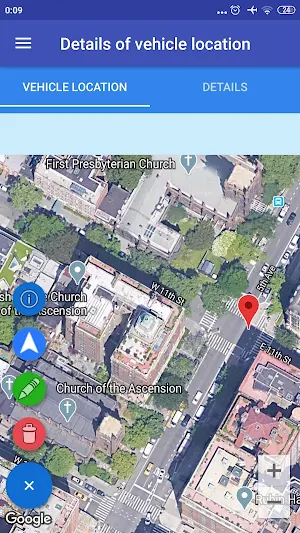
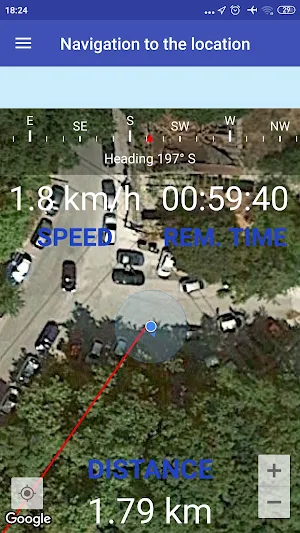
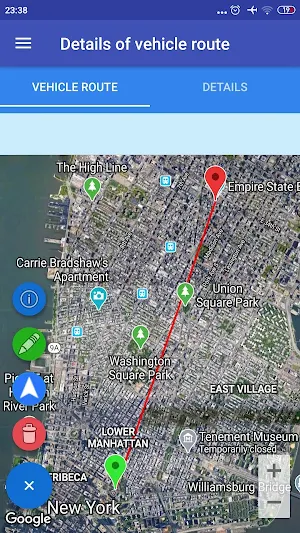
This app helps you save and manage your vehicle locations and routes, and allows you to navigate to these saved locations and routes. The application lets you record and plan vehicle routes and save them for review and analysis. For saved routes, you can navigate from your current position to the beginning of the route, the end of the route, or follow the entire route.
You can also find an address using coordinates, find coordinates and addresses by clicking on the map, and calculate distances (for both on-road and off-road routes) using coordinates or by clicking on the map. In addition, you can obtain coordinates (longitude and latitude), speed, altitude, bearing, and full address information (street address, state, zip code, country, etc.), and view your current location on the map using the GPS provider in real time.
Features
1. Find an address using coordinates.
Enter the longitude and latitude to display a marker on the map. Click on the marker to see the full address.
2. Find coordinates by clicking on the map.
Click anywhere on the map and a marker will be displayed. Click on the marker to see the coordinates and the full address.
3. Get current location information in real time using the GPS provider.
You can obtain longitude, latitude, altitude, accuracy, bearing, speed, provider, and the full address at the time intervals and distance intervals specified in the settings.
4. Find distances for on-road and off-road routes.
You can calculate distances using coordinates or by clicking on the map. The distances can also be saved and managed.
5. Save and manage vehicle locations.
Vehicle locations can be saved using the GPS provider in real time, by entering coordinates, or by clicking on the map. You can also navigate to any saved vehicle location.
6. Save and manage vehicle routes.
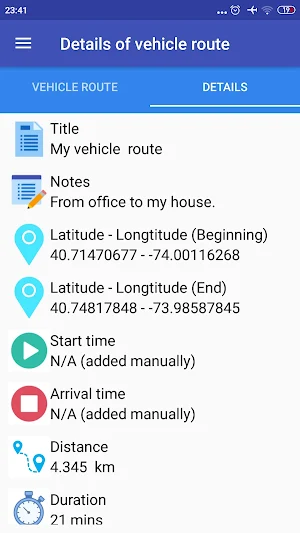
The application allows you to record and plan vehicle routes (for both on-road and off-road routes). You can store information such as the title, notes, starting longitude and latitude, ending longitude and latitude, start time, arrival time, duration, distance, maximum speed, average speed, maximum altitude, minimum altitude, and the saved or updated date. These routes can later be reviewed and analyzed. You can also navigate from your current location to the start of the route, the end of the route, or follow the route.
7. Settings.
Various settings are available to help you customize the application according to your needs.
I used some icons from icons8.com
This app helps you save and manage your vehicle locations and routes, and allows you to navigate to these saved locations and routes. The application lets you record and plan vehicle routes and save them for review and analysis. For saved routes, you can navigate from your current position to the beginning of the route, the end of the route, or follow the entire route.
You can also find an address using coordinates, find coordinates and addresses by clicking on the map, and calculate distances (for both on-road and off-road routes) using coordinates or by clicking on the map. In addition, you can obtain coordinates (longitude and latitude), speed, altitude, bearing, and full address information (street address, state, zip code, country, etc.), and view your current location on the map using the GPS provider in real time.
Features
1. Find an address using coordinates.
Enter the longitude and latitude to display a marker on the map. Click on the marker to see the full address.
2. Find coordinates by clicking on the map.
Click anywhere on the map and a marker will be displayed. Click on the marker to see the coordinates and the full address.
3. Get current location information in real time using the GPS provider.
You can obtain longitude, latitude, altitude, accuracy, bearing, speed, provider, and the full address at the time intervals and distance intervals specified in the settings.
4. Find distances for on-road and off-road routes.
You can calculate distances using coordinates or by clicking on the map. The distances can also be saved and managed.
5. Save and manage vehicle locations.
Vehicle locations can be saved using the GPS provider in real time, by entering coordinates, or by clicking on the map. You can also navigate to any saved vehicle location.
6. Save and manage vehicle routes.
The application allows you to record and plan vehicle routes (for both on-road and off-road routes). You can store information such as the title, notes, starting longitude and latitude, ending longitude and latitude, start time, arrival time, duration, distance, maximum speed, average speed, maximum altitude, minimum altitude, and the saved or updated date. These routes can later be reviewed and analyzed. You can also navigate from your current location to the start of the route, the end of the route, or follow the route.
7. Settings.
Various settings are available to help you customize the application according to your needs.
I used some icons from icons8.com
What’s new
Version 1.110 · Updated September 19, 2026
v. 1.110: 1. Fixed minor bugs for a smoother experience. 2. Improved the user interface and enhanced overall performance and usability.
Alternatives to GPS Vehicle Tracker
Looking for apps like GPS Vehicle Tracker? Here are 6 similar Android apps on Google Play. All of them are free to download.
-
GPS Measurement
-
Boat Navigation
-
GPS Hunting Tracker
-
GPS Hiking Tracker
-
GPS Fishing Tracker
-
Weather Forecast
| App | Rating | Price | Installs | Last updated | Compare |
|---|---|---|---|---|---|
| GPS Vehicle Tracker | – | Free | 500+ | Sep 19, 2026 | |
| GPS Measurement | – | Free | 100+ | Oct 27, 2026 | Compare |
| Boat Navigation | – | Free | 100+ | Oct 23, 2026 | Compare |
| GPS Hunting Tracker | – | Free | 100+ | – | Compare |
| GPS Hiking Tracker | – | Free | 50+ | Oct 23, 2026 | Compare |
| GPS Fishing Tracker | – | Free | 100+ | Oct 23, 2026 | Compare |
| Weather Forecast | – | Free | 100+ | – | Compare |