

DWG CAD Viewer: DXF, STL
Gowalk Productivity In-app purchases
Open, measure and mark up DWG, DXF and 3D CAD files offline.
- Downloads
- 3.3K+
- on Google Play
- Price
- Free
- In-app purchases
- Updated
- Aug 25
- 2026 · v1.0.0
Screenshots


About DWG CAD Viewer: DXF, STL
Serious CAD review, without the workstation.
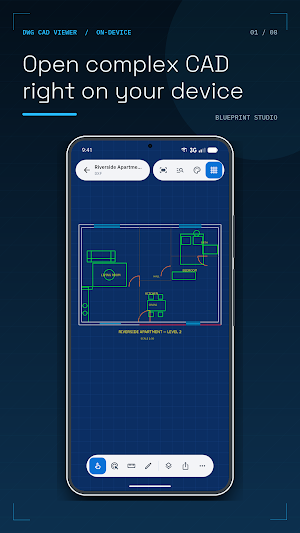
DWG CAD Viewer opens technical drawings directly on your Android phone or tablet. Inspect a plan in the field, isolate a
layer during review, measure a detail, mark a revision and send a clean result—all while the project file stays on
your device unless you choose to share it.
OPEN VERIFIED DRAWINGS
• DWG R13, R14, R2000, R2004, R2010, R2013 and R2018
• ASCII DXF R12 through R2018
• STL, OBJ, PLY and 3MF meshes in a real 3D viewport
• Six original sample drawings are included, so every tool is ready to explore
REVIEW WITH CONTEXT
• Smooth pan and focal-point zoom on a GPU-rendered canvas
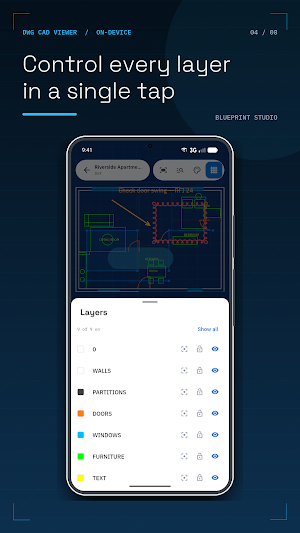
• Show, hide, isolate and lock layers
• Inspect entity type, layer, handle, colour and geometry
• Search drawing text and jump straight to each result
• True Black, Paper White and Blueprint canvas themes
MEASURE, MARK UP AND EXPORT WITH PRO
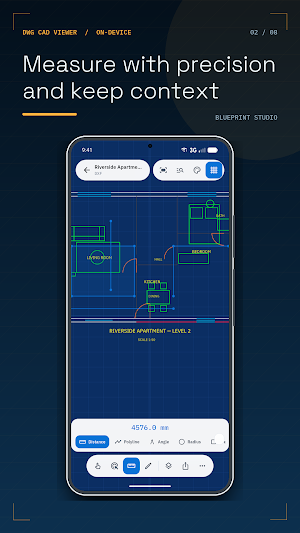
• Distance, polyline, angle, radius and area measurements
• Endpoint, midpoint, centre, node and nearest object snaps
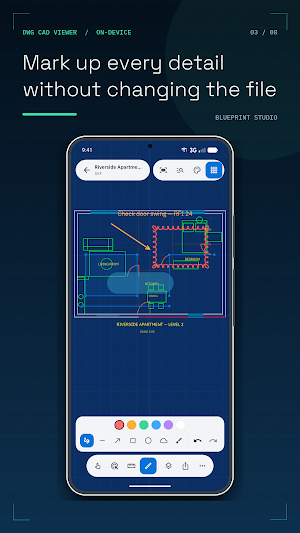
• Ink, lines, arrows, shapes, revision clouds, highlights and notes
• PDF, PNG, DXF, SVG, print and measurement CSV export
• Orbit, zoom, wireframe and shaded 3D mesh inspection
• Restore purchases from Settings at any time
BUILT FOR PRIVATE, OFFLINE WORK
Drawing contents are parsed on-device and are never uploaded by the app. No account is required. Viewing remains
available offline. The app uses privacy-disclosed analytics, crash diagnostics and store purchase services; it has
no advertising SDK and does not use data for cross-app tracking.
R2007 DWG files are not currently supported and receive a clear version-specific message instead of a blank
canvas. ZIP browsing, XREF resolution and cloud collaboration are not provided.
Pro is offered as an auto-renewing weekly subscription with a 3-day introductory trial and as an auto-renewing
yearly subscription. Prices are shown before purchase. Payment is charged to your Google Play account at confirmation.
Subscriptions renew unless cancelled at least 24 hours before the current period ends and can be managed in your
Google Play Subscriptions settings.
DWG and DXF are file formats. AutoCAD® and DWG™ are trademarks of Autodesk, Inc. This app is not affiliated with,
endorsed by, or certified by Autodesk.
DWG CAD Viewer opens technical drawings directly on your Android phone or tablet. Inspect a plan in the field, isolate a
layer during review, measure a detail, mark a revision and send a clean result—all while the project file stays on
your device unless you choose to share it.
OPEN VERIFIED DRAWINGS
• DWG R13, R14, R2000, R2004, R2010, R2013 and R2018
• ASCII DXF R12 through R2018
• STL, OBJ, PLY and 3MF meshes in a real 3D viewport
• Six original sample drawings are included, so every tool is ready to explore
REVIEW WITH CONTEXT
• Smooth pan and focal-point zoom on a GPU-rendered canvas
• Show, hide, isolate and lock layers
• Inspect entity type, layer, handle, colour and geometry
• Search drawing text and jump straight to each result
• True Black, Paper White and Blueprint canvas themes
MEASURE, MARK UP AND EXPORT WITH PRO
• Distance, polyline, angle, radius and area measurements
• Endpoint, midpoint, centre, node and nearest object snaps
• Ink, lines, arrows, shapes, revision clouds, highlights and notes
• PDF, PNG, DXF, SVG, print and measurement CSV export
• Orbit, zoom, wireframe and shaded 3D mesh inspection
• Restore purchases from Settings at any time
BUILT FOR PRIVATE, OFFLINE WORK
Drawing contents are parsed on-device and are never uploaded by the app. No account is required. Viewing remains
available offline. The app uses privacy-disclosed analytics, crash diagnostics and store purchase services; it has
no advertising SDK and does not use data for cross-app tracking.
R2007 DWG files are not currently supported and receive a clear version-specific message instead of a blank
canvas. ZIP browsing, XREF resolution and cloud collaboration are not provided.
Pro is offered as an auto-renewing weekly subscription with a 3-day introductory trial and as an auto-renewing
yearly subscription. Prices are shown before purchase. Payment is charged to your Google Play account at confirmation.
Subscriptions renew unless cancelled at least 24 hours before the current period ends and can be managed in your
Google Play Subscriptions settings.
DWG and DXF are file formats. AutoCAD® and DWG™ are trademarks of Autodesk, Inc. This app is not affiliated with,
endorsed by, or certified by Autodesk.
What’s new
Version 1.0.0 · Updated August 25, 2026
Initial release: open, inspect, measure and mark up DWG, DXF and 3D CAD files offline.
Alternatives to DWG CAD Viewer: DXF, STL
Looking for apps like DWG CAD Viewer: DXF, STL? Here are 5 similar Android apps on Google Play. The highest rated is ArcSite: CAD & Floor Plans (4.3/5), and all 5 are free to download.
-
ConstructionOnline 3.9
-
Procore 3.7
-
ZWCAD Mobile - DWG Viewer 3.6
-
ArcSite: CAD & Floor Plans 4.3
-
AutoCAD - DWG Viewer & Editor 2.9
| App | Rating | Price | Installs | Last updated | Compare |
|---|---|---|---|---|---|
| DWG CAD Viewer: DXF, STL | – | Free | 1,000+ | Aug 25, 2026 | |
| ConstructionOnline | 3.9 / 5 | Free | 10,000+ | Oct 23, 2026 | Compare |
| Procore | 3.7 / 5 | Free | 1,000,000+ | Oct 23, 2026 | Compare |
| ZWCAD Mobile - DWG Viewer | 3.6 / 5 | Free | 1,000,000+ | Aug 12, 2026 | Compare |
| ArcSite: CAD & Floor Plans | 4.3 / 5 | Free | 500,000+ | Oct 30, 2026 | Compare |
| AutoCAD - DWG Viewer & Editor | 2.9 / 5 | Free | 10,000,000+ | Oct 9, 2026 | Compare |