

eGrade Portal
Teacher Andro Education Contains ads
Securely view learner grades, attendance, averages, and teacher remarks online.
- Downloads
- 755+
- on Google Play
- Price
- Free
- No in-app purchases
- Updated
- Oct 18
- 2026 · v26.0
Screenshots


About eGrade Portal
e-Grade Portal provides authorized learners and their families with secure, convenient, and read-only access to available school academic records through the official Android application.
MAIN FEATURES
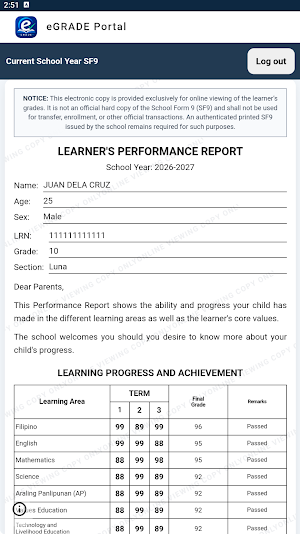
• View grades for Terms 1, 2, and 3
• View final grades and corresponding remarks
• View the learner’s general average
• View attendance records
• View teacher comments and remarks
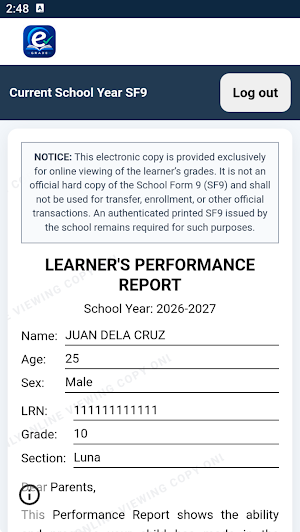
• Access the current school year’s electronic performance report
• Mobile-friendly presentation of learner information
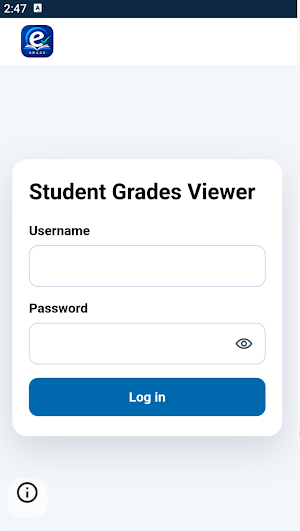
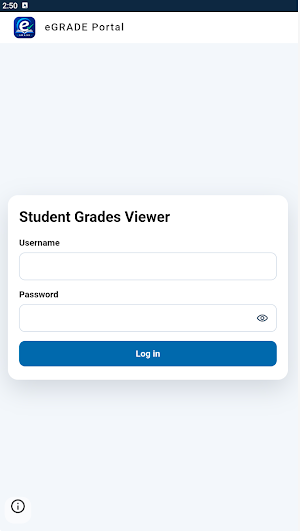
• Secure login using the learner’s authorized credentials
• Automatic session expiration for added security
• No Internet Connection notice with a retry option
SECURITY AND PRIVACY
e-Grade Portal uses security measures designed to help protect learner information. Access is limited to authorized users with valid credentials.
The application includes:
• Encrypted HTTPS communication
• Official Android application access verification
• Protection against ordinary browser access
• Temporary and expiring authentication sessions
• Restricted in-app web navigation
• Disabled cleartext HTTP traffic
• Disabled WebView debugging in the released application
• Screenshot and screen-recording protection supported by Android
• Protection of application content in the Android Recent Apps screen
The application does not request access to the device’s contacts, location, camera, microphone, photographs, videos, call logs, or text messages.
IMPORTANT NOTICE
The academic information displayed in e-Grade Portal is provided for online viewing and reference only. It is not an official printed copy of School Form 9 (SF9) and must not be used for transfer, enrollment, or other official transactions.
An authenticated printed SF9 or another officially issued school record may still be required for official purposes.
The availability and accuracy of grades, attendance information, and teacher remarks depend on records entered and maintained by authorized school personnel.
An internet connection and valid learner credentials are required to use the application.
Users must keep login credentials private, access only records they are authorized to view, and report suspected unauthorized access or inaccurate information to the school.
MAIN FEATURES
• View grades for Terms 1, 2, and 3
• View final grades and corresponding remarks
• View the learner’s general average
• View attendance records
• View teacher comments and remarks
• Access the current school year’s electronic performance report
• Mobile-friendly presentation of learner information
• Secure login using the learner’s authorized credentials
• Automatic session expiration for added security
• No Internet Connection notice with a retry option
SECURITY AND PRIVACY
e-Grade Portal uses security measures designed to help protect learner information. Access is limited to authorized users with valid credentials.
The application includes:
• Encrypted HTTPS communication
• Official Android application access verification
• Protection against ordinary browser access
• Temporary and expiring authentication sessions
• Restricted in-app web navigation
• Disabled cleartext HTTP traffic
• Disabled WebView debugging in the released application
• Screenshot and screen-recording protection supported by Android
• Protection of application content in the Android Recent Apps screen
The application does not request access to the device’s contacts, location, camera, microphone, photographs, videos, call logs, or text messages.
IMPORTANT NOTICE
The academic information displayed in e-Grade Portal is provided for online viewing and reference only. It is not an official printed copy of School Form 9 (SF9) and must not be used for transfer, enrollment, or other official transactions.
An authenticated printed SF9 or another officially issued school record may still be required for official purposes.
The availability and accuracy of grades, attendance information, and teacher remarks depend on records entered and maintained by authorized school personnel.
An internet connection and valid learner credentials are required to use the application.
Users must keep login credentials private, access only records they are authorized to view, and report suspected unauthorized access or inaccurate information to the school.
User reviews

NICE

good thnks Teacher Andro

it's cool

it's nice!!

very helpful! hehe

This app is so cool
Alternatives to eGrade Portal
Looking for apps like eGrade Portal? Here are 6 similar Android apps on Google Play. All of them are free to download.
-
SimhaDhwaja - Jyotishya
-
Praxisanleitung besser machen
-
Speak French - NowFluency
-
WSES app
-
Bloom App!
-
SageHill Connect
| App | Rating | Price | Installs | Last updated | Compare |
|---|---|---|---|---|---|
| eGrade Portal | – | Free | 500+ | Oct 18, 2026 | |
| SimhaDhwaja - Jyotishya | – | Free | 1,000+ | – | Compare |
| Praxisanleitung besser machen | – | Free | 50+ | – | Compare |
| Speak French - NowFluency | – | Free | 10+ | – | Compare |
| WSES app | – | Free | 100+ | May 11, 2026 | Compare |
| Bloom App! | – | Free | 500+ | Jun 2, 2026 | Compare |
| SageHill Connect | – | Free | 100+ | Jun 28, 2026 | Compare |
Compare eGrade Portal with the top alternatives: ratings, updates, ASO score and keyword gaps →
Similar apps on Google Play
- SimhaDhwaja - Jyotishya
- Praxisanleitung besser machen
- Speak French - NowFluency
- WSES app
- Bloom App!
- SageHill Connect
- Startupreneur
- Fincom
- ISC2 CGRC Exam Prep 2026
- CISSP Practice Test 2026
- Brat-Trader
- DC Lead
- Rido Lang
- AntekHub
- GeoTech Parent
- CRCSD Connections
- My FSR
- Kids Electronics: Kidstronic
- MathMaster Kids: Fun Math
- GREE Contractor Pro
- Koop-Akademie
- CodeTapp
- Zuzibo
- ABB RoboMasters
- Skilario: Learn AI Skills