
GeoShift – Fake GPS Location
Nogiz Technologies Tools Contains ads
Set fake GPS location or simulate routes with speed control and map search.
- Downloads
- 1.1K+
- on Google Play
- Price
- Free
- No in-app purchases
- Updated
- Oct 22
- 2026 · v1.0.6
Screenshots
About GeoShift – Fake GPS Location
📍 GeoShift – Fake GPS Location & Route Simulator
GeoShift is a powerful and easy-to-use location simulation tool for Android, designed to help developers, testers, and demo users control and simulate GPS movement with precision.
Whether you need to set a fixed mock location or simulate travel along a route, GeoShift delivers a smooth and reliable experience with a modern map interface and smart controls.
🚀 Key Features
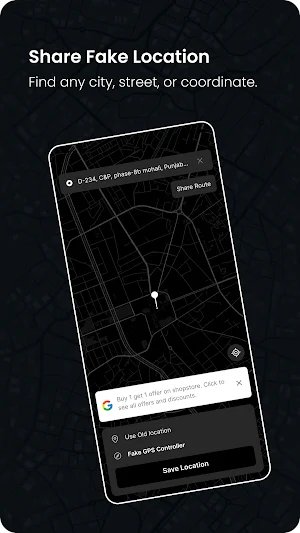
• Set Mock Location Instantly: Pin any location on the map and start spoofing your GPS in seconds.
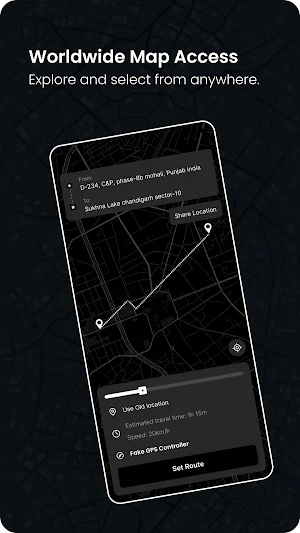
• Route Simulation: Simulate movement between two points with realistic navigation behavior.
• Adjustable Speed Control: Customize movement speed to mimic walking, cycling, or driving.
• Interactive Map Selection: Pick locations directly from the map with a clean UI.
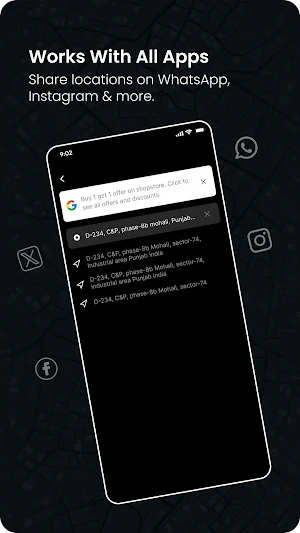
• Smart Location Search: Quickly find places with fast and accurate search suggestions.
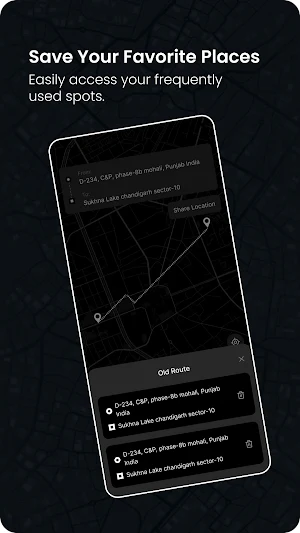
• Save Locations & Routes: Reuse frequently used locations and routes anytime.
• Stable Foreground Service: Ensures continuous mock location updates in background.
• Notification Support: Stay informed with service status and alerts.
⚙️ How It Works
1. Select a location or create a route on the map
2. Start mock location mode
3. GeoShift updates your device location in real-time
4. Stop simulation anytime using in-app controls
🎯 Use Cases
✔ Test location-based apps
✔ Demo apps with location features
✔ Validate UI/UX for maps and geofencing
✔ Simulate real-world movement scenarios
✔ Developer testing & debugging
⚠️ Important Notes
• Requires Developer Options to be enabled on your device
• You must select GeoShift as your mock location app
• Intended strictly for testing and development purposes
• Users are responsible for complying with local laws and app policies
🔐 Permissions
• Location Permission – Used to simulate and update GPS location
• Foreground Service Permission – Keeps simulation active in background
• Notification Permission – Shows service updates and alerts
GeoShift is a powerful and easy-to-use location simulation tool for Android, designed to help developers, testers, and demo users control and simulate GPS movement with precision.
Whether you need to set a fixed mock location or simulate travel along a route, GeoShift delivers a smooth and reliable experience with a modern map interface and smart controls.
🚀 Key Features
• Set Mock Location Instantly: Pin any location on the map and start spoofing your GPS in seconds.
• Route Simulation: Simulate movement between two points with realistic navigation behavior.
• Adjustable Speed Control: Customize movement speed to mimic walking, cycling, or driving.
• Interactive Map Selection: Pick locations directly from the map with a clean UI.
• Smart Location Search: Quickly find places with fast and accurate search suggestions.
• Save Locations & Routes: Reuse frequently used locations and routes anytime.
• Stable Foreground Service: Ensures continuous mock location updates in background.
• Notification Support: Stay informed with service status and alerts.
⚙️ How It Works
1. Select a location or create a route on the map
2. Start mock location mode
3. GeoShift updates your device location in real-time
4. Stop simulation anytime using in-app controls
🎯 Use Cases
✔ Test location-based apps
✔ Demo apps with location features
✔ Validate UI/UX for maps and geofencing
✔ Simulate real-world movement scenarios
✔ Developer testing & debugging
⚠️ Important Notes
• Requires Developer Options to be enabled on your device
• You must select GeoShift as your mock location app
• Intended strictly for testing and development purposes
• Users are responsible for complying with local laws and app policies
🔐 Permissions
• Location Permission – Used to simulate and update GPS location
• Foreground Service Permission – Keeps simulation active in background
• Notification Permission – Shows service updates and alerts
What’s new
Version 1.0.6 · Updated October 22, 2026
Bug fixes and performance improvements.
User reviews

I like that I can save locations and come back to them later. Saves a bit of time when I’m testing the same things repeatedly..

Simple app that does what I needed without much setup.

Gf ko location bhejne ka tension khatam 😂 Friends k sath kahi ghoomne niklo aur location pooch Li jaye, GeoShift Zindabad 🤣🤣, Really useful app.

Tried a few similar apps before this one and this felt much simpler to figure out.

I mainly been using it while testing an app that depends on location. Being able to quickly switch between places has made things way easier.

very smooth and clean app
Alternatives to GeoShift – Fake GPS Location
Looking for apps like GeoShift – Fake GPS Location? Here are 3 similar Android apps on Google Play. All of them are free to download.



| App | Rating | Price | Installs | Last updated | Compare |
|---|---|---|---|---|---|
| GeoShift – Fake GPS Location | – | Free | 1,000+ | Oct 22, 2026 | |
| Snapcut Video Editor & Maker | – | Free | 500+ | Sep 18, 2026 | Compare |
| Minjo Games - Online Games | – | Free | 1,000+ | – | Compare |
| Geo Camera - GPS Map Location | – | Free | 100+ | – | Compare |