
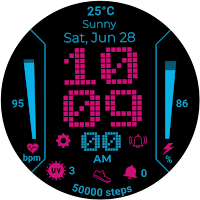
Pixel Pulse: Retro Watch Face
Personalization Contains ads
A vibrant, retro-futuristic LED watch face for Wear OS, packed with style.
- Downloads
- 1.9K+
- on Google Play
- Price
- $1.49
- No in-app purchases
- Updated
- Dec 11
- 2025
Screenshots

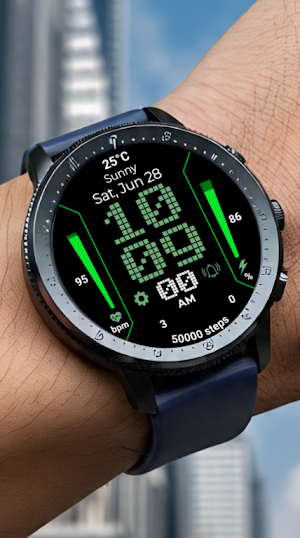
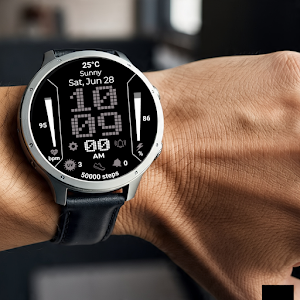
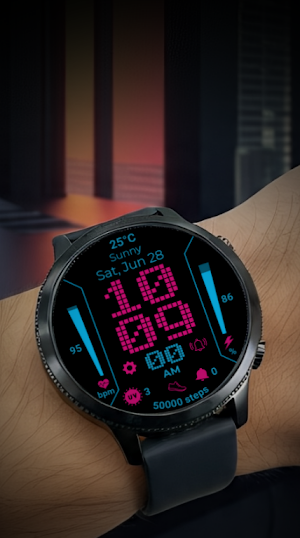


About Pixel Pulse: Retro Watch Face
Transform your Wear OS device with Pixel Pulse, a watch face inspired by the vibrant energy of 8-bit consoles and retro-futuristic design. Its high-contrast, dot-matrix style makes a bold statement while displaying your key information clearly.
Perfect for fans of pixel art, retro gaming, and unique cyberpunk aesthetics, Pixel Pulse merges nostalgic charm with the powerful functionality of a modern smartwatch.
✨ KEY FEATURES ✨
Bold Time Display:
-Large, pixelated numbers for hours and minutes.
-Classic dot-matrix display for seconds.
-Clear AM/PM indicator.
At-a-Glance Data Complications:
Date: Displays the current day of the week and date.
Health Metrics: Track your Heart Rate (BPM) and daily Step Count.
Watch Status: Monitor your watch's Battery Level with a percentage and progress bar.
Weather & More: Default complications include Weather, temperature, and UV Index.
Please Note: This watch face uses standard Wear OS complications. The data displayed (like weather, steps, heart rate) is powered by the apps you have installed on your watch. The appearance and availability of certain data points may vary depending on your device and installed apps.
-Design & Functionality:
-High-Contrast Readability:
-Customizable Shortcuts:
⌚ COMPATIBILITY ⌚
-Designed exclusively for Wear OS 3+ devices (e.g., Samsung Galaxy Watch 4/5/6/7, Google Pixel Watch, Fossil Gen 6).
NOT compatible with Tizen OS (older Samsung watches) or other operating systems.
🔧 INSTALLATION 🔧
-Ensure your watch is connected to your phone.
-From the Play Store, use the "Install" button's dropdown menu to select your watch device.
-After a few minutes, the watch face will transfer to your watch.
-To apply, long-press your current watch face, scroll to find Pixel Pulse, and select it. You can also apply it via your phone's companion app (e.g., Galaxy Wearable).
Download Pixel Pulse today and give your wrist an unforgettable retro-tech upgrade!
Perfect for fans of pixel art, retro gaming, and unique cyberpunk aesthetics, Pixel Pulse merges nostalgic charm with the powerful functionality of a modern smartwatch.
✨ KEY FEATURES ✨
Bold Time Display:
-Large, pixelated numbers for hours and minutes.
-Classic dot-matrix display for seconds.
-Clear AM/PM indicator.
At-a-Glance Data Complications:
Date: Displays the current day of the week and date.
Health Metrics: Track your Heart Rate (BPM) and daily Step Count.
Watch Status: Monitor your watch's Battery Level with a percentage and progress bar.
Weather & More: Default complications include Weather, temperature, and UV Index.
Please Note: This watch face uses standard Wear OS complications. The data displayed (like weather, steps, heart rate) is powered by the apps you have installed on your watch. The appearance and availability of certain data points may vary depending on your device and installed apps.
-Design & Functionality:
-High-Contrast Readability:
-Customizable Shortcuts:
⌚ COMPATIBILITY ⌚
-Designed exclusively for Wear OS 3+ devices (e.g., Samsung Galaxy Watch 4/5/6/7, Google Pixel Watch, Fossil Gen 6).
NOT compatible with Tizen OS (older Samsung watches) or other operating systems.
🔧 INSTALLATION 🔧
-Ensure your watch is connected to your phone.
-From the Play Store, use the "Install" button's dropdown menu to select your watch device.
-After a few minutes, the watch face will transfer to your watch.
-To apply, long-press your current watch face, scroll to find Pixel Pulse, and select it. You can also apply it via your phone's companion app (e.g., Galaxy Wearable).
Download Pixel Pulse today and give your wrist an unforgettable retro-tech upgrade!
User reviews

nice vertical style watch face with customizable colors

WOW really superb design and I love the layout and colour of the design. excellent job on this design. thank you
Alternatives to Pixel Pulse: Retro Watch Face
Looking for apps like Pixel Pulse: Retro Watch Face? Here are 6 similar Android apps on Google Play. The highest rated is Ballozi PARTICLE Digital (4.8/5), and 3 of the 6 are free to download.
-
MKNA watchface for Wear OS
-
Oled - Hybrid | watch face
-
HMKWatch Digital 029 HUD 3.8
-
Ballozi PARTICLE Digital 4.8
-
Watch Face WF153 4.5
-
Dashcard
| App | Rating | Price | Installs | Last updated | Compare |
|---|---|---|---|---|---|
| Pixel Pulse: Retro Watch Face | – | $1.49 | 1,000+ | Dec 11, 2025 | |
| MKNA watchface for Wear OS | – | Free | 1,000+ | Oct 9, 2024 | Compare |
| Oled - Hybrid | watch face | – | 0.99 USD | 100+ | Jun 22, 2025 | Compare |
| HMKWatch Digital 029 HUD | 3.8 / 5 | Free | 10,000+ | Oct 11, 2026 | Compare |
| Ballozi PARTICLE Digital | 4.8 / 5 | 1.49 USD | 1,000+ | Aug 9, 2026 | Compare |
| Watch Face WF153 | 4.5 / 5 | Free | 5,000+ | Oct 28, 2025 | Compare |
| Dashcard | – | 1.49 USD | 50+ | Nov 1, 2024 | Compare |
Similar apps on Google Play
- MKNA watchface for Wear OS
- Oled - Hybrid | watch face
- HMKWatch Digital 029 HUD
- Ballozi PARTICLE Digital
- Watch Face WF153
- Dashcard
- SamWatch Digital Final 2 2024
- TKS 25 Circuit Watch Face
- ML2U 515 Watch Face
- PRADO 35 Digital Watch Face
- Oogly Attivita
- Pet Cat Watch Face
- SamWatch Digital Final 3 2025
- PRADO 34 Digital Watch Face
- Sity Flora Digital Watch Face
- SH093 Watch Face, WearOS watch
- SamWatch PointColor 46
- Chester Inform MOD LCD
- Digital Watch Face Sport Wear
- SG-126
- MD238 Digital watch face
- DF031
- TKS 22 Dotrix Watch Face
- SamWatch Digital Final 4 2024
- HMKWatch Digital 237