

CPU X RAM - Task manager
GeetMark Personalization Contains ads
Monitor CPU, RAM, Battery & Network. Device Info & Analyzer
- Rating
- 5.0
- 24 ratings
- Downloads
- 6.8K+
- on Google Play
- Price
- Free
- No in-app purchases
- Updated
- Sep 1
- 2026 · v26.9.1
Screenshots


About CPU X RAM - Task manager
Unlock the full potential of your Android device with CPU X RAM, the most comprehensive and beautifully designed system information app. Whether you're a tech enthusiast, a developer, or just curious about what's under the hood, CPU X RAM provides you with real-time, in-depth analytics about every aspect of your phone or tablet.
Dive into a clean, modern interface and monitor your device's performance like never before. From CPU usage and RAM consumption to battery health and network speed, everything you need is just a tap away.
✨ Key Features at a Glance:
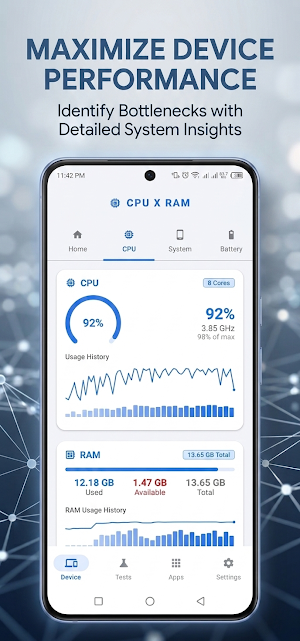
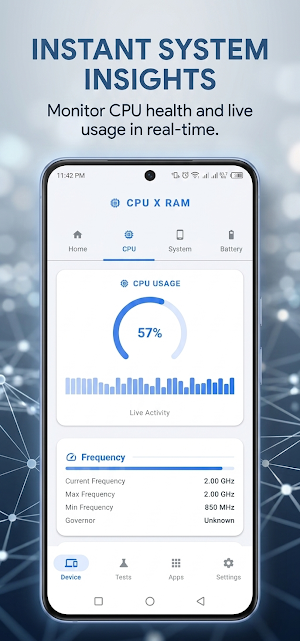
📊 Real-Time Monitoring: Watch your CPU usage, RAM consumption, and Network speed update live with beautiful, animated charts and gauges.
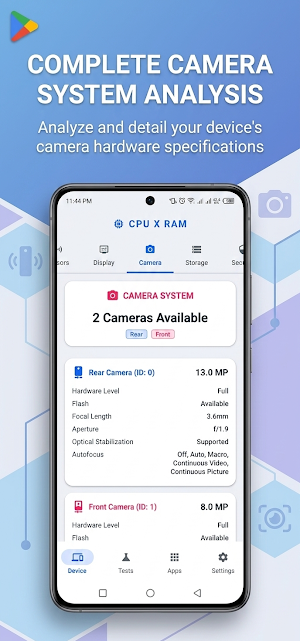
⚙️ In-Depth Hardware Info: Get detailed specifications for your CPU (cores, frequency, governor, temperature), GPU (renderer, vendor, OpenGL version), Display (resolution, density, refresh rate), and more.
🔋 Battery Analyzer: Check your battery's level, temperature, voltage, health, technology, and charging status with historical data charts.
📱 Complete System Overview: View all essential device information in one place, including Android version, build number, security patch, kernel, uptime, and hardware identifiers.
🌐 Network Toolkit:
Network Scanner: Discover all devices connected to your Wi-Fi network, view their IP and MAC addresses, and identify vendors.
Wi-Fi Password Viewer: View the password for your current and saved Wi-Fi networks *(Root required on Android 10+)*.
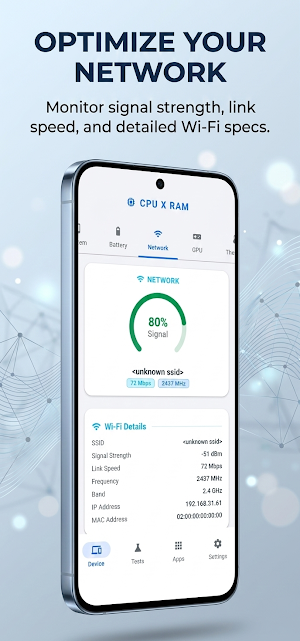
Connection Details: Monitor SSID, signal strength (dBm), link speed, frequency, and IP address.
💾 Storage Analyzer: Visualize your internal and external (SD card) storage usage with detailed breakdowns of system, apps, and media files.
🧪 Device Tests:
Speed Test: Test your network download and upload speeds.
CPU Stress Test: Push your CPU to its limits to test stability and thermal performance.
Thermal Throttling Test: Monitor how your device handles heat under load.
Phone Function Test: Test sensors, display, and other hardware components.
📱 Apps Manager: View lists of your Installed Apps, System Apps, and track app Usage Statistics.
🧭 Sensor Explorer: See a list of all available sensors on your device with real-time data for motion, environment, and position sensors (Accelerometer, Gyroscope, Light, Proximity, etc.).
🎨 Modern & Intuitive UI: Experience a smooth, edge-to-edge design with a customizable dark/light theme that follows your system settings. Material 3 design language ensures a familiar and polished look.
🔒 Privacy Focused: We only access information locally on your device to provide you with these insights. No data is collected or sent to external servers.
CPU X RAM is your ultimate toolkit for understanding and optimizing your Android device. Download now and take control of your tech!
Dive into a clean, modern interface and monitor your device's performance like never before. From CPU usage and RAM consumption to battery health and network speed, everything you need is just a tap away.
✨ Key Features at a Glance:
📊 Real-Time Monitoring: Watch your CPU usage, RAM consumption, and Network speed update live with beautiful, animated charts and gauges.
⚙️ In-Depth Hardware Info: Get detailed specifications for your CPU (cores, frequency, governor, temperature), GPU (renderer, vendor, OpenGL version), Display (resolution, density, refresh rate), and more.
🔋 Battery Analyzer: Check your battery's level, temperature, voltage, health, technology, and charging status with historical data charts.
📱 Complete System Overview: View all essential device information in one place, including Android version, build number, security patch, kernel, uptime, and hardware identifiers.
🌐 Network Toolkit:
Network Scanner: Discover all devices connected to your Wi-Fi network, view their IP and MAC addresses, and identify vendors.
Wi-Fi Password Viewer: View the password for your current and saved Wi-Fi networks *(Root required on Android 10+)*.
Connection Details: Monitor SSID, signal strength (dBm), link speed, frequency, and IP address.
💾 Storage Analyzer: Visualize your internal and external (SD card) storage usage with detailed breakdowns of system, apps, and media files.
🧪 Device Tests:
Speed Test: Test your network download and upload speeds.
CPU Stress Test: Push your CPU to its limits to test stability and thermal performance.
Thermal Throttling Test: Monitor how your device handles heat under load.
Phone Function Test: Test sensors, display, and other hardware components.
📱 Apps Manager: View lists of your Installed Apps, System Apps, and track app Usage Statistics.
🧭 Sensor Explorer: See a list of all available sensors on your device with real-time data for motion, environment, and position sensors (Accelerometer, Gyroscope, Light, Proximity, etc.).
🎨 Modern & Intuitive UI: Experience a smooth, edge-to-edge design with a customizable dark/light theme that follows your system settings. Material 3 design language ensures a familiar and polished look.
🔒 Privacy Focused: We only access information locally on your device to provide you with these insights. No data is collected or sent to external servers.
CPU X RAM is your ultimate toolkit for understanding and optimizing your Android device. Download now and take control of your tech!
What’s new
Version 26.9.1 · Updated September 1, 2026
🛠️ Added new diagnostic tools including Compass, Ping Test, Bubble Level, Noise Meter, Barometer, Display Test and Secret Codes. 🚀 Added RAM Boost and App Size Sorting. 📊 Improved storage, temperature, network and system information accuracy. 🎨 Improved UI, formatting, localization and overall stability.
Alternatives to CPU X RAM - Task manager
Looking for apps like CPU X RAM - Task manager? Here are 6 similar Android apps on Google Play. The highest rated is One IPTV Player (4.5/5), and all 6 are free to download.
-
Local AI: Offline Chat & Image
-
Fox IPTV Player:Stream live TV 4.4
-
One IPTV Player 4.5
-
Box IPTV Player: Watch Live TV
-
CamScan – PDF Scanner & Edit
-
Vidado: Watch & Share.
| App | Rating | Price | Installs | Last updated | Compare |
|---|---|---|---|---|---|
| CPU X RAM - Task manager | 5.0 / 5 | Free | 5,000+ | Sep 1, 2026 | |
| Local AI: Offline Chat & Image | – | Free | 5,000+ | Sep 30, 2026 | Compare |
| Fox IPTV Player:Stream live TV | 4.4 / 5 | Free | 10,000+ | Oct 22, 2026 | Compare |
| One IPTV Player | 4.5 / 5 | Free | 50,000+ | – | Compare |
| Box IPTV Player: Watch Live TV | – | Free | 10,000+ | Aug 19, 2026 | Compare |
| CamScan – PDF Scanner & Edit | – | Free | 10,000+ | Feb 20, 2026 | Compare |
| Vidado: Watch & Share. | – | Free | 10+ | Dec 4, 2025 | Compare |