

E Player (Music Player)
GG Tech Labs Music & Audio In-app purchases Contains ads
Your complete offline music player — equalizer, cutter, tag editor & widgets.
- Rating
- 4.8
- 5.3K ratings
- Downloads
- 223K+
- on Google Play
- Price
- Free
- In-app purchases
- Updated
- Aug 11
- 2026 · v4.9
Screenshots


About E Player (Music Player)
E Player is a powerful, feature-packed music player for Android 8.0 and above. Designed with a clean and intuitive interface, E Player puts your entire music library at your fingertips — with the tools and customization options you'd expect from a pro-level audio app.
🎵 BROWSE YOUR MUSIC YOUR WAY
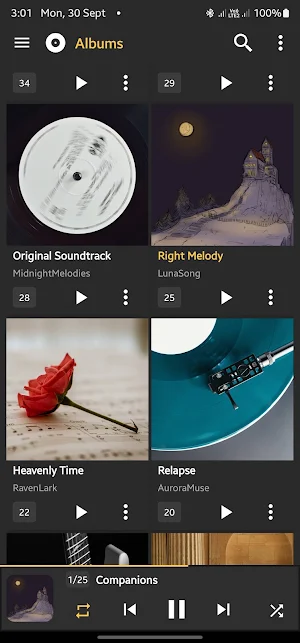
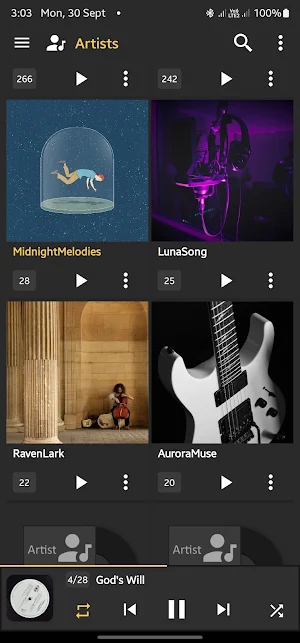
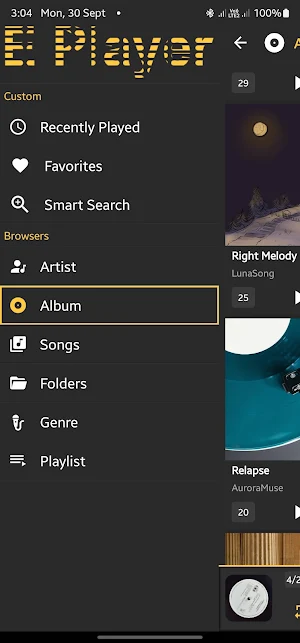
Navigate your library by Songs, Albums, Artists, Genres, Playlists, Folders, or Artist Albums. Whether you prefer browsing by folder structure or by metadata, E Player has you covered. The built-in folder player lets you play music directly from any directory on your device.
🎛️ EQUALIZER & AUDIO EFFECTS
Fine-tune your sound with the built-in 5-band Equalizer. Save and load custom presets, or pick from a variety of built-in presets. Enhance your audio further with Bass Boost, Virtualizer, and Reverb effects — all adjustable to your taste.
✂️ MP3 CUTTER & RINGTONE MAKER
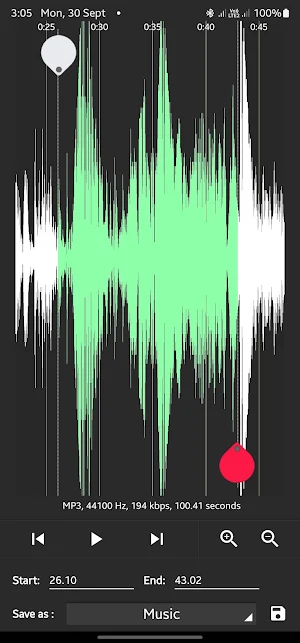
Trim any song directly on your device. Set the start and end points, cut, and save — perfect for creating custom ringtones, notification tones, or alarm sounds without needing a separate app.
🖼️ ALBUM ART GRABBER
Missing artwork? E Player can automatically download album and artist artwork for your entire library in a single tap. You can also manually search the internet for artwork, pick from your gallery, or reuse artwork already set for another item.
✏️ TAG EDITOR
Edit song metadata directly on your device. Modify the title, album, artist, genre, track number, year, and comments — for a single song or multiple songs at once in one batch operation.
⭐ SONG RATINGS
Rate your songs out of 5 stars right from the Now Playing screen. Keep track of your favorites and your least-listened tracks.
📁 PLAYLIST MANAGEMENT
Create, edit, and manage playlists with ease. Use the drag-and-drop reorder feature for custom sorting. Add single or multiple songs to any playlist in just a few taps.
🔍 SEARCH+
Instantly search your music library by song title, artist name, or album. Results are grouped and easy to act on.
📤 SHARE MUSIC
Share one or multiple songs with friends and family directly from within the app — no extra steps needed.
📱 HOME SCREEN WIDGETS
Control your music without opening the app. Choose from three home screen widget sizes (4×1, 4×2, 4×4) — each with playback controls, track info, and album art. A dedicated 4×2 lock screen widget is also available.
🎨 CUSTOMIZABLE THEMES & ACCENT COLORS
Personalize E Player to match your style. Choose your accent color from a full color picker under Settings > Look and Feel. Multiple skin options let you make the app truly yours.
🔒 LOCK SCREEN CONTROLS
Control playback right from your lock screen without unlocking your device. View track info and album art at a glance.
🗂️ HIDE FOLDERS
Keep your music library clean by excluding specific folders from your library view — ideal for hiding notification sounds, voice memos, or app sounds.
🔁 PLAYBACK CONTROLS
Shuffle and repeat modes, rewind/fast-forward with long-press, and smooth Now Playing queue management with drag-to-reorder support.
🎙️ MEDIA BUTTON & BLUETOOTH SUPPORT
Works seamlessly with Bluetooth headphones, wired headsets, and media button events — including on boot, so your widgets are always ready.
WHY E PLAYER?
✔ Lightweight and fast
✔ No internet required for playback
✔ Works with your existing music files — no streaming subscription
✔ Supports Android 8.0 through the latest Android versions, including Android 16
E Player reads music stored on your device. It does not stream music from the internet.
What’s new
Version 4.9 · Updated August 11, 2026
• New playback speed control (0.5x to 2x). • New sleep timer. • New left/right balance control, in the Equalizer screen • New Playback settings screen (Settings > Playback): • Gapless playback and crossfade between tracks. • Volume normalization, to keep loudness even between tracks. • Visualizer over the Player screen. • Shake to skip to the next track. • Mono audio and skip silence. • New synced lyrics on the Player screen (from an .lrc file or the song's embedded lyrics tag).
User reviews

super duper application and sound quality very very nice and clear sound quality. i love this application. thank you.⭐⭐⭐⭐⭐ .

Nice 🙂

Still simply the best awesome sauce!!!!

Love this app but freezs on song

Awesome sauce Simply the Best

I🎧🎻 Really Enjoy E Player 🎧🎷
Alternatives to E Player (Music Player)
Looking for apps like E Player (Music Player)? Here are 6 similar Android apps on Google Play. The highest rated is WaveFlow – Offline Music (4.9/5), and all 6 are free to download.
-
Verbo Vivo web rádio AD PS
-
WaveFlow – Offline Music 4.9
-
Boom
-
Chincolco la Radio
-
IMAPA gospel
-
خطب الجمعة المنبرية بدون نت 4.2
| App | Rating | Price | Installs | Last updated | Compare |
|---|---|---|---|---|---|
| E Player (Music Player) | 4.8 / 5 | Free | 100,000+ | Aug 11, 2026 | |
| Verbo Vivo web rádio AD PS | – | Free | 100+ | – | Compare |
| WaveFlow – Offline Music | 4.9 / 5 | Free | 10,000+ | Jun 20, 2026 | Compare |
| Boom | – | Free | 100+ | Aug 27, 2024 | Compare |
| Chincolco la Radio | – | Free | 100+ | Dec 5, 2025 | Compare |
| IMAPA gospel | – | Free | 10+ | Jun 9, 2026 | Compare |
| خطب الجمعة المنبرية بدون نت | 4.2 / 5 | Free | 10,000+ | Oct 13, 2026 | Compare |
Similar apps on Google Play
- Verbo Vivo web rádio AD PS
- WaveFlow – Offline Music
- Boom
- Chincolco la Radio
- IMAPA gospel
- خطب الجمعة المنبرية بدون نت
- Rádio Panqueca
- Radio Estacion 80
- Skhanga All Songs
- Radio Voz do Interior
- World Cup Songs Offline
- Vieta Pro Audio
- Music Pod
- BTS Songs Offline
- اغاني الراي القديمة بدون نت
- Mondial Audio
- Music Downloader & Mp3 Player
- AirTune Music for Apple Users
- xBooster: Volume Booster & EQ
- Joytify - Music & Playlists
- Riffusion AI
- Album Nura M Inuwa All Song
- 4K Video Player & Music Player
- Reverse Audio: Singing Play
- AI Music Maker: Song Creator