
Gaming Screen Recorder
PTC STUDIO Tools Contains ads
Gaming Screen Recorder & Game Screen Recorder with live drawing and smooth FPS
- Downloads
- 2.8K+
- on Google Play
- Price
- Free
- No in-app purchases
- Updated
- Mar 16
- 2026 · v2.0
Screenshots
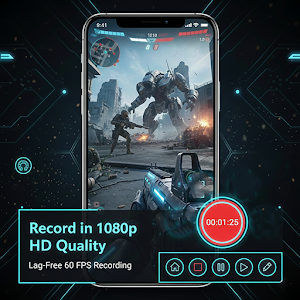


About Gaming Screen Recorder
📌 Gaming Screen Recorder – Professional Game Screen Recorder for Android
Gaming Screen Recorder is a powerful, professional, and easy-to-use game screen recorder designed especially for gamers, YouTubers, and content creators. With advanced recording controls, live drawing tools, and high-quality video & audio settings, this app gives you everything you need to record smooth gameplay videos without lag.
If you are searching for a gaming screen recorder or a game screen recorder that delivers professional-level performance, smooth FPS, and clean audio, this app is the perfect choice for you.
🎮 Professional Game Screen Recording Experience
Gaming Screen Recorder allows you to record your screen while playing games in high resolution, smooth frame rates, and customizable quality settings. Whether you are recording casual gameplay, competitive matches, tutorials, or walkthrough videos, this game screen recorder ensures crystal-clear output.
🧭 Smart Floating Control Panel
The app comes with an advanced floating button that gives you full control while recording:
▶️ Stop Recording
⏸️ Pause & Resume Recording
🏠 Home Button Access
✏️ Edit / Draw on Screen
This floating system makes Gaming Screen Recorder extremely easy to use without interrupting your gameplay.
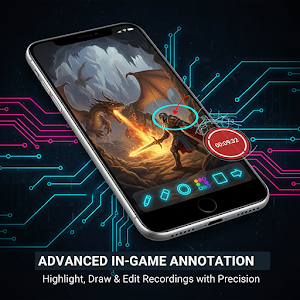
✏️ Live Drawing & Annotation Tools
Unlike normal screen recorders, this gaming screen recorder includes a powerful live edit panel:
Pencil for free drawing
Eraser tool
Circle and Rectangle shapes
Arrow tool to point or explain
Color change options
Undo functionality
These tools are perfect for game tutorials, strategy explanations, and live guidance during recording.
🎞️ Advanced Video Settings
Gaming Screen Recorder gives you full control over video quality:
Custom Video Resolution (HD, Full HD, etc.)
Multiple Output Formats (MPEG-4 and more)
Adjustable Encoding Bitrate
Smooth Frame Rate (FPS) options
This makes it a true professional game screen recorder for Android.
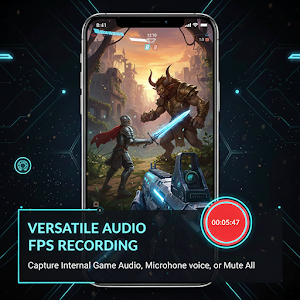
🔊 High-Quality Audio Recording
Capture clear sound with flexible audio options:
Internal Audio Recording
High-quality AAC Audio Encoder
Perfect for recording game sounds, background music, and commentary.
📁 Flexible Storage Management
Choose your preferred save location
Organize recordings easily
Reset to default settings anytime
🚀 Why Choose Gaming Screen Recorder?
✔ Professional-grade game screen recorder
✔ Smooth gameplay recording without lag
✔ Live drawing & annotation tools
✔ Floating controls for easy access
✔ High-quality video & audio output
✔ Simple, clean & user-friendly interface
🎯 Best For
Mobile gamers
YouTube gaming creators
Game tutorial makers
Screen recording professionals
If you are looking for the best gaming screen recorder or a reliable game screen recorder that combines power, simplicity, and professional features, Gaming Screen Recorder is the perfect app for you.
📥 Download now and start recording your gameplay like a pro!
Gaming Screen Recorder is a powerful, professional, and easy-to-use game screen recorder designed especially for gamers, YouTubers, and content creators. With advanced recording controls, live drawing tools, and high-quality video & audio settings, this app gives you everything you need to record smooth gameplay videos without lag.
If you are searching for a gaming screen recorder or a game screen recorder that delivers professional-level performance, smooth FPS, and clean audio, this app is the perfect choice for you.
🎮 Professional Game Screen Recording Experience
Gaming Screen Recorder allows you to record your screen while playing games in high resolution, smooth frame rates, and customizable quality settings. Whether you are recording casual gameplay, competitive matches, tutorials, or walkthrough videos, this game screen recorder ensures crystal-clear output.
🧭 Smart Floating Control Panel
The app comes with an advanced floating button that gives you full control while recording:
▶️ Stop Recording
⏸️ Pause & Resume Recording
🏠 Home Button Access
✏️ Edit / Draw on Screen
This floating system makes Gaming Screen Recorder extremely easy to use without interrupting your gameplay.
✏️ Live Drawing & Annotation Tools
Unlike normal screen recorders, this gaming screen recorder includes a powerful live edit panel:
Pencil for free drawing
Eraser tool
Circle and Rectangle shapes
Arrow tool to point or explain
Color change options
Undo functionality
These tools are perfect for game tutorials, strategy explanations, and live guidance during recording.
🎞️ Advanced Video Settings
Gaming Screen Recorder gives you full control over video quality:
Custom Video Resolution (HD, Full HD, etc.)
Multiple Output Formats (MPEG-4 and more)
Adjustable Encoding Bitrate
Smooth Frame Rate (FPS) options
This makes it a true professional game screen recorder for Android.
🔊 High-Quality Audio Recording
Capture clear sound with flexible audio options:
Internal Audio Recording
High-quality AAC Audio Encoder
Perfect for recording game sounds, background music, and commentary.
📁 Flexible Storage Management
Choose your preferred save location
Organize recordings easily
Reset to default settings anytime
🚀 Why Choose Gaming Screen Recorder?
✔ Professional-grade game screen recorder
✔ Smooth gameplay recording without lag
✔ Live drawing & annotation tools
✔ Floating controls for easy access
✔ High-quality video & audio output
✔ Simple, clean & user-friendly interface
🎯 Best For
Mobile gamers
YouTube gaming creators
Game tutorial makers
Screen recording professionals
If you are looking for the best gaming screen recorder or a reliable game screen recorder that combines power, simplicity, and professional features, Gaming Screen Recorder is the perfect app for you.
📥 Download now and start recording your gameplay like a pro!
User reviews

it just awesome and perfect

cool

this app is very godd

nice 👍
Alternatives to Gaming Screen Recorder
Looking for apps like Gaming Screen Recorder? Here are 6 similar Android apps on Google Play. All of them are free to download.
-
Girl Voice Changer
-
Reaction Video Maker
-
Spy Bug & Hidden App Detector
-
Bluetooth Voice Recorder
-
3d Name Live Wallpaper
-
Hidden Apps Finder
| App | Rating | Price | Installs | Last updated | Compare |
|---|---|---|---|---|---|
| Gaming Screen Recorder | – | Free | 1,000+ | Mar 16, 2026 | |
| Girl Voice Changer | – | Free | 100,000+ | Sep 2, 2026 | Compare |
| Reaction Video Maker | – | Free | 5,000+ | Jun 30, 2026 | Compare |
| Spy Bug & Hidden App Detector | – | Free | 100+ | Aug 6, 2026 | Compare |
| Bluetooth Voice Recorder | – | Free | 500+ | Jun 18, 2026 | Compare |
| 3d Name Live Wallpaper | – | Free | 1,000+ | Sep 15, 2026 | Compare |
| Hidden Apps Finder | – | Free | 1,000+ | Jul 15, 2026 | Compare |
Similar apps on Google Play
- Girl Voice Changer
- Reaction Video Maker
- Spy Bug & Hidden App Detector
- Bluetooth Voice Recorder
- 3d Name Live Wallpaper
- Hidden Apps Finder
- Video Voice Changer
- Bluetooth Volume Booster EQ
- Live Echo Mic
- Audio Volume Booster
- Bangla Diary - বাংলা ডায়েরি
- Ear Speaker Cleaner
- Bluetooth Device Finder, Find
- My Video Live Wallpaper
- Game Voice Changer
- Bhakti Live Wallpaper
- Stylish Gaming Name Creator
- Curve Name Art
- Speaker Dust Cleaner
- Bangla Notepad – বাংলায় লিখুন
- Handwritten Notepad –Draw Note
- Gujrati Notepad -ગુજરાતી લખો
- Echo Voice Recorder
- Marathi Notepad –Marathi Diary
- Call Volume Booster & Enhancer
- Fingerprint Notepad
- Bolo Aur Likho
- Contacts Backup & Restore
- Hindu Marriage Biodata Maker
- Marathi Suvichar -Name & Photo