
Poster Maker: Flyer, Poster
Art & Design Contains ads
Create professional posters extremely easily with poster maker app
- Downloads
- 100+
- on Google Play
- Price
- Free
- No in-app purchases
- Updated
- Feb 28
- 2022 · v1.0.1
Screenshots

About Poster Maker: Flyer, Poster
Let's get started by using the poster maker-poster design app to make an amazing poster in seconds.
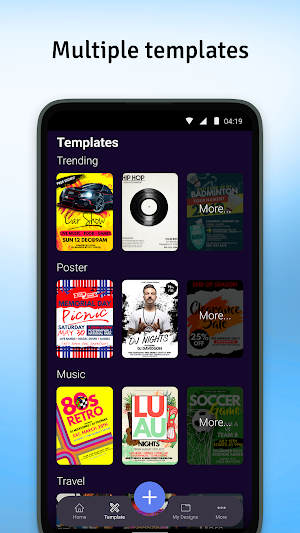
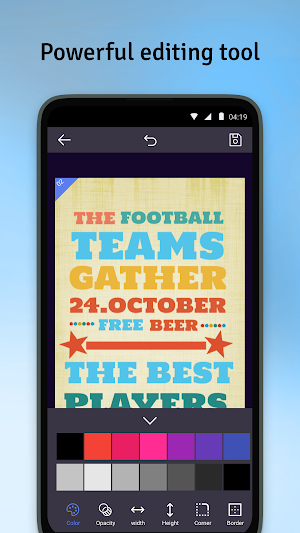
The poster maker app is the best option for you if you are looking for a professional tool to design posters for promotional posters, advertisements, offer announcements, cover photos for your shop. You can create your own posters with your creation, and then edit them easier with the powerful editing tool. There are many options for you to choose: you can select the available templates, or customize your own poster with a variety of editing tools.
This poster maker online is the latest graphic design editor for making Posters, Flyers, Advertisement Banners, Social Media Posts, Invitations, Company Cards, Logo Designs, and any other type of graphic design for business promotion and marketing.
Let's create original branding and promotional banner graphic designs to become a professional poster designer. Download now!
The poster design app allows you to alter ad templates in a matter of minutes and get professional results. You can use the Poster Maker app to simply make the most attractive picture frames and add your own photos to them. It's time to enjoy the greatest picture editing experience possible with our new one-of-a-kind Poster Maker.
Design poster
This poster maker allows you to use color background or add the image into the background which helps you to edit your poster creatively. You can also change the shape or draw on the background to decorate your poster as you like
Text on poster
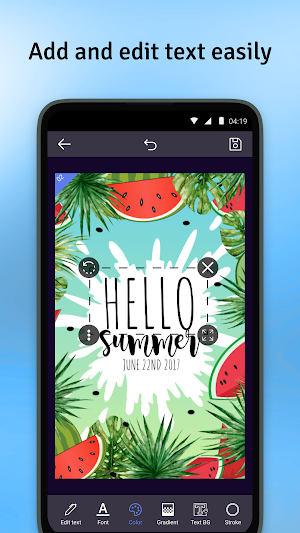
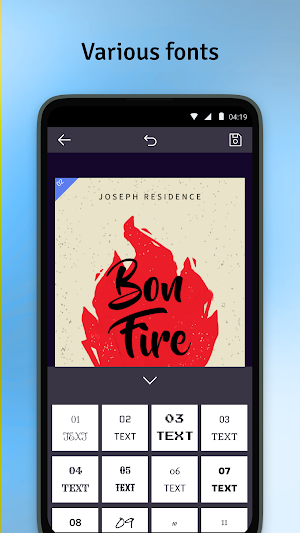
To make your poster more professional, adding text to the poster is one of the most important steps. In this poster maker app, there are various tools to edit your text in a unique way. You can select multiple fonts, change text background & text color, and stroke
The highlight features of poster maker:
✓ Design your own poster or select from templates
✓ Powerful editing tool to edit poster and text on the poster
✓ Numerous fonts
✓ Share on social media quickly
Download poster maker online for free now! Try it now!
If you have any questions or problems when using poster maker app, please contact us at [email protected], we will answer all your wondering.
Thanks for using Poster Maker: Flyer, Poster app!
The poster maker app is the best option for you if you are looking for a professional tool to design posters for promotional posters, advertisements, offer announcements, cover photos for your shop. You can create your own posters with your creation, and then edit them easier with the powerful editing tool. There are many options for you to choose: you can select the available templates, or customize your own poster with a variety of editing tools.
This poster maker online is the latest graphic design editor for making Posters, Flyers, Advertisement Banners, Social Media Posts, Invitations, Company Cards, Logo Designs, and any other type of graphic design for business promotion and marketing.
Let's create original branding and promotional banner graphic designs to become a professional poster designer. Download now!
The poster design app allows you to alter ad templates in a matter of minutes and get professional results. You can use the Poster Maker app to simply make the most attractive picture frames and add your own photos to them. It's time to enjoy the greatest picture editing experience possible with our new one-of-a-kind Poster Maker.
Design poster
This poster maker allows you to use color background or add the image into the background which helps you to edit your poster creatively. You can also change the shape or draw on the background to decorate your poster as you like
Text on poster
To make your poster more professional, adding text to the poster is one of the most important steps. In this poster maker app, there are various tools to edit your text in a unique way. You can select multiple fonts, change text background & text color, and stroke
The highlight features of poster maker:
✓ Design your own poster or select from templates
✓ Powerful editing tool to edit poster and text on the poster
✓ Numerous fonts
✓ Share on social media quickly
Download poster maker online for free now! Try it now!
If you have any questions or problems when using poster maker app, please contact us at [email protected], we will answer all your wondering.
Thanks for using Poster Maker: Flyer, Poster app!
Alternatives to Poster Maker: Flyer, Poster
Looking for apps like Poster Maker: Flyer, Poster? Here are 6 similar Android apps on Google Play. The highest rated is Auto Clicker - Fast Auto Click (2.5/5), and all 6 are free to download.
-
Auto Clicker - Fast Auto Click 2.5
-
Video To Mp3 Audio Converter
-
Birthday Song With Name
-
Live Wallpapers - 4K Wallpaper
-
Crosses - Tic Tac Toe
-
Add Cool Text To Image, Photo
| App | Rating | Price | Installs | Last updated | Compare |
|---|---|---|---|---|---|
| Poster Maker: Flyer, Poster | – | Free | 100+ | Feb 28, 2022 | |
| Auto Clicker - Fast Auto Click | 2.5 / 5 | Free | 500+ | Dec 4, 2021 | Compare |
| Video To Mp3 Audio Converter | – | Free | 1,000,000+ | Oct 10, 2024 | Compare |
| Birthday Song With Name | – | Free | 500+ | Dec 1, 2022 | Compare |
| Live Wallpapers - 4K Wallpaper | – | Free | 500+ | Dec 1, 2022 | Compare |
| Crosses - Tic Tac Toe | – | Free | 1,000+ | Aug 31, 2022 | Compare |
| Add Cool Text To Image, Photo | – | Free | 1,000+ | Jan 3, 2023 | Compare |