
DetoxDroid: Grayscale & Focus
FLX Apps Health & Fitness In-app purchases
Doomscroll breaker, grayscale & app blocker — digital detox, cut screen time
- Downloads
- 1K+
- on Google Play
- Price
- Free
- In-app purchases
- Updated
- Oct 22
- 2026 · v3.0.1
Screenshots




About DetoxDroid: Grayscale & Focus
Most digital detox apps make you sign a contract with yourself: no phone for the next X minutes, no more than Z minutes in app Y — and they punish you when you fail. DetoxDroid flips that approach. Instead of relying on willpower, it strips the attention-grabbing tricks out of your phone, so healthy screen time is your default — not something you have to opt into every day.
Use your phone. Don't let your phone use you.
WHY DETOXDROID?
★ Opt-out instead of opt-in: protection is always on — take deliberate breaks with the pause button
★ No punishments, no guilt-tripping, no "fines" when you slip
★ Open source, no ads, no tracking, no account
★ A one-time premium unlock instead of yet another subscription
FEATURES
🎨 Automatic Grayscale
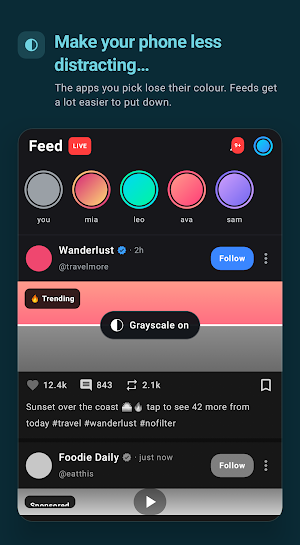
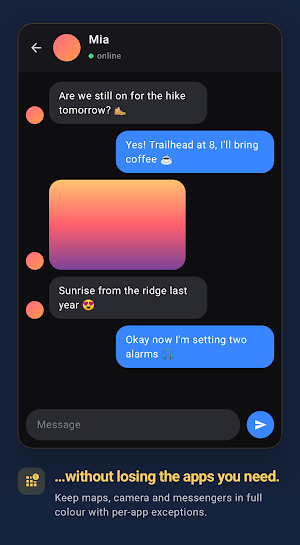
Color is a big part of what makes feeds addictive. DetoxDroid turns your screen grayscale to dampen compulsive scrolling — with exceptions for apps that need color (camera, gallery, maps), an optional daily budget of colored screen time, and an extra-dim mode for calmer evenings.
📵 Doomscroll Breaker
A scroll guard for endless feeds: DetoxDroid detects when you are stuck doomscrolling (Shorts, Reels, TikTok & co.) and steps in with a prompt to stop. Sensitivity, warning time and cooldown are configurable — after a break, the feed that trapped you stays locked for a while.
🚫 App Blocker
Block or fully deactivate distracting apps — including their launcher icons and notifications. Or give them a daily screen time budget after which they lock until tomorrow.
🔕 Automatic Do Not Disturb
Make Do Not Disturb your default. Notifications wait for you — not the other way around.
⏸️ Pause Button
Need a distracting app for a moment? Pause DetoxDroid for a set time from Quick Settings, your assistant, or by long-pressing a hardware button. It resumes automatically, and a minimum gap between pauses keeps "just one more pause" in check.
🔒 Commitment Password
For the moments when future you shouldn't trust present you: lock DetoxDroid's settings behind a password — keep it yourself, or hand it to a partner or friend for real accountability.
PREMIUM
DetoxDroid is open source and its core features are free to use. A single one-time purchase — no subscription — unlocks the power-user extras and directly supports development.
HOW DETOXDROID USES THE ACCESSIBILITY SERVICE API
DetoxDroid uses Android's AccessibilityService API — with your explicit consent during setup — to power its core self-control features. The service detects scroll events in the apps you use, so the Doomscroll Breaker can recognize endless scrolling and prompt you to take a break. It also detects which app is in the foreground, so DetoxDroid can apply the rules you have configured: block or budget distracting apps, keep color on in your grayscale exception apps, and react to a long press of your hardware pause key. Everything is processed locally on your device — DetoxDroid does not collect, store, or share any personal or sensitive data, and nothing ever leaves your phone.
ONE-TIME SETUP REQUIRED
For the grayscale feature, Android requires a special permission (WRITE_SECURE_SETTINGS) that has to be granted once from a computer — or directly on the phone if it is rooted. It usually takes only a few minutes, and there is a step-by-step guide: https://github.com/flxapps/DetoxDroid#installation
Cut your screen time, break the doomscrolling habit, beat phone addiction — and get your focus back. DetoxDroid is developed openly on GitHub; issues, ideas and contributions are always welcome.
What’s new
Version 3.0.1 · Updated October 22, 2026
✨ New Features - your rules are groups now: apps and websites, when they count, how much time they get, and what happens then; existing rules were carried over - websites, in Chrome, Firefox and most browsers built on them, with ready-made lists for porn, gambling, dating, shopping, social media and video 🐛 Bug Fixes - Suspend as the lock mode now sets up Shizuku, not the grayscale permission - while Shizuku is not running, a suspend lock shows the block screen instead
User reviews

amazing app. The only issue it that it doesnt work while phone is locked.
Alternatives to DetoxDroid: Grayscale & Focus
Looking for apps like DetoxDroid: Grayscale & Focus? Here are 3 similar Android apps on Google Play. The highest rated is GOLFFOREVER (4.9/5), and all 3 are free to download.


| App | Rating | Price | Installs | Last updated | Compare |
|---|---|---|---|---|---|
| DetoxDroid: Grayscale & Focus | – | Free | 1,000+ | Oct 22, 2026 | |
| Cubii | 4.1 / 5 | Free | 50,000+ | Sep 14, 2026 | Compare |
| Sunsational Swim Instructor | – | Free | 1,000+ | Jul 25, 2026 | Compare |
| GOLFFOREVER | 4.9 / 5 | Free | 100,000+ | Oct 21, 2026 | Compare |