

FlowScribe
Back cent Tools
Capture ideas as floating bubbles. Auto-connect and replay your thought flow.
- Downloads
- 1+
- on Google Play
- Price
- Free
- No in-app purchases
- Updated
- May 26
- 2026 · v1.0.0
Screenshots

About FlowScribe
FlowScribe transforms the way you capture and connect ideas. Instead of rigid note-taking, it offers a freeform canvas where thoughts float as translucent bubbles, and connections appear automatically when ideas share common ground.
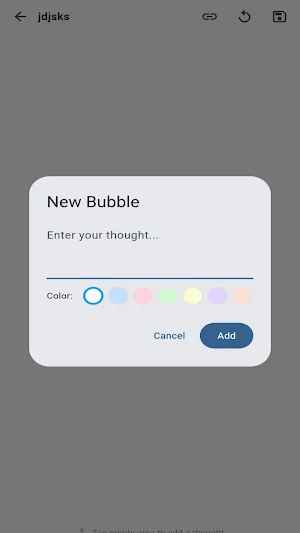
Create a bubble anywhere on the infinite white canvas with a single tap. Type your thought, choose a color, and watch it appear with a smooth animation. Drag bubbles freely to arrange them spatially, just like arranging ideas on a real whiteboard. Double-tap any bubble to minimize it into a small dot that preserves its first letter, freeing up visual space without losing information.
As you add more bubbles, FlowScribe automatically analyzes their text to find shared keywords. When two bubbles contain similar concepts, a soft glowing blue line appears between them, revealing hidden connections in your thinking. These auto-resonance lines pulse gently, making the relationships between your ideas visually alive.
You can also create manual connections by entering connect mode and tapping two bubbles in sequence. Manual connections appear in orange, letting you distinguish between discovered and deliberately created relationships.
The replay feature turns your brainstorming session into a visual story. Tap replay to watch your bubbles appear one by one in the order you created them, with connections forming as their endpoints appear. A speed slider lets you control playback from half speed to five times speed, perfect for reviewing how your thinking evolved.
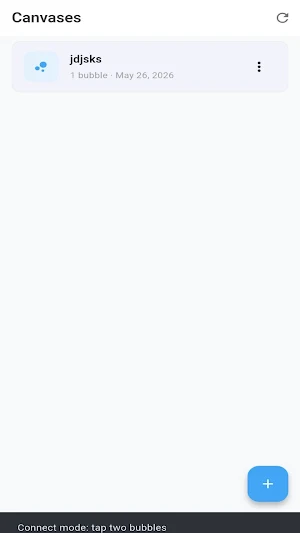
Create multiple canvases for different topics or projects. Each canvas maintains its own collection of bubbles and connections. Name your canvases freely and switch between them from the main gallery. Your data is stored locally on your device.
Canvas gallery shows all your saved works with bubble counts and creation dates. Create new canvases, rename existing ones, or delete those you no longer need. Every change is saved locally and persists between sessions.
The app interface is clean and distraction-free. A white canvas background with frosted glass bubble styling creates a calm, focused environment. The bottom hint bar reminds you to tap empty space to add thoughts, while the top toolbar provides quick access to save, connect mode, replay, and navigation.
Create a bubble anywhere on the infinite white canvas with a single tap. Type your thought, choose a color, and watch it appear with a smooth animation. Drag bubbles freely to arrange them spatially, just like arranging ideas on a real whiteboard. Double-tap any bubble to minimize it into a small dot that preserves its first letter, freeing up visual space without losing information.
As you add more bubbles, FlowScribe automatically analyzes their text to find shared keywords. When two bubbles contain similar concepts, a soft glowing blue line appears between them, revealing hidden connections in your thinking. These auto-resonance lines pulse gently, making the relationships between your ideas visually alive.
You can also create manual connections by entering connect mode and tapping two bubbles in sequence. Manual connections appear in orange, letting you distinguish between discovered and deliberately created relationships.
The replay feature turns your brainstorming session into a visual story. Tap replay to watch your bubbles appear one by one in the order you created them, with connections forming as their endpoints appear. A speed slider lets you control playback from half speed to five times speed, perfect for reviewing how your thinking evolved.
Create multiple canvases for different topics or projects. Each canvas maintains its own collection of bubbles and connections. Name your canvases freely and switch between them from the main gallery. Your data is stored locally on your device.
Canvas gallery shows all your saved works with bubble counts and creation dates. Create new canvases, rename existing ones, or delete those you no longer need. Every change is saved locally and persists between sessions.
The app interface is clean and distraction-free. A white canvas background with frosted glass bubble styling creates a calm, focused environment. The bottom hint bar reminds you to tap empty space to add thoughts, while the top toolbar provides quick access to save, connect mode, replay, and navigation.
Alternatives to FlowScribe
Looking for apps like FlowScribe? Here are 6 similar Android apps on Google Play. All of them are free to download.




| App | Rating | Price | Installs | Last updated | Compare |
|---|---|---|---|---|---|
| FlowScribe | – | Free | 1+ | May 26, 2026 | |
| 567FGrid | – | Free | 10,000+ | Jun 12, 2026 | Compare |
| 567FVane | – | Free | 5,000+ | Jun 12, 2026 | Compare |
| FoldRune | – | Free | 5,000+ | Jun 3, 2026 | Compare |
| GlowTrace | – | Free | 1,000+ | Jun 3, 2026 | Compare |
| PulseTrace | – | Free | 1,000+ | Jun 3, 2026 | Compare |
| 567FMaze | – | Free | 5,000+ | Jun 12, 2026 | Compare |
Compare FlowScribe with the top alternatives: ratings, updates, ASO score and keyword gaps →