
Document Reader - File Opener
Productivity Contains ads
Document reader helps you open all kinds of office files quickly & effective
- Downloads
- 100+
- on Google Play
- Price
- Free
- No in-app purchases
- Updated
- Apr 22
- 2022 · v1.0.2
Screenshots


About Document Reader - File Opener
If you don't have time to sit in front of your computer to open your files, you can use Document Reader App. It allows you to read documents on your phone anywhere, anytime. All formats supported, opener any type file
📚 Document manager, file reader
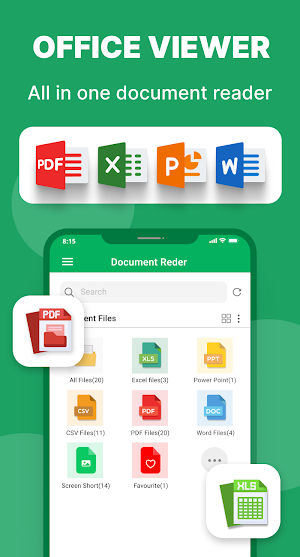
• Multiple documents files are also available in a single place, making it easy to search and view
• Folder structure view: easily view PDF, Word, Excel, CSV, PPT files, etc. in the corresponding folders
• Favorites: you can add files to the Favorite list for quick opening
• Easy to search: easily search for files within or outside the app
• Supports many formats, any file viewer
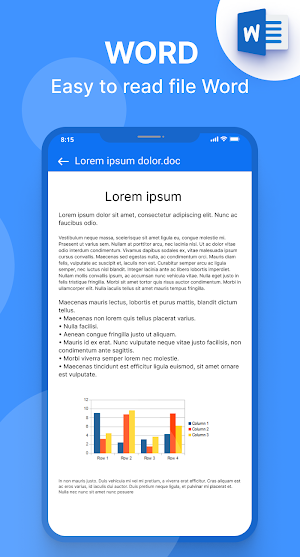
📘 Word Reader (DOC/DOCX)
• Easy and simple Word reader
• Word documents are an important and popular document for everyone, so the application supports you to read word documents with formats such as doc, docx ...vv
• Easily convert Word to PDF file
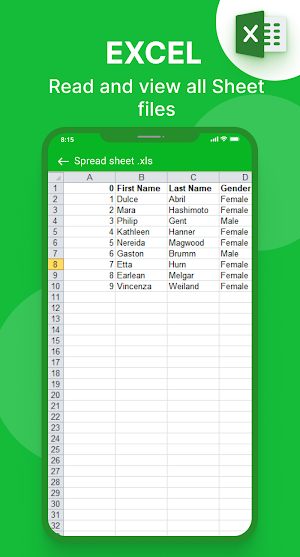
📊 Excel Reader – CSV file Viewer (XLS/XLSX)
• Excel reader with all formats
• View XLS, XLSX , CSV files with high quality and fast
• Simple Excel file spreadsheet manager
📙 PPT – Powerpoint Slideshow (PPT/PPTX)
• High quality Powerpoint viewer
• Supports thumbnail images for an overview of the slides
• Easily convert PPT to PDF file
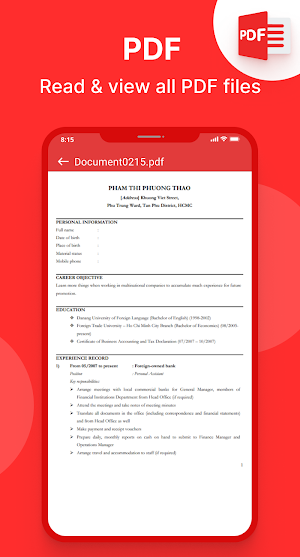
📕 PDF Reader
• Quickly open and view PDF documents
• Go to page: jump directly to the desired page
• Rename, delete files, and view details of your PDF files with simple operations
• Share and send PDF files to your friends with a single tap
• Set password to lock PDF files and protect them from prying eyes
• Print PDF files quickly from your phone
🌟Features
✔ Quick response
✔ No internet required
✔ Simple and easy to use
✔ Sort by names, file size, last modified, group, etc
✔ Rename files, delete files, share files to your friends
Supported formats
• PDF files, PDF Reader, PDF Viewer
• Word Document free: DOC, DOCX, DOCS
• Excel Document: XLS, XLSX, CSV
• Slide Document: PPT, PPTX, PPS, PPSX
• Super easy to use and no internet needed
🔒 Private policy
Document Reader app doesn’t collect any personal information or anything else.
You need to read and understand content is here:
👉 Private policy: https://sites.google.com/view/officereader/home
[Disclaimers]
- All copyrights reserved to their respective owners.
- If you notice that any content in our app violates copyrights then please inform us so that we remove that content.
📬 Any idea or feedback about the Document Reader application please contact us via email: [email protected]. We always listen to you to improve our work.
Thank you for choosing our Document Reader app. Have a nice day! ❤️
📚 Document manager, file reader
• Multiple documents files are also available in a single place, making it easy to search and view
• Folder structure view: easily view PDF, Word, Excel, CSV, PPT files, etc. in the corresponding folders
• Favorites: you can add files to the Favorite list for quick opening
• Easy to search: easily search for files within or outside the app
• Supports many formats, any file viewer
📘 Word Reader (DOC/DOCX)
• Easy and simple Word reader
• Word documents are an important and popular document for everyone, so the application supports you to read word documents with formats such as doc, docx ...vv
• Easily convert Word to PDF file
📊 Excel Reader – CSV file Viewer (XLS/XLSX)
• Excel reader with all formats
• View XLS, XLSX , CSV files with high quality and fast
• Simple Excel file spreadsheet manager
📙 PPT – Powerpoint Slideshow (PPT/PPTX)
• High quality Powerpoint viewer
• Supports thumbnail images for an overview of the slides
• Easily convert PPT to PDF file
📕 PDF Reader
• Quickly open and view PDF documents
• Go to page: jump directly to the desired page
• Rename, delete files, and view details of your PDF files with simple operations
• Share and send PDF files to your friends with a single tap
• Set password to lock PDF files and protect them from prying eyes
• Print PDF files quickly from your phone
🌟Features
✔ Quick response
✔ No internet required
✔ Simple and easy to use
✔ Sort by names, file size, last modified, group, etc
✔ Rename files, delete files, share files to your friends
Supported formats
• PDF files, PDF Reader, PDF Viewer
• Word Document free: DOC, DOCX, DOCS
• Excel Document: XLS, XLSX, CSV
• Slide Document: PPT, PPTX, PPS, PPSX
• Super easy to use and no internet needed
🔒 Private policy
Document Reader app doesn’t collect any personal information or anything else.
You need to read and understand content is here:
👉 Private policy: https://sites.google.com/view/officereader/home
[Disclaimers]
- All copyrights reserved to their respective owners.
- If you notice that any content in our app violates copyrights then please inform us so that we remove that content.
📬 Any idea or feedback about the Document Reader application please contact us via email: [email protected]. We always listen to you to improve our work.
Thank you for choosing our Document Reader app. Have a nice day! ❤️
What’s new
Version 1.0.2 · Updated April 22, 2022
Thank you for use application
Alternatives to Document Reader - File Opener
Looking for apps like Document Reader - File Opener? Here are 4 similar Android apps on Google Play. The highest rated is Word Reader Office Docs Viewer (4.5/5), and all 4 are free to download.
-
Docs Viewer 3.9
-
PDF to Word Converter 2.6
-
Word Reader Office Docs Viewer 4.5
-
ONLYOFFICE Documents 3.6
| App | Rating | Price | Installs | Last updated | Compare |
|---|---|---|---|---|---|
| Document Reader - File Opener | – | Free | 100+ | Apr 22, 2022 | |
| Docs Viewer | 3.9 / 5 | Free | 5,000,000+ | – | Compare |
| PDF to Word Converter | 2.6 / 5 | Free | 1,000,000+ | Nov 7, 2019 | Compare |
| Word Reader Office Docs Viewer | 4.5 / 5 | Free | 1,000,000+ | Oct 28, 2026 | Compare |
| ONLYOFFICE Documents | 3.6 / 5 | Free | 1,000,000+ | Oct 26, 2026 | Compare |