
FamiGuard-Parental Control App
Speckpro Digital Tools
Stay connected. Stay informed. Stay in control with Parental Control App
- Downloads
- 5K+
- on Google Play
- Price
- Free
- No in-app purchases
- Updated
- Aug 10
- 2026 · v2.1
Screenshots


About FamiGuard-Parental Control App
FamiGuard is a powerful yet easy-to-use parental control and monitoring app that helps parents guide their children’s digital habits and ensure online safety. With FamiGuard, you can monitor your child’s smartphone activity, track their location, manage installed apps, and even lock their device remotely — all from your own phone.
Designed for today’s families, FamiGuard brings real-time insights, safety tools, and privacy protection together in one seamless app.
🌟 Key Features
👨👩👧 Parent or Child Setup
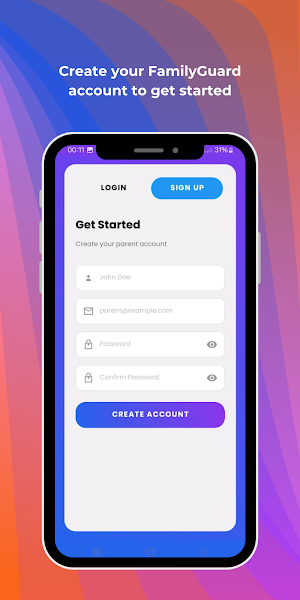
When you open FamiGuard, simply choose your role — Parent or Child. Parents can link multiple child devices securely to their account, while children’s devices stay connected for continuous updates.
🏠 Home Dashboard
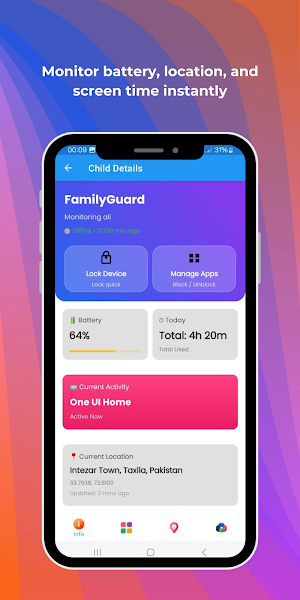
Stay informed at a glance! The home screen shows your child’s battery status, current app in use, live location, and total screen time for the day. Everything you need for smarter digital supervision, right on your screen.
🔒 Remote Device Lock
Need your child to focus on homework or bedtime? Instantly lock their phone remotely from your FamiGuard app. Take full control over when and how the device can be used — anytime, anywhere.
📲 Manage Apps
Search, filter, and view all apps installed on your child’s device. Block, allow, or monitor specific apps to encourage balanced digital behavior and limit distractions.
📊 Reports & Insights
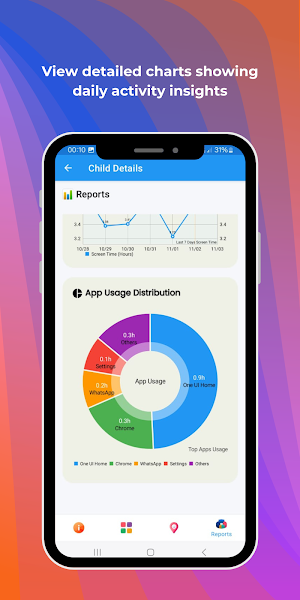
Understand your child’s digital patterns through interactive pie charts and activity graphs. View daily and weekly screen time summaries and get a clear picture of how their time is spent online.
📍 Real-Time Location Tracking
See your child’s current location on the map in real time. FamiGuard helps ensure your child’s safety by letting you know exactly where they are at any given moment.
🔐 Secure Login and Data Protection
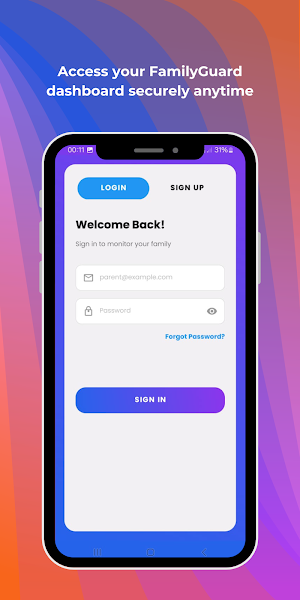
Your data security is our priority. All parent and child data is securely encrypted to protect your family’s privacy and safety.
🧹 Delete All Data Option
FamiGuard values your control and privacy. If you decide to uninstall the app, you can easily delete all personal and usage data directly from within the app. This ensures that no information remains stored on our servers once you leave FamiGuard.
♿ Use of AccessibilityService API
FamiGuard uses the AccessibilityService API solely to help parents monitor and manage their child’s device usage in a secure and transparent way.
This permission enables core parental control functions such as:
- Detecting and monitoring the apps being used on the child’s device
- Blocking or restricting access to specific apps as chosen by the parent
- Enforcing screen time limits or locking the device during study or rest periods
- These features cannot be performed automatically without the parent’s explicit consent and setup.
The AccessibilityService API is not used for reading sensitive user data, recording audio, changing system settings without permission, or performing deceptive actions.
FamiGuard’s use of AccessibilityService strictly complies with Google Play’s policies, and all accessibility-related permissions are clearly disclosed and require user consent during setup.
👨👩👧👦 Empower Smart Parenting
FamiGuard is built not to invade privacy, but to promote responsible and safe digital use. It helps parents stay informed and connected, ensuring kids enjoy technology in a balanced and protected way.
Download FamiGuard today — and experience peace of mind knowing your child’s digital world is safe, secure, and under your care.
✅ Disclosure Summary for Google Play Review:
- AccessibilityService API is used only for core parental control features (app monitoring, blocking, and device locking).
- The service is activated manually by the parent and cannot be enabled without consent.
- FamiGuard does not use AccessibilityService for call recording, system manipulation, or data extraction.
All permissions are clearly explained to users within the app setup process.
Designed for today’s families, FamiGuard brings real-time insights, safety tools, and privacy protection together in one seamless app.
🌟 Key Features
👨👩👧 Parent or Child Setup
When you open FamiGuard, simply choose your role — Parent or Child. Parents can link multiple child devices securely to their account, while children’s devices stay connected for continuous updates.
🏠 Home Dashboard
Stay informed at a glance! The home screen shows your child’s battery status, current app in use, live location, and total screen time for the day. Everything you need for smarter digital supervision, right on your screen.
🔒 Remote Device Lock
Need your child to focus on homework or bedtime? Instantly lock their phone remotely from your FamiGuard app. Take full control over when and how the device can be used — anytime, anywhere.
📲 Manage Apps
Search, filter, and view all apps installed on your child’s device. Block, allow, or monitor specific apps to encourage balanced digital behavior and limit distractions.
📊 Reports & Insights
Understand your child’s digital patterns through interactive pie charts and activity graphs. View daily and weekly screen time summaries and get a clear picture of how their time is spent online.
📍 Real-Time Location Tracking
See your child’s current location on the map in real time. FamiGuard helps ensure your child’s safety by letting you know exactly where they are at any given moment.
🔐 Secure Login and Data Protection
Your data security is our priority. All parent and child data is securely encrypted to protect your family’s privacy and safety.
🧹 Delete All Data Option
FamiGuard values your control and privacy. If you decide to uninstall the app, you can easily delete all personal and usage data directly from within the app. This ensures that no information remains stored on our servers once you leave FamiGuard.
♿ Use of AccessibilityService API
FamiGuard uses the AccessibilityService API solely to help parents monitor and manage their child’s device usage in a secure and transparent way.
This permission enables core parental control functions such as:
- Detecting and monitoring the apps being used on the child’s device
- Blocking or restricting access to specific apps as chosen by the parent
- Enforcing screen time limits or locking the device during study or rest periods
- These features cannot be performed automatically without the parent’s explicit consent and setup.
The AccessibilityService API is not used for reading sensitive user data, recording audio, changing system settings without permission, or performing deceptive actions.
FamiGuard’s use of AccessibilityService strictly complies with Google Play’s policies, and all accessibility-related permissions are clearly disclosed and require user consent during setup.
👨👩👧👦 Empower Smart Parenting
FamiGuard is built not to invade privacy, but to promote responsible and safe digital use. It helps parents stay informed and connected, ensuring kids enjoy technology in a balanced and protected way.
Download FamiGuard today — and experience peace of mind knowing your child’s digital world is safe, secure, and under your care.
✅ Disclosure Summary for Google Play Review:
- AccessibilityService API is used only for core parental control features (app monitoring, blocking, and device locking).
- The service is activated manually by the parent and cannot be enabled without consent.
- FamiGuard does not use AccessibilityService for call recording, system manipulation, or data extraction.
All permissions are clearly explained to users within the app setup process.
User reviews

FamiGuard has a clean design and everything is easy to navigate.

It's a wonderful easy to use app. never seen the privacy and security made this easier.

FamiGuard makes it simple to track my child’s screen time and location. Love it!

Best parental control app I’ve used — accurate tracking, instant alerts, Apps blocking and super smooth performance!

I feel more relaxed knowing FamiGuard helps me monitor my child’s phone safely.
Alternatives to FamiGuard-Parental Control App
Looking for apps like FamiGuard-Parental Control App? Here are 6 similar Android apps on Google Play. The highest rated is Permit Hub: Permission Manager (4.3/5), and all 6 are free to download.
-
Permit Hub: Permission Manager 4.3
-
My Clock Screensaver App 3.9
-
ZikrSpace: Dua and Salah App
-
Fishy Feast Adventure Game App
-
Sukoon-e-Islam App: Dua & Ayat
-
Net SpeedScan & VPN Connect
| App | Rating | Price | Installs | Last updated | Compare |
|---|---|---|---|---|---|
| FamiGuard-Parental Control App | – | Free | 5,000+ | Aug 10, 2026 | |
| Permit Hub: Permission Manager | 4.3 / 5 | Free | 50,000+ | Aug 6, 2026 | Compare |
| My Clock Screensaver App | 3.9 / 5 | Free | 5,000+ | Aug 10, 2026 | Compare |
| ZikrSpace: Dua and Salah App | – | Free | 50+ | Apr 17, 2025 | Compare |
| Fishy Feast Adventure Game App | – | Free | 10+ | Apr 9, 2025 | Compare |
| Sukoon-e-Islam App: Dua & Ayat | – | Free | 100+ | – | Compare |
| Net SpeedScan & VPN Connect | – | Free | 500+ | Jun 14, 2024 | Compare |
Similar apps on Google Play
- Permit Hub: Permission Manager
- My Clock Screensaver App
- ZikrSpace: Dua and Salah App
- Fishy Feast Adventure Game App
- Sukoon-e-Islam App: Dua & Ayat
- Net SpeedScan & VPN Connect
- Screen Recorder & Capture App
- Calculator Pro App: Quick Math
- Brick Arcade: 14 Classic Games
- PlanetX VPN: Fast & Secure Net
- TextScan Pro: OCR Expert
- DocScan Pro: Productivity Tool
- Emotion Detector
- Blood Pressure & Sugar Tracker
- VYO Patient Care
- Let's Grow - Employees
- IQ Jewellers
- My Tasks App: To Do List
- Secure Password Generator App
- My Notes: To Do List & Memos
- Unit Converter App 2024
- HD Islamic Stickers for Chat
- Apps Monitor - Track App Usage
- Religious Event Stickers 2024
- Search Files for Play Store