

PixCompress: Photo Compressor
EZ Tools Studio Photography Contains ads
Batch compress & resize photos, reduce image size to KB. JPG, PNG, WebP.
- Downloads
- 500+
- on Google Play
- Price
- Free
- No in-app purchases
- Updated
- Aug 2
- 2026 · v1.0.7
Screenshots
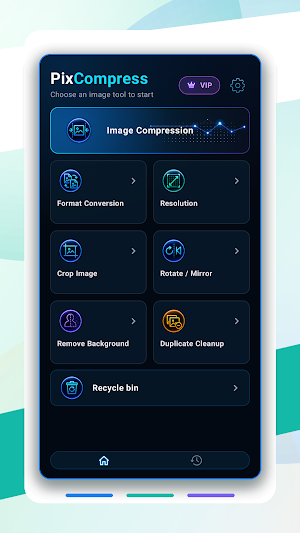
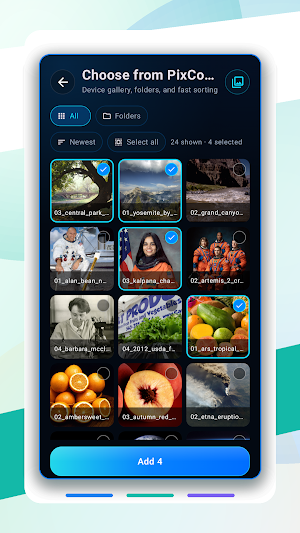
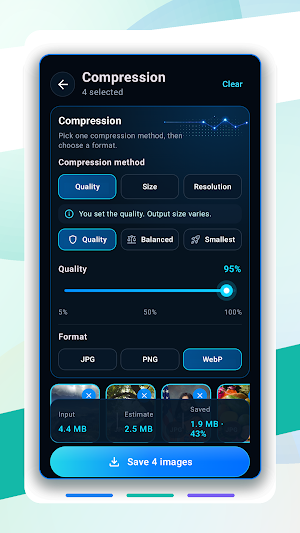
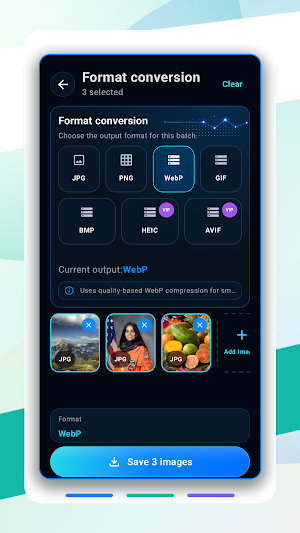


About PixCompress: Photo Compressor
PixCompress is a photo compressor, image resizer and image converter in one app. Reduce image size from MB to KB, hit a target like 512 KB or 1 MB, and process a whole batch of photos in one run.
Smaller files for email, chat apps, online forms, job applications, websites and product listings — without giving up control over quality, resolution, format or output size.
⚡ COMPRESS PHOTOS — MB TO KB
• Compress a single photo or a full batch in one run
• Set a target size: 512 KB, 1 MB, 2 MB, 4 MB or your own KB value
• Or use the quality slider and watch the estimated size update live
• Preview the estimated output before anything is processed
• Compare original vs. result: dimensions, file size and space saved
• How small a file can get depends on the image content and output format
📐 RESIZE IMAGES
• Change width and height, or scale by percentage
• Resize by long edge, short edge or exact dimensions
• Lock the original aspect ratio, or set width and height separately
• Ready-made presets for social, web, e-commerce, thumbnails and avatars
• Shrink photos for faster sharing — or enlarge them when you need to
🔄 CONVERT IMAGE FORMATS
Export as JPG, PNG, WebP, HEIC, AVIF, GIF or BMP.
• JPG — photos and the widest compatibility
• PNG — lossless output with transparency
• WebP — efficient compression, optional transparency
• HEIC & AVIF — modern, compact output (Premium; requires device support)
• GIF — static single-frame output
• BMP — uncompressed output
✂️ CROP, ROTATE & MIRROR
• Crop with common aspect ratios or a custom frame
• Pan and zoom the photo inside the crop box
• Rotate left or right, mirror horizontally or vertically
• Check the framing before you save
🪄 BACKGROUND REMOVER
Make transparent PNGs for product shots, profile pictures, stickers and design work.
• Automatic cutout, then refine the edges with paint, erase, restore, move and brush size
• Automatic mode temporarily uploads only the selected photo to Firebase to generate the cutout mask
• Prefer not to upload anything? Manual cutout runs entirely on your device
🧹 DUPLICATE PHOTO CLEANER
• Scan selected photos or your whole gallery for exact and look-alike duplicates
• Review every duplicate group before anything is deleted
• Accept the suggested copies or pick the images yourself
• See how much storage you get back
• On Android 11+, deleted photos go to the system recycle bin and can be restored
🔒 PRIVACY BY DEFAULT
• Compressing, resizing, converting, cropping, duplicate scanning and export all run on your device
• Photo metadata is cleared by default, and location data is never written into exported images
• No account and no sign-up
• Automatic background removal is the only step that sends a photo off your device
🛠️ BUILT FOR REPEAT WORK
• Save your own presets — create, edit, import and export them
• Choose the output folder, file-name template and how same-name files are handled
• Share images straight from other apps into PixCompress
• Search and filter your history, re-export with Save as, and resume unfinished tasks
👍 GREAT FOR
Emailing large photos · Uploading application and ID documents · Passport and profile pictures · Online shop listings · Faster-loading websites · Freeing up phone storage · Sending photos over slow connections
💎 FREE AND PREMIUM
PixCompress is free and supported by ads. The free version saves up to 10 images per batch. Premium removes ads and adds unlimited batch saving, HEIC and AVIF export, the option to keep photo info, and longer recycle-bin retention. It is available as a subscription or a one-time lifetime purchase.
Compress, resize, convert, cut out backgrounds and clear duplicates — one image tool for the whole job.
What’s new
Version 1.0.7 · Updated August 2, 2026
• Share images directly from other apps to PixCompress • Create, edit, import, and export presets • Customize output folders, file names, and handling for existing files • Search and filter history, remove multiple records, and use Save as • Batch processing now shows per-image estimates and status, with cancel, retry, and clearer results • Now available in 18 languages • Safer duplicate cleanup and original deletion, improved metadata handling, and stability fixes
Alternatives to PixCompress: Photo Compressor
Looking for apps like PixCompress: Photo Compressor? Here are 6 similar Android apps on Google Play. The highest rated is Eclat: Baby Monthly Photoshoot (4.9/5), and all 6 are free to download.
-
Eclat: Baby Monthly Photoshoot 4.9
-
Cam15
-
Manual DSLR Camera Pro 4.6
-
Camera Location: Photos GeoTag
-
باقات ورد رائعة بدون انترنت
-
Past Forward: AI Photo Decades
| App | Rating | Price | Installs | Last updated | Compare |
|---|---|---|---|---|---|
| PixCompress: Photo Compressor | – | Free | 500+ | Aug 2, 2026 | |
| Eclat: Baby Monthly Photoshoot | 4.9 / 5 | Free | 5,000+ | Sep 15, 2026 | Compare |
| Cam15 | – | Free | 100+ | Jul 27, 2026 | Compare |
| Manual DSLR Camera Pro | 4.6 / 5 | Free | 10,000+ | Sep 12, 2026 | Compare |
| Camera Location: Photos GeoTag | – | Free | 100+ | Nov 7, 2024 | Compare |
| باقات ورد رائعة بدون انترنت | – | Free | 10,000+ | – | Compare |
| Past Forward: AI Photo Decades | – | Free | 500+ | – | Compare |
Similar apps on Google Play
- Eclat: Baby Monthly Photoshoot
- Cam15
- Manual DSLR Camera Pro
- Camera Location: Photos GeoTag
- باقات ورد رائعة بدون انترنت
- Past Forward: AI Photo Decades
- Gallery- Photo Albums, Vault
- Blur Face - Image & Videos
- Photo Merger BG Changer Editor
- Paper Camera
- Artova AI: Photo Video Editor
- AI Photo Editor & Filters
- SwapX AI Face Swap Photo Video
- GPS Camera & Map Stamp
- Punjabi Turban Editor
- OurCameraRoll: Live Event Feed
- Square Fit Photo: PicFitter
- FKB Lightmeter
- Mira: AI Editor & Enhance
- AI Headshot: Pro Portrait
- ThemeSnap: Daily Photo Contest
- Photo to Cartoon: AI Editor
- TPOP - No More Selfies
- Photo Gallery - Photo Album
- Patina: Retro Vintage Camera