
Brailliance
Word In-app purchases Contains ads
A puzzle game where you guess the word by adding up braille dots
- Rating
- 4.6
- 61 ratings
- Downloads
- 12.1K+
- on Google Play
- Price
- Free
- In-app purchases
- Updated
- Sep 16
- 2025 · v1.0.1
Screenshots


About Brailliance
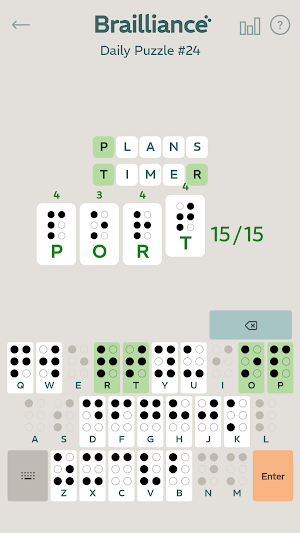
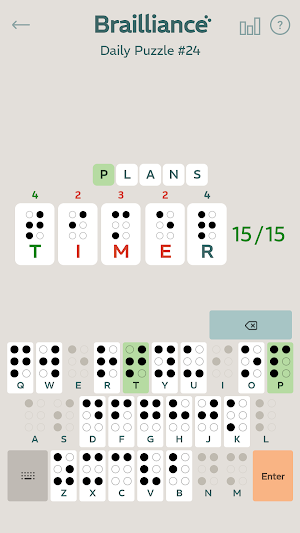
Brailliance is a puzzle game where you guess the word by adding up braille dots.
This game has been carefully crafted to be playable by everyone, and it includes multiple accessibility features for people with blindness and other disabilities. For players with unhindered sight, tap the keyboard as you normally would and enjoy the challenge. For everyone else, the game is fully compatible with popular screen readers and can be played with a number of different input methods including keyboards and accessibility shortcuts.
1. Guess the correct word to win.
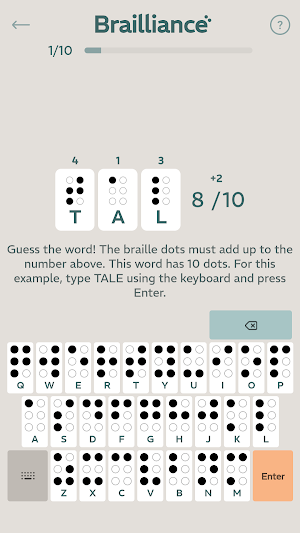
2. Each guess must contain the total number of braille dots shown. Above, the letters W-O-R-D include 14 braille dots out of the 17 needed.
A screenshot of Brailliance, where the player has added an 'S' to form the word W-O-R-D-S. This adds up to 17 braille dots. The correct letters turn green and make a chime.
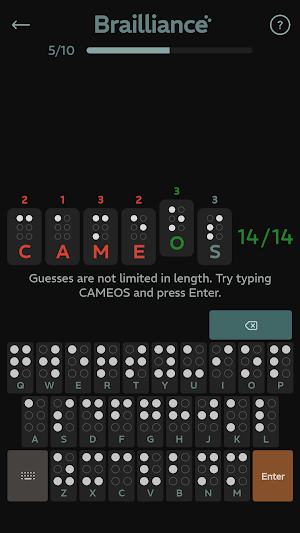
3. Letters turn GREEN and make a chime if they're somewhere in the answer.
4. Guesses can be any length, so long as the dot sum matches.
5. You get unlimited guesses. Try to win in as few guesses as possible!
You can play an interactive tutorial by selecting "Start Here" from the main menu.
Tips and Strategy
You can understand how Brailliance plays kind of like a blind Wordle. However, you will quickly run into some major differences. Remember the following as you play:
a. Always look for how many braille dots you need. Swap letters based on the dots, unlike in Wordle where you just swap letters to form similar words.
b. Just start typing! Don't worry about being accurate at first. You will get a feel for the dots as you play.
c. Don't be afraid to use grayed-out letters! Especially if it helps you remove possibilities from the board.
d. There is no penalty for being wrong. Keep trying!
About How We Make Games
Everything we create is designed to be playable by as many people as possible. This means our games are just as fun with sight as without it. Our focus on inclusive design means support for screen readers and other mobile accessibility tools is both completely invisible and just works out of the box. Brailliance is a bastion of adaptive gaming, conforming to whatever tools you bring to it.
You can tap Play Game above and just start enjoying the challenge. Sighted players can type words using the keyboard just as you've always done, and blind players can use the standard web browsing controls of any screen reader or braille display you're used to. The game is perfect for the visually impaired, as it works seamlessly with a variety of accessibility tools and features a user-friendly interface.
The game works in your web browser on any iOS or Android phone or tablet, and it can be played on your computer too! This mobile-friendly game even works on your Chromebook, promoting spelling education and literacy in addition to passively teaching the braille alphabet.
Because the game is designed for blind and sighted at the same time, you and your friends, parents, children and classmates can all work to solve the same puzzle at the same time. Gather around a TV or large tablet and make guesses as a group. Brailliance brings people together by being a good game, and not just because it's accessible.
Themis Games is dedicated to the production of disability-friendly games. Please refer to the game manual for details about how to use your preferred screen readers and input devices. Be sure to reach out to us with questions and suggestions.
This game has been carefully crafted to be playable by everyone, and it includes multiple accessibility features for people with blindness and other disabilities. For players with unhindered sight, tap the keyboard as you normally would and enjoy the challenge. For everyone else, the game is fully compatible with popular screen readers and can be played with a number of different input methods including keyboards and accessibility shortcuts.
1. Guess the correct word to win.
2. Each guess must contain the total number of braille dots shown. Above, the letters W-O-R-D include 14 braille dots out of the 17 needed.
A screenshot of Brailliance, where the player has added an 'S' to form the word W-O-R-D-S. This adds up to 17 braille dots. The correct letters turn green and make a chime.
3. Letters turn GREEN and make a chime if they're somewhere in the answer.
4. Guesses can be any length, so long as the dot sum matches.
5. You get unlimited guesses. Try to win in as few guesses as possible!
You can play an interactive tutorial by selecting "Start Here" from the main menu.
Tips and Strategy
You can understand how Brailliance plays kind of like a blind Wordle. However, you will quickly run into some major differences. Remember the following as you play:
a. Always look for how many braille dots you need. Swap letters based on the dots, unlike in Wordle where you just swap letters to form similar words.
b. Just start typing! Don't worry about being accurate at first. You will get a feel for the dots as you play.
c. Don't be afraid to use grayed-out letters! Especially if it helps you remove possibilities from the board.
d. There is no penalty for being wrong. Keep trying!
About How We Make Games
Everything we create is designed to be playable by as many people as possible. This means our games are just as fun with sight as without it. Our focus on inclusive design means support for screen readers and other mobile accessibility tools is both completely invisible and just works out of the box. Brailliance is a bastion of adaptive gaming, conforming to whatever tools you bring to it.
You can tap Play Game above and just start enjoying the challenge. Sighted players can type words using the keyboard just as you've always done, and blind players can use the standard web browsing controls of any screen reader or braille display you're used to. The game is perfect for the visually impaired, as it works seamlessly with a variety of accessibility tools and features a user-friendly interface.
The game works in your web browser on any iOS or Android phone or tablet, and it can be played on your computer too! This mobile-friendly game even works on your Chromebook, promoting spelling education and literacy in addition to passively teaching the braille alphabet.
Because the game is designed for blind and sighted at the same time, you and your friends, parents, children and classmates can all work to solve the same puzzle at the same time. Gather around a TV or large tablet and make guesses as a group. Brailliance brings people together by being a good game, and not just because it's accessible.
Themis Games is dedicated to the production of disability-friendly games. Please refer to the game manual for details about how to use your preferred screen readers and input devices. Be sure to reach out to us with questions and suggestions.
What’s new
Version 1.0.1 · Updated September 16, 2025
Updated to fully support Android 16.
Play today's Threadline puzzle
Draw one line through every cell, visiting the numbers in order. A free daily puzzle from Fiplay, same board for everyone. It plays right here, no download.
Alternatives to Brailliance
Looking for apps like Brailliance? Here are 6 similar Android apps on Google Play. The highest rated is Wordvoyance (4.7/5), and all 6 are free to download.
-
Knockout 2: Wrath of the Karen 3.9
-
Election Year Knockout 4.6
-
Finders Sweepers - Minesweeper 4.0
-
Word Stitch: Quilting & Sewing 4.5
-
Golf Towers
-
Wordvoyance 4.7
| App | Rating | Price | Installs | Last updated | Compare |
|---|---|---|---|---|---|
| Brailliance | 4.6 / 5 | Free | 10,000+ | Sep 16, 2025 | |
| Knockout 2: Wrath of the Karen | 3.9 / 5 | Free | 100+ | May 31, 2023 | Compare |
| Election Year Knockout | 4.6 / 5 | Free | 500,000+ | – | Compare |
| Finders Sweepers - Minesweeper | 4.0 / 5 | Free | 10,000+ | – | Compare |
| Word Stitch: Quilting & Sewing | 4.5 / 5 | Free | 10,000+ | Nov 13, 2024 | Compare |
| Golf Towers | – | Free | 1,000+ | Aug 9, 2023 | Compare |
| Wordvoyance | 4.7 / 5 | Free | 1,000+ | Sep 15, 2025 | Compare |
Compare Brailliance with the top alternatives: ratings, updates, ASO score and keyword gaps →