
PDF Translator with OCR
Enzo22 Tools In-app purchases Contains ads
Translate PDFs with OCR and preserve the original formatting in seconds.
- Downloads
- 1.6K+
- on Google Play
- Price
- Free
- In-app purchases
- Updated
- Aug 11
- 2026 · v1.0
Screenshots


About PDF Translator with OCR
PDF Translator with OCR allows you to translate PDF documents quickly and easily from your Android mobile. It is designed to translate real files: notes, reports, contracts, manuals, ebooks and scanned PDFs.
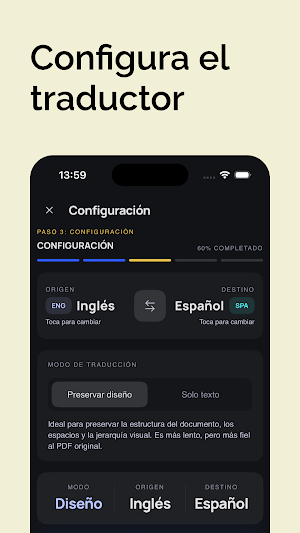
The app combines document translation, OCR to detect text in scanned files and a guided flow to choose the best conversion mode in each case. You can use the mode to preserve the layout of the PDF or choose text only when you are looking for a faster and more direct reading.
Main functions:
- Translate PDF files into multiple languages.
- OCR to recognize text in scanned PDFs.
- Preserve format and structure when possible.
- Choose between design-preserved mode or text-only mode.
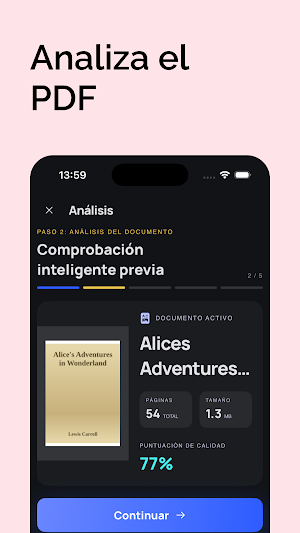
- Preview of the translated file.
- Download and save the final PDF.
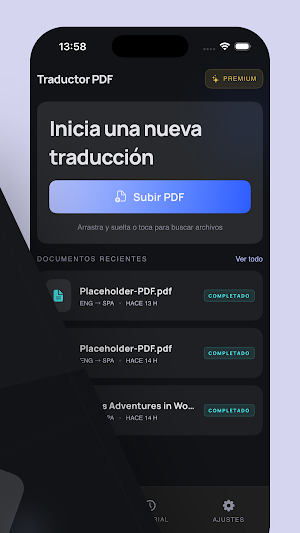
- Review recent conversion history.
Ideal for:
- Students who need to translate notes or articles.
- Professionals who receive reports or documentation in another language.
- Users who want to translate scanned PDFs without manually copying text.
- People who need to understand contracts, guides or manuals in several languages.
How it works:
1. Upload your PDF document.
2. Analyze pages, size and quality.
3. Choose source and destination language.
4. Select the translation mode.
5. Wait for the conversion and download the result.
Why it stands out:
- Specific focus on PDF, not just loose text.
- Integrated OCR for scanned documents.
- Better experience for translating long or complex files.
- Clear, modern and easy-to-use interface.
- Quick access to history and recent documents.
If you are looking for an app to translate PDF, translate documents, translate scanned files or convert a PDF to another language while preserving as much context as possible, PDF Translator with OCR is a direct and practical option.
Download the app and start translating your PDFs with OCR, preview and download the final file in just a few steps.
The app combines document translation, OCR to detect text in scanned files and a guided flow to choose the best conversion mode in each case. You can use the mode to preserve the layout of the PDF or choose text only when you are looking for a faster and more direct reading.
Main functions:
- Translate PDF files into multiple languages.
- OCR to recognize text in scanned PDFs.
- Preserve format and structure when possible.
- Choose between design-preserved mode or text-only mode.
- Preview of the translated file.
- Download and save the final PDF.
- Review recent conversion history.
Ideal for:
- Students who need to translate notes or articles.
- Professionals who receive reports or documentation in another language.
- Users who want to translate scanned PDFs without manually copying text.
- People who need to understand contracts, guides or manuals in several languages.
How it works:
1. Upload your PDF document.
2. Analyze pages, size and quality.
3. Choose source and destination language.
4. Select the translation mode.
5. Wait for the conversion and download the result.
Why it stands out:
- Specific focus on PDF, not just loose text.
- Integrated OCR for scanned documents.
- Better experience for translating long or complex files.
- Clear, modern and easy-to-use interface.
- Quick access to history and recent documents.
If you are looking for an app to translate PDF, translate documents, translate scanned files or convert a PDF to another language while preserving as much context as possible, PDF Translator with OCR is a direct and practical option.
Download the app and start translating your PDFs with OCR, preview and download the final file in just a few steps.
What’s new
Version 1.0 · Updated August 11, 2026
Bug fixes.
Alternatives to PDF Translator with OCR
Looking for apps like PDF Translator with OCR? Here are 6 similar Android apps on Google Play. The highest rated is Convert from PDF to Word (4.1/5), and all 6 are free to download.
-
Convert from PDF to Word 4.1
-
Convert Video to Text
-
Convertir PPT a PDF
-
Convertir PDF a PPT
-
Steam Deck: Game Settings
-
Convert Word to PDF
| App | Rating | Price | Installs | Last updated | Compare |
|---|---|---|---|---|---|
| PDF Translator with OCR | – | Free | 1,000+ | Aug 11, 2026 | |
| Convert from PDF to Word | 4.1 / 5 | Free | 50,000+ | Aug 11, 2026 | Compare |
| Convert Video to Text | – | Free | 10,000+ | Aug 12, 2026 | Compare |
| Convertir PPT a PDF | – | Free | 10,000+ | Aug 11, 2026 | Compare |
| Convertir PDF a PPT | – | Free | 10,000+ | Sep 17, 2026 | Compare |
| Steam Deck: Game Settings | – | Free | 10,000+ | Aug 13, 2026 | Compare |
| Convert Word to PDF | – | Free | 10,000+ | Sep 13, 2026 | Compare |
Similar apps on Google Play
- Convert from PDF to Word
- Convert Video to Text
- Convertir PPT a PDF
- Convertir PDF a PPT
- Steam Deck: Game Settings
- Convert Word to PDF
- Convertir MP4 a MP3
- Convertir MP3 a MP4
- Convertir PDF a EPUB
- Relaxing Rain to Sleep
- Audio Compressor: MP3 M4A
- PDF Page Remover
- Repair PDF
- Traductor Chino Español
- Traductor Gallego Español
- Traductor Arabe Español
- Convert Image to Text
- MP4 to GIF Converter
- Convertir EPUB a PDF
- Convert JPG to PDF
- Convert PDF to Excel
- Convert PDF to JPG
- Compress PDF
- Unir PDF
- Fondos de Pantalla de BTS