

Paystub Generator - Payslip44
EHM Tech LLC Business In-app purchases
Create professional pay stubs and payslips, then export as PDF in seconds
- Downloads
- 388+
- on Google Play
- Price
- Free
- In-app purchases
- Updated
- Oct 27
- 2026 · v1.2.0
Screenshots


About Paystub Generator - Payslip44
Need a pay stub in a hurry? Build one for any employee or contractor, then export it as a PDF. No ads, no account needed.
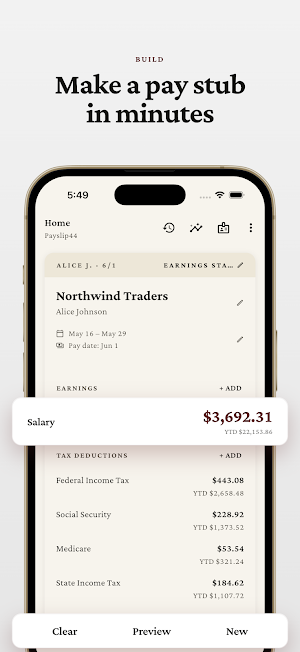
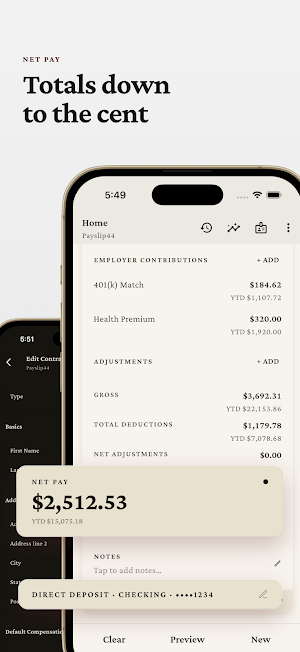
Pick an employer and an employee, set the pay period, and fill in the sections that belong on the stub: earnings, taxes, pre-tax and after-tax deductions, employer contributions, adjustments, and leave balances. Saved employers and employees come back ready to reuse, so your next stub is mostly tapping who's involved. Every total comes out to the exact cent, with no rounding errors.
Answers to your pay stub questions
• How do I make a pay stub for an employee or contractor?
• Do I need payroll software to create one?
• How do I show year-to-date earnings and deductions on the stub?
• What goes on a paycheck stub for a 1099 contractor?
• Can I export the stub as a PDF or image?
Build the stub
• Earnings by hours and rate or a flat amount, with year-to-date totals
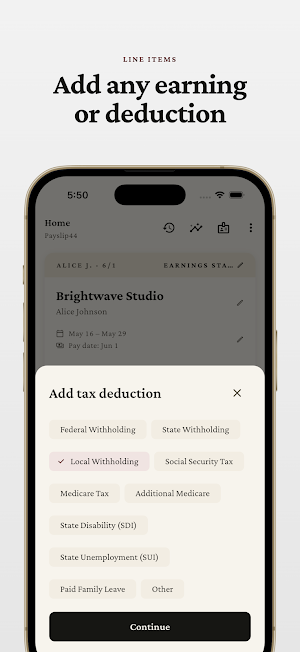
• Taxes, pre-tax deductions (401(k), HSA, health insurance), and after-tax deductions (garnishments, union dues, loan repayments)
• Employer contributions like a 401(k) match or insurance
• Adjustments for reimbursements and one-off corrections
• Leave balances with accrued, used, and remaining hours
• Mark any line taxable and track YTD amounts
Parties you save once
• Employers with name, address, and logo for the stub header
• Employees as W-2, 1099 contractor, statutory employee, or owner
• Filing status and a default pay rate per worker
• Reuse any party on the next stub instead of retyping
Preview and export
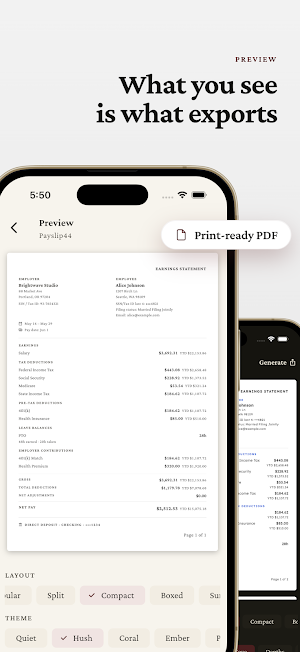
• See the exact A4 page before you export: the preview is the file
• Six document layouts: Standard, Tabular, Compact, Boxed, Summary First, Split
• Export as PDF, image, CSV, or text
• Share straight to email, messages, or cloud storage
• Label it Pay Stub, Earnings Statement, Pay Statement, or your own title
Payment details
• Direct deposit with account type and last four digits
• Check with a check number
• Cash or a custom method
Insights
• Totals for gross, deductions, net, and employer contributions over any date range
• Average net pay and stub count
• Labor cost and deduction rate
• Breakdowns by employee, employer, and earning or deduction type
• A trend chart across the range
History
• Save your pay stubs to history and reopen them anytime
• Start a new stub from a saved one in a tap
Ad-free and private
• No ads
• Your data stays on your device
• No account required, works completely offline
• Available in 39 languages
Paystub Generator turns the figures you enter into a finished pay stub in minutes. Build it for an employee or a 1099 contractor, then export a PDF you can print or send. Works offline, no account needed.
Your pay stub, ready to send.
Disclaimer
This app helps you create pay stub documents from the figures you enter. It does not calculate taxes or withholding and is not financial, payroll, or tax advice. You are responsible for the accuracy of the amounts on each stub. Verify all figures against your payroll records and official IRS and state guidance.
Pick an employer and an employee, set the pay period, and fill in the sections that belong on the stub: earnings, taxes, pre-tax and after-tax deductions, employer contributions, adjustments, and leave balances. Saved employers and employees come back ready to reuse, so your next stub is mostly tapping who's involved. Every total comes out to the exact cent, with no rounding errors.
Answers to your pay stub questions
• How do I make a pay stub for an employee or contractor?
• Do I need payroll software to create one?
• How do I show year-to-date earnings and deductions on the stub?
• What goes on a paycheck stub for a 1099 contractor?
• Can I export the stub as a PDF or image?
Build the stub
• Earnings by hours and rate or a flat amount, with year-to-date totals
• Taxes, pre-tax deductions (401(k), HSA, health insurance), and after-tax deductions (garnishments, union dues, loan repayments)
• Employer contributions like a 401(k) match or insurance
• Adjustments for reimbursements and one-off corrections
• Leave balances with accrued, used, and remaining hours
• Mark any line taxable and track YTD amounts
Parties you save once
• Employers with name, address, and logo for the stub header
• Employees as W-2, 1099 contractor, statutory employee, or owner
• Filing status and a default pay rate per worker
• Reuse any party on the next stub instead of retyping
Preview and export
• See the exact A4 page before you export: the preview is the file
• Six document layouts: Standard, Tabular, Compact, Boxed, Summary First, Split
• Export as PDF, image, CSV, or text
• Share straight to email, messages, or cloud storage
• Label it Pay Stub, Earnings Statement, Pay Statement, or your own title
Payment details
• Direct deposit with account type and last four digits
• Check with a check number
• Cash or a custom method
Insights
• Totals for gross, deductions, net, and employer contributions over any date range
• Average net pay and stub count
• Labor cost and deduction rate
• Breakdowns by employee, employer, and earning or deduction type
• A trend chart across the range
History
• Save your pay stubs to history and reopen them anytime
• Start a new stub from a saved one in a tap
Ad-free and private
• No ads
• Your data stays on your device
• No account required, works completely offline
• Available in 39 languages
Paystub Generator turns the figures you enter into a finished pay stub in minutes. Build it for an employee or a 1099 contractor, then export a PDF you can print or send. Works offline, no account needed.
Your pay stub, ready to send.
Disclaimer
This app helps you create pay stub documents from the figures you enter. It does not calculate taxes or withholding and is not financial, payroll, or tax advice. You are responsible for the accuracy of the amounts on each stub. Verify all figures against your payroll records and official IRS and state guidance.
What’s new
Version 1.2.0 · Updated October 27, 2026
- Request a feature directly from the menu - Fixed employer logos lost after a failed save - Fixed a crash when quickly closing Add employer/employee - Weekly reminders keep their time across daylight saving Thank you for using Payslip44!
Alternatives to Paystub Generator - Payslip44
Looking for apps like Paystub Generator - Payslip44? Here are 6 similar Android apps on Google Play. The highest rated is ASWB Exam Test Prep 2026 (4.8/5), and all 6 are free to download.
-
Bilance - Your Money & Budget
-
Credit Union 1 Mobile Banking 4.1
-
Quicken: Intelligent Money 4.7
-
Whip Around - DVIR 3.4
-
Meru Health 4.7
-
ASWB Exam Test Prep 2026 4.8
| App | Rating | Price | Installs | Last updated | Compare |
|---|---|---|---|---|---|
| Paystub Generator - Payslip44 | – | Free | 100+ | Oct 27, 2026 | |
| Bilance - Your Money & Budget | – | Free | 50,000+ | Sep 29, 2026 | Compare |
| Credit Union 1 Mobile Banking | 4.1 / 5 | Free | 50,000+ | Apr 14, 2026 | Compare |
| Quicken: Intelligent Money | 4.7 / 5 | Free | 500,000+ | Sep 22, 2026 | Compare |
| Whip Around - DVIR | 3.4 / 5 | Free | 100,000+ | Sep 23, 2026 | Compare |
| Meru Health | 4.7 / 5 | Free | 10,000+ | Sep 22, 2026 | Compare |
| ASWB Exam Test Prep 2026 | 4.8 / 5 | Free | 10,000+ | Nov 28, 2025 | Compare |