
Custom Keyboard - Voice Typing
AlfaSolutionApps Productivity In-app purchases Contains ads
Custom keyboard with voice typing, translation, voice chat, and dictionary.
- Rating
- 3.6
- 2K ratings
- Downloads
- 1M+
- on Google Play
- Price
- Free
- In-app purchases
- Updated
- Sep 26
- 2026 · v1.38
Screenshots


About Custom Keyboard - Voice Typing
Unlock a new way of typing and translation with Custom Keyboard Voice Typing! This all-in-one keyboard app offers voice typing, translation, voice conversation, and English dictionary features, along with full customization options that let you design a keyboard experience tailored to your style.
Key Features:
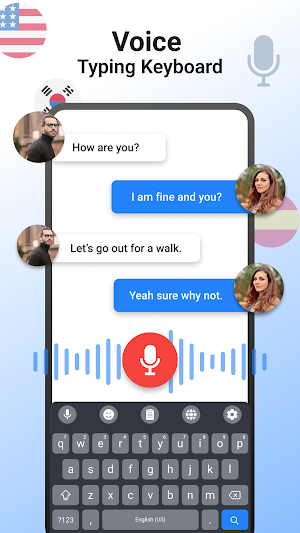
1. Voice Typing Made Simple: Speak naturally and watch your words appear on the screen with precision. Our powerful voice recognition supports hands-free typing, so you can easily dictate notes, messages, and more.
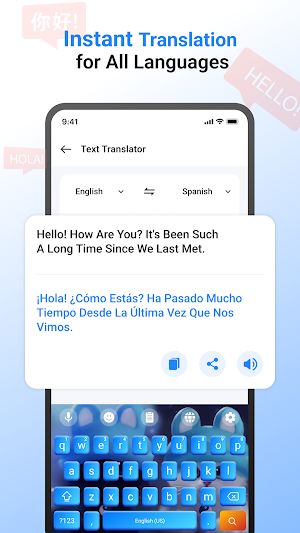
2. Text and Voice Translation: Effortlessly translate text and speech into multiple languages. Break down language barriers in real-time with our instant translation feature, making conversations and interactions across languages easier than ever.
3. Real-time Voice Conversations: Engage in voice conversations with seamless translation. Simply speak, and the app translates your words into the language of your choice, enabling smooth communication with people worldwide.
4. Built-in English Dictionary: Access a comprehensive English dictionary from the Voice typing keyboard app. Look up word meanings, synonyms, and usage examples without switching apps, enhancing your vocabulary on the fly.
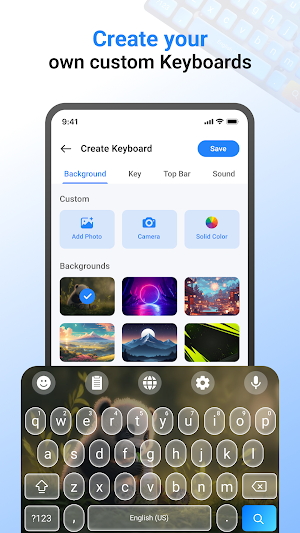
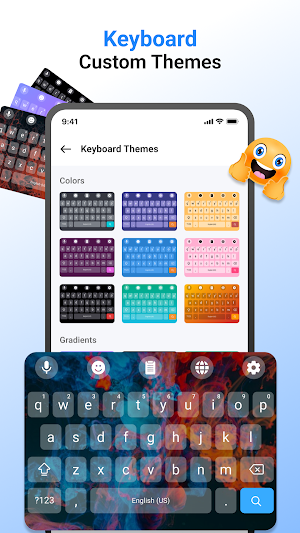
5. Full Customization & Theme Creation: Express yourself by customizing your keyboard layout, colors, button styles, borders, and background themes. With the full theme creation feature, personalize every aspect of the keyboard to suit your aesthetic preferences, including the option to use custom images and color palettes.
6. User-Friendly Interface: Our app features a simple, intuitive design with easy-to-navigate menus, so all ages can enjoy the app’s robust capabilities.
7. Additional Features:
--> Quick Suggestions for Efficient Typing
--> Emojis for expressive messages
--> Keyboard Sound Effects for a tactile experience
Why Choose Custom Keyboard Voice Typing?
Custom Keyboard Voice Typing combines modern technology into a single, user-centric app. Designed for productivity, our voice typing app is good for users who want an efficient, hands-free typing solution, those who frequently communicate across languages, or anyone looking to add a personal touch to their typing experience. With our built-in dictionary, real-time translation, and customizable design, typing has never been this functional or fun!
How to Use:
Download & Set Up - Install the app and follow the setup instructions.
Voice Typing & Translation - Access voice typing or translation with single click.
Customize Your Keyboard - Personalize your keyboard by selecting "Custom keyboard".
Download Custom Keyboard Voice Typing today and elevate your typing and translation experience with the power of voice, multilingual support, and customization options!
Key Features:
1. Voice Typing Made Simple: Speak naturally and watch your words appear on the screen with precision. Our powerful voice recognition supports hands-free typing, so you can easily dictate notes, messages, and more.
2. Text and Voice Translation: Effortlessly translate text and speech into multiple languages. Break down language barriers in real-time with our instant translation feature, making conversations and interactions across languages easier than ever.
3. Real-time Voice Conversations: Engage in voice conversations with seamless translation. Simply speak, and the app translates your words into the language of your choice, enabling smooth communication with people worldwide.
4. Built-in English Dictionary: Access a comprehensive English dictionary from the Voice typing keyboard app. Look up word meanings, synonyms, and usage examples without switching apps, enhancing your vocabulary on the fly.
5. Full Customization & Theme Creation: Express yourself by customizing your keyboard layout, colors, button styles, borders, and background themes. With the full theme creation feature, personalize every aspect of the keyboard to suit your aesthetic preferences, including the option to use custom images and color palettes.
6. User-Friendly Interface: Our app features a simple, intuitive design with easy-to-navigate menus, so all ages can enjoy the app’s robust capabilities.
7. Additional Features:
--> Quick Suggestions for Efficient Typing
--> Emojis for expressive messages
--> Keyboard Sound Effects for a tactile experience
Why Choose Custom Keyboard Voice Typing?
Custom Keyboard Voice Typing combines modern technology into a single, user-centric app. Designed for productivity, our voice typing app is good for users who want an efficient, hands-free typing solution, those who frequently communicate across languages, or anyone looking to add a personal touch to their typing experience. With our built-in dictionary, real-time translation, and customizable design, typing has never been this functional or fun!
How to Use:
Download & Set Up - Install the app and follow the setup instructions.
Voice Typing & Translation - Access voice typing or translation with single click.
Customize Your Keyboard - Personalize your keyboard by selecting "Custom keyboard".
Download Custom Keyboard Voice Typing today and elevate your typing and translation experience with the power of voice, multilingual support, and customization options!
What’s new
Version 1.38 · Updated September 26, 2026
Customization Experience Updated....
User reviews

Best keyboard ever 😇

Nice apk

Fantastic! I love it! Highly recommended!
Alternatives to Custom Keyboard - Voice Typing
Looking for apps like Custom Keyboard - Voice Typing? Here are 6 similar Android apps on Google Play. The highest rated is PDF Viewer : Read & Edit (4.7/5), and all 6 are free to download.
-
Hashtag Copy Paste
-
PDF Viewer : Read & Edit 4.7
-
Bim
-
Cucú Time
-
Mi robot vacuum mop s12 Guide
-
Focus Home Screen - Launcher 4.7
| App | Rating | Price | Installs | Last updated | Compare |
|---|---|---|---|---|---|
| Custom Keyboard - Voice Typing | 3.6 / 5 | Free | 1,000,000+ | Sep 26, 2026 | |
| Hashtag Copy Paste | – | Free | 100+ | Sep 2, 2024 | Compare |
| PDF Viewer : Read & Edit | 4.7 / 5 | Free | 1,000+ | Nov 15, 2024 | Compare |
| Bim | – | Free | 1,000+ | Dec 9, 2024 | Compare |
| Cucú Time | – | Free | 1,000+ | Aug 28, 2026 | Compare |
| Mi robot vacuum mop s12 Guide | – | Free | 500+ | Sep 16, 2024 | Compare |
| Focus Home Screen - Launcher | 4.7 / 5 | Free | 10,000+ | Sep 12, 2026 | Compare |
Similar apps on Google Play
- Hashtag Copy Paste
- PDF Viewer : Read & Edit
- Bim
- Cucú Time
- Mi robot vacuum mop s12 Guide
- Focus Home Screen - Launcher
- Mindful : Focus & Screen Time
- Admin Safety
- Compound Interest Calculator
- 2024 IEEE CDC
- PMPeople: PPM AI
- Joker's Fruits
- Portaria Dumon
- Beawre Collect
- Confirmafy
- SMT 2024 Annual Meeting
- Little Garden
- BT DO
- Кордон водитель
- AEK NetTest
- Tine Health
- Cayman Climate Controls
- GulfGuard VPN
- Text Repeater and Speech
- Marg HR