

Easy GPS Mock: Joystick
EasyToolsStudio Tools In-app purchases Contains ads
Pro GPS mocking. Joystick, GPX routes & auto-import coords from clipboard.
- Downloads
- 20.6K+
- on Google Play
- Price
- Free
- In-app purchases
- Updated
- Oct 7
- 2026 · v4.4.3
Screenshots
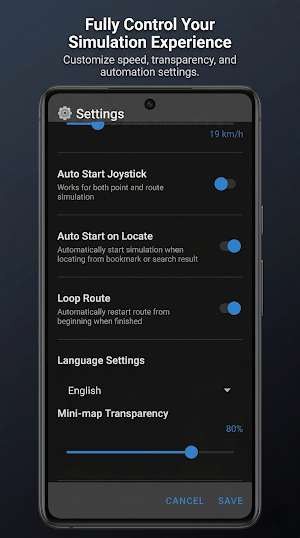
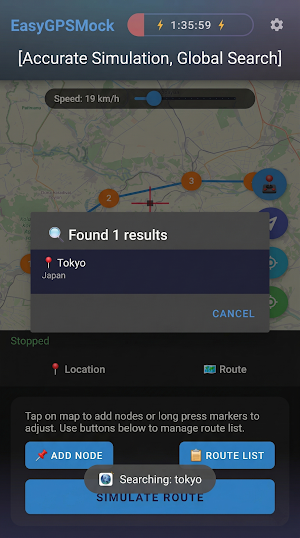
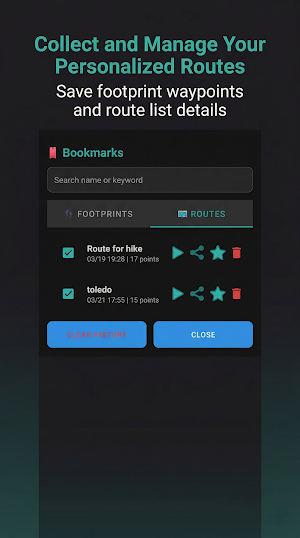
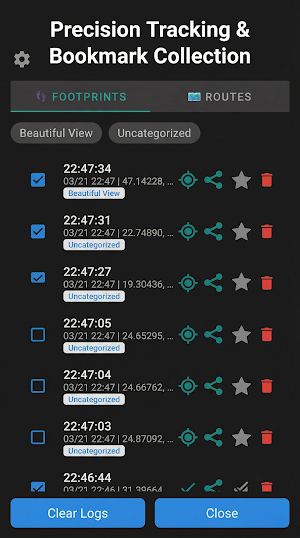


About Easy GPS Mock: Joystick
📱 EasyGPSMock - Developer's System-Level GPS Utility
EasyGPSMock is a professional tool designed for Android developers to test location-based (LBS) apps without leaving their desks. Fully compliant with Android’s Mock Location standards, it provides system-wide GPS overriding for precise testing.
🌟 Core Technologies & Strategies
🗺️ Google Maps Display Engine
Integrated Google Maps SDK for the main interface, providing superior smoothness, map details, and stability.
🏎️ Real-Path Mode (OSRM)
Navigate actual roads using OSRM technology. Includes realistic cornering speeds, signal stops, and traffic fluctuations—perfect for simulating real-world driving or walking.
🌀 Exploration Mode (Spiral)
Automatically perform spiral movements at each waypoint. The app circles outward from your target for maximum geographical coverage in a specific area.
🚁 Teleport Exploration
A powerful combo of "High-Speed Teleport" and "Local Exploration." Jumps to your target, performs a local scan, and moves to the next location—balancing efficiency and stealth.
📍 Single-Point & Joystick
Select any location on the map and start with one tap. Supports real-time joystick control and non-linear speed for precise micro-adjustments.
🌟 System Stability & Stealth
🌍 System-Wide Coverage
Effective for all apps on the device, ensuring consistency across your testing environment.
🛡️ Stealth & Adaptive Healing
"Adaptive Healing" automatically detects and prevents "rubber-banding" (jumping back to real location). Optimized GMS sync ensures your movement aligns 100% with modern LBS games.
⚡ Persistent Foreground Service
Stable foreground service keeps simulation alive even when switching apps or in background (Android 10 to Android 15+).
🌟 Smart Tools & Management
📋 Clipboard GPS Detection
Automatically identifies coordinates in your clipboard for one-tap teleportation or searching.
🔍 Smart Search
Supports mixed-text coordinate extraction. If text contains coordinates, the app prioritizes locating that spot immediately.
📂 Route & Backup Management
Batch import GPX files, merge routes, and organize favorites. Full backup and restore ensures your test data is always safe.
🔗 Instant Share & Import
Share locations/routes via URL or GPX. One click on the link automatically imports and locates the target.
🌟 Optimized Experience
🔄 Full Orientation Support
New adaptive UI supports Portrait and Landscape modes—perfect for phones, tablets, and split-screen multitasking.
✨ Developer-Focused UI
Clean, intuitive interface with no clutter, allowing you to focus on code and testing.
⚙️ How to Get Started
1. Enable Developer Options: Tap "Build Number" 7 times in Settings.
2. Set Mock App: In Developer Options, select "EasyGPSMock" as the mock location app.
3. Permissions: Grant the app location access.
📺 How it Works (Unlock Features)
We use a reward-based model to support continuous development:
1. Tap the "⚡" lightning button.
2. Watch a rewarded ad to unlock simulation features.
3. Each unlock provides 4 hours of full access (accumulative up to 16 hours).
🔒 Privacy & Security
- Local Processing: We do not collect or store your sensitive location data. All simulation happens locally on your device.
- Sharing Privacy: Coordinate sharing is handled entirely on-device and never transmitted to external servers.
⚠️ Disclaimer
This tool is intended for development and testing only. Please respect the Terms of Service of other applications. Users assume all responsibility for their usage.
EasyGPSMock is a professional tool designed for Android developers to test location-based (LBS) apps without leaving their desks. Fully compliant with Android’s Mock Location standards, it provides system-wide GPS overriding for precise testing.
🌟 Core Technologies & Strategies
🗺️ Google Maps Display Engine
Integrated Google Maps SDK for the main interface, providing superior smoothness, map details, and stability.
🏎️ Real-Path Mode (OSRM)
Navigate actual roads using OSRM technology. Includes realistic cornering speeds, signal stops, and traffic fluctuations—perfect for simulating real-world driving or walking.
🌀 Exploration Mode (Spiral)
Automatically perform spiral movements at each waypoint. The app circles outward from your target for maximum geographical coverage in a specific area.
🚁 Teleport Exploration
A powerful combo of "High-Speed Teleport" and "Local Exploration." Jumps to your target, performs a local scan, and moves to the next location—balancing efficiency and stealth.
📍 Single-Point & Joystick
Select any location on the map and start with one tap. Supports real-time joystick control and non-linear speed for precise micro-adjustments.
🌟 System Stability & Stealth
🌍 System-Wide Coverage
Effective for all apps on the device, ensuring consistency across your testing environment.
🛡️ Stealth & Adaptive Healing
"Adaptive Healing" automatically detects and prevents "rubber-banding" (jumping back to real location). Optimized GMS sync ensures your movement aligns 100% with modern LBS games.
⚡ Persistent Foreground Service
Stable foreground service keeps simulation alive even when switching apps or in background (Android 10 to Android 15+).
🌟 Smart Tools & Management
📋 Clipboard GPS Detection
Automatically identifies coordinates in your clipboard for one-tap teleportation or searching.
🔍 Smart Search
Supports mixed-text coordinate extraction. If text contains coordinates, the app prioritizes locating that spot immediately.
📂 Route & Backup Management
Batch import GPX files, merge routes, and organize favorites. Full backup and restore ensures your test data is always safe.
🔗 Instant Share & Import
Share locations/routes via URL or GPX. One click on the link automatically imports and locates the target.
🌟 Optimized Experience
🔄 Full Orientation Support
New adaptive UI supports Portrait and Landscape modes—perfect for phones, tablets, and split-screen multitasking.
✨ Developer-Focused UI
Clean, intuitive interface with no clutter, allowing you to focus on code and testing.
⚙️ How to Get Started
1. Enable Developer Options: Tap "Build Number" 7 times in Settings.
2. Set Mock App: In Developer Options, select "EasyGPSMock" as the mock location app.
3. Permissions: Grant the app location access.
📺 How it Works (Unlock Features)
We use a reward-based model to support continuous development:
1. Tap the "⚡" lightning button.
2. Watch a rewarded ad to unlock simulation features.
3. Each unlock provides 4 hours of full access (accumulative up to 16 hours).
🔒 Privacy & Security
- Local Processing: We do not collect or store your sensitive location data. All simulation happens locally on your device.
- Sharing Privacy: Coordinate sharing is handled entirely on-device and never transmitted to external servers.
⚠️ Disclaimer
This tool is intended for development and testing only. Please respect the Terms of Service of other applications. Users assume all responsibility for their usage.
What’s new
Version 4.4.3 · Updated October 7, 2026
[Version 4.4.3] [New Features] - Jump to Waypoint: Long press fast-forward or rewind on the floating bar to jump to any waypoint. - Fine-Grained Exploration: Exploration sector step size reduced to 5% for precise area coverage. [System Improvements] - Ghost Route Jump Fix: Fixed an issue where fast-forwarding or rewinding ghost routes in fleets would reset to start.
Alternatives to Easy GPS Mock: Joystick
Looking for apps like Easy GPS Mock: Joystick? Here are 6 similar Android apps on Google Play. All of them are free to download.






| App | Rating | Price | Installs | Last updated | Compare |
|---|---|---|---|---|---|
| Easy GPS Mock: Joystick | – | Free | 10,000+ | Oct 7, 2026 | |
| B&W Video Wall Control II | – | Free | 100+ | Aug 12, 2026 | Compare |
| HUO AO | – | Free | 10+ | Feb 12, 2026 | Compare |
| Innova Invest | – | Free | 10+ | Apr 16, 2026 | Compare |
| Lab Laps: Lab Multi Timer | – | Free | 50,000+ | Oct 10, 2026 | Compare |
| My SHS App | – | Free | 100+ | Aug 31, 2025 | Compare |
| Dueby | – | Free | 10+ | May 10, 2026 | Compare |
Similar apps on Google Play
- B&W Video Wall Control II
- HUO AO
- Innova Invest
- Lab Laps: Lab Multi Timer
- My SHS App
- Dueby
- EasyBrowser - Fast & Private
- Solar PV Designer
- Espaço Fácil - Self Storage
- XNet Downloader VPN & Proxy
- FENIX Connect
- Yabby Flint Virid Sienna
- TRUECLOUD PLUS
- Info Deșeuri
- Retra UWT
- Lenzap - Magnifier
- Urbis Pestera
- KamiAni (Romance & Fantasy)
- Hot Status Saver - Downloader
- Status Saver - Story Saver
- aiPolar IoT
- ASM - Quản lý công việc
- Qibla Finder
- QR Scanner
- APP CIMTEL Acesso Fácil PRO