

Smart Phone Sensor Checker
Earthquakeham Tools
Find out whether this phone can produce the signal you need
- Downloads
- 1+
- on Google Play
- Price
- $2.09
- No in-app purchases
- Updated
- Aug 22
- 2026 · v1.1.0
Screenshots



About Smart Phone Sensor Checker
Before you build an app or a device, check whether the phone can actually produce the signals it will depend on.
A spec sheet may list a sensor, but whether it reports values, how often, and how accurately varies from handset to handset. Sensor Checker shows you.
■ Two ways to use it
Situations - pick one of ten situations (on a boat, coastal walking, work at height and more) and the required sensors and sampling rate are set for you. You see at a glance whether this phone is enough for an app built around that situation.
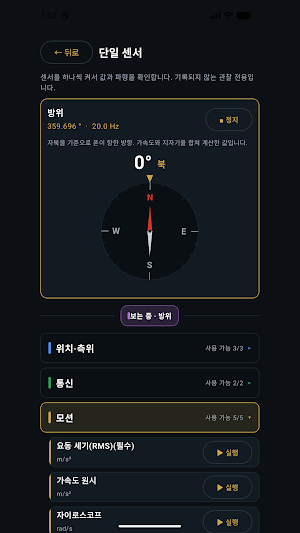
Single sensor - turn on any of 18 sensors one at a time and watch its value and waveform. Nothing is recorded, so you can explore freely.
■ Display that fits the sensor
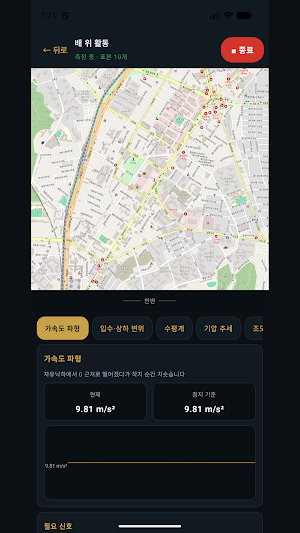
Heading appears as a compass, tilt as a spirit level, cellular strength as signal bars, position on a map. Not just rows of numbers.
■ Signals you can check
Location - latitude/longitude, altitude, accuracy, speed, satellite count
Cellular - signal strength (dBm), bar level
Motion - acceleration, linear acceleration, gravity, gyroscope
Attitude - heading, pitch and roll, magnetometer
Environment - barometric pressure, relative altitude, light, proximity
■ Export to Excel
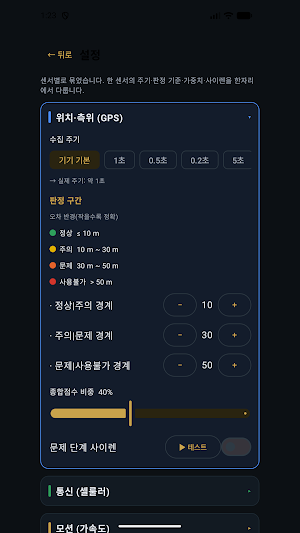
Save a session as an xlsx file. Alongside the raw values it includes a sheet explaining every column, its unit, and the grading thresholds, so whoever receives it can read it without asking you.
■ Your data never leaves the device
Measurements are stored only on this phone. Nothing is uploaded. No accounts, no ads, no analytics SDKs.
■ Four languages
Korean, English, Chinese and Japanese. Switch any time inside the app; the Excel export follows the language you chose.
■ Not a safety device
This app does not detect or report accidents. It is a development and evaluation tool for checking what signals a handset can produce. Do not rely on it where safety is at stake.
A spec sheet may list a sensor, but whether it reports values, how often, and how accurately varies from handset to handset. Sensor Checker shows you.
■ Two ways to use it
Situations - pick one of ten situations (on a boat, coastal walking, work at height and more) and the required sensors and sampling rate are set for you. You see at a glance whether this phone is enough for an app built around that situation.
Single sensor - turn on any of 18 sensors one at a time and watch its value and waveform. Nothing is recorded, so you can explore freely.
■ Display that fits the sensor
Heading appears as a compass, tilt as a spirit level, cellular strength as signal bars, position on a map. Not just rows of numbers.
■ Signals you can check
Location - latitude/longitude, altitude, accuracy, speed, satellite count
Cellular - signal strength (dBm), bar level
Motion - acceleration, linear acceleration, gravity, gyroscope
Attitude - heading, pitch and roll, magnetometer
Environment - barometric pressure, relative altitude, light, proximity
■ Export to Excel
Save a session as an xlsx file. Alongside the raw values it includes a sheet explaining every column, its unit, and the grading thresholds, so whoever receives it can read it without asking you.
■ Your data never leaves the device
Measurements are stored only on this phone. Nothing is uploaded. No accounts, no ads, no analytics SDKs.
■ Four languages
Korean, English, Chinese and Japanese. Switch any time inside the app; the Excel export follows the language you chose.
■ Not a safety device
This app does not detect or report accidents. It is a development and evaluation tool for checking what signals a handset can produce. Do not rely on it where safety is at stake.
What’s new
Version 1.1.0 · Updated August 22, 2026
Added elapsed time and pause/resume while measuring. The run screen now shows an overall score card, and the session list shows measured time and how many times you paused. The acceleration waveform is split into X, Y and Z so you can see which axis moved. The map no longer draws a straight line across a paused stretch.
Alternatives to Smart Phone Sensor Checker
Looking for apps like Smart Phone Sensor Checker? Here are 6 similar Android apps on Google Play. The highest rated is Simple Alarm Clock (4.4/5), and all 6 are free to download.
-
Robokiller - Spam Call Blocker 3.8
-
Simple Alarm Clock 4.4
-
Sleep Tracker - Sleep Cycle 3.8
-
Fortect Mobile Security 4.1
-
Simpro Mobile 3.8
-
Emaldo
| App | Rating | Price | Installs | Last updated | Compare |
|---|---|---|---|---|---|
| Smart Phone Sensor Checker | – | $2.09 | 1+ | Aug 22, 2026 | |
| Robokiller - Spam Call Blocker | 3.8 / 5 | Free | 5,000,000+ | May 28, 2026 | Compare |
| Simple Alarm Clock | 4.4 / 5 | Free | 1,000,000+ | Dec 11, 2023 | Compare |
| Sleep Tracker - Sleep Cycle | 3.8 / 5 | Free | 50,000+ | Feb 1, 2024 | Compare |
| Fortect Mobile Security | 4.1 / 5 | Free | 10,000+ | Aug 17, 2026 | Compare |
| Simpro Mobile | 3.8 / 5 | Free | 100,000+ | Sep 21, 2026 | Compare |
| Emaldo | – | Free | 10,000+ | Sep 14, 2026 | Compare |