
iOS 27 Launcher - iPhone 17
Nasim Alsharq LLC Tools Contains ads
Launcher iOS 27 like iPhone 17 Pro max UI. Lite, Smooth and Quickly
- Downloads
- 12.4K+
- on Google Play
- Price
- Free
- No in-app purchases
- Updated
- Aug 12
- 2026 · v4.0
Screenshots
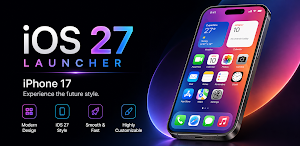
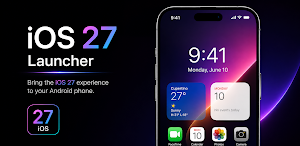
About iOS 27 Launcher - iPhone 17
🚀 Bring the iOS 27 Experience to Your Android
With App Launcher iOS 27, you can give your Android phone a stunning iOS 27-style makeover in just seconds. Customize your layout, icons, effects, and gestures for a smooth, elegant, and modern feel that's entirely your own.
💡 Key Features
✔ 🔍 Smart Search Swipe down to instantly find your apps and files — faster, simpler, and more intuitive than ever.
✔ 🏡 Customizable Home Screen Adjust icon size, shape, color, and layout with ease to create a look that matches your personal style.
✔ 🧩 Icon & Theme Customization Change app icons, rename apps, and choose your favorite theme to keep your phone looking fresh and unique.
✔ 🖼️ High-Quality Wallpapers Browse a stunning collection of vibrant wallpapers to make your home screen look polished and eye-catching.
✔ 📱 Unique Widgets Display clocks, calendars, notes, and other handy widgets directly on your home screen.
✔ ⚙️ Flexible Utilities Add, rearrange, or remove widgets effortlessly to suit your daily routine and needs.
ACCESSIBILITY SERVICE DISCLOSURE
This launcher uses the Android Accessibility Service API to power optional iOS-style features that you choose to enable:
• Assistive Touch — Home, Back, Recent Apps, Notifications, and Power menu shortcuts
• Control Center — system shortcuts including screenshot (on supported devices)
• Custom Lock Screen — detects when a phone call is active to adjust lock screen behavior
Why it is needed: Android only allows certain system actions (such as Home, Back, Recents, and Notifications) through the Accessibility Service when provided by a third-party launcher overlay.
What we do NOT do: We do not read typed text, collect personal data, or send accessibility data to any server. The service is used only for the features above while they are enabled by you.
Before enabling: The app shows a clear in-app disclosure explaining this use. You can disable the service at any time in Android Settings → Accessibility.
Optional: These features work only if you manually enable Accessibility for this app. The launcher home screen works without it.
Optional Accessibility Service powers Assistive Touch & Control Center — disclosed in-app before enable.
With App Launcher iOS 27, you can give your Android phone a stunning iOS 27-style makeover in just seconds. Customize your layout, icons, effects, and gestures for a smooth, elegant, and modern feel that's entirely your own.
💡 Key Features
✔ 🔍 Smart Search Swipe down to instantly find your apps and files — faster, simpler, and more intuitive than ever.
✔ 🏡 Customizable Home Screen Adjust icon size, shape, color, and layout with ease to create a look that matches your personal style.
✔ 🧩 Icon & Theme Customization Change app icons, rename apps, and choose your favorite theme to keep your phone looking fresh and unique.
✔ 🖼️ High-Quality Wallpapers Browse a stunning collection of vibrant wallpapers to make your home screen look polished and eye-catching.
✔ 📱 Unique Widgets Display clocks, calendars, notes, and other handy widgets directly on your home screen.
✔ ⚙️ Flexible Utilities Add, rearrange, or remove widgets effortlessly to suit your daily routine and needs.
ACCESSIBILITY SERVICE DISCLOSURE
This launcher uses the Android Accessibility Service API to power optional iOS-style features that you choose to enable:
• Assistive Touch — Home, Back, Recent Apps, Notifications, and Power menu shortcuts
• Control Center — system shortcuts including screenshot (on supported devices)
• Custom Lock Screen — detects when a phone call is active to adjust lock screen behavior
Why it is needed: Android only allows certain system actions (such as Home, Back, Recents, and Notifications) through the Accessibility Service when provided by a third-party launcher overlay.
What we do NOT do: We do not read typed text, collect personal data, or send accessibility data to any server. The service is used only for the features above while they are enabled by you.
Before enabling: The app shows a clear in-app disclosure explaining this use. You can disable the service at any time in Android Settings → Accessibility.
Optional: These features work only if you manually enable Accessibility for this app. The launcher home screen works without it.
Optional Accessibility Service powers Assistive Touch & Control Center — disclosed in-app before enable.
User reviews

I love so much
Alternatives to iOS 27 Launcher - iPhone 17
Looking for apps like iOS 27 Launcher - iPhone 17? Here are 3 similar Android apps on Google Play. The highest rated is GO Launcher S – 3D Theme, Wall (4.5/5), and all 3 are free to download.


| App | Rating | Price | Installs | Last updated | Compare |
|---|---|---|---|---|---|
| iOS 27 Launcher - iPhone 17 | – | Free | 10,000+ | Aug 12, 2026 | |
| GO Launcher S – 3D Theme, Wall | 4.5 / 5 | Free | 5,000,000+ | Aug 29, 2025 | Compare |
| ADW Launcher 2 | 3.9 / 5 | Free | 10,000,000+ | Sep 15, 2018 | Compare |
| backiee (Wallpaper Studio 10) | 4.4 / 5 | Free | 100,000+ | Mar 21, 2024 | Compare |