

Modbus TCP Station
DreamSoftware52 Tools In-app purchases Contains ads
Ultimate Modbus TCP Master. Monitor, Debug & Control PLCs/IIoT devices easily.
- Downloads
- 1K+
- on Google Play
- Price
- Free
- In-app purchases
- Updated
- Oct 22
- 2026 · v1.1.1
Screenshots
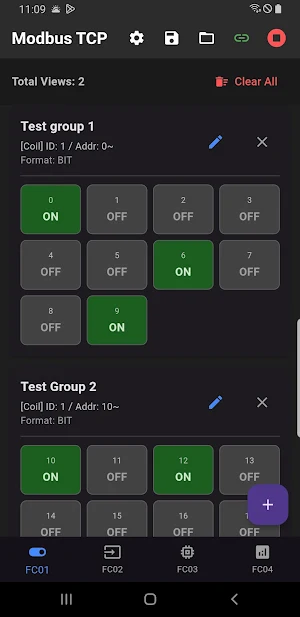
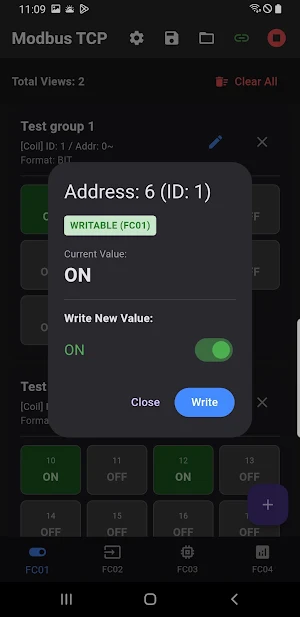
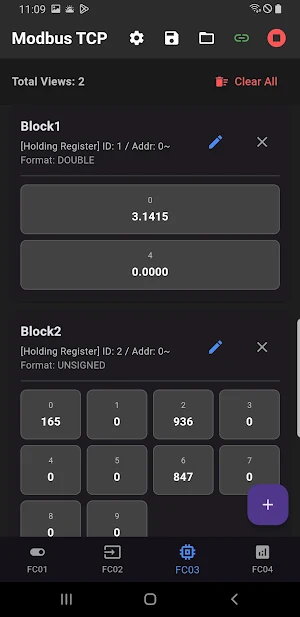
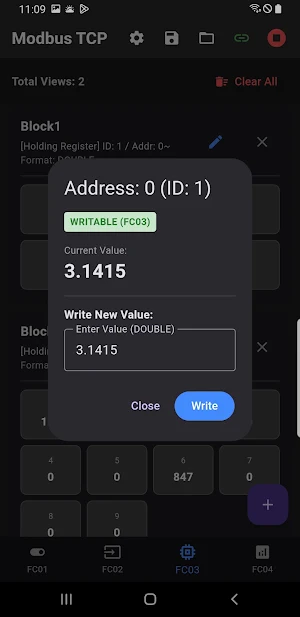


About Modbus TCP Station
Turn your smartphone into a powerful Modbus TCP Master tool! Designed for PLC engineers, system integrators, and DIY enthusiasts, Modbus TCP Station allows you to communicate with, monitor, and control any Modbus TCP-enabled device (PLC, HMI, SCADA, ESP32, Raspberry Pi, etc.) with ease.
Whether you are debugging a smart factory system or testing a home automation project, this app provides a professional interface to visualize and manipulate data in real-time.
🔥 Key Features:
Complete Connectivity: Connect to any Modbus TCP Server (Slave) via IP and Port.
Comprehensive Function Codes: Supports FC01 (Coil), FC02 (Discrete Input), FC03 (Holding Register), and FC04 (Input Register).
Flexible Data Formats: View data in Binary, Unsigned/Signed Integer, Hex, Float, and Double.
Advanced Byte Swapping: Supports Inverse/Swap options for handling complex Word orders (Big Endian/Little Endian).
Real-time Monitoring: Watch your data change instantly with efficient polling.
Write Capabilities: Easily write values to Coils and Registers for device control.
💎 Pro Features:
Profile Management: Save and load unlimited connection profiles and register setups.
Ad-Free Experience: Focus on your work without distractions.
Unlimited Views: Create as many data blocks as you need.
🌍 Multi-Language Support:
English
German (Deutsch)
Korean (한국어)
Japanese (日本語)
Traditional Chinese (繁體中文 - TW/HK)
Simplified Chinese (中文)
Why choose Modbus TCP Station? Stop carrying heavy laptops for simple checks. With a clean UI and robust performance, this is the essential pocket tool for every automation engineer. Download now and master your Modbus network!
Whether you are debugging a smart factory system or testing a home automation project, this app provides a professional interface to visualize and manipulate data in real-time.
🔥 Key Features:
Complete Connectivity: Connect to any Modbus TCP Server (Slave) via IP and Port.
Comprehensive Function Codes: Supports FC01 (Coil), FC02 (Discrete Input), FC03 (Holding Register), and FC04 (Input Register).
Flexible Data Formats: View data in Binary, Unsigned/Signed Integer, Hex, Float, and Double.
Advanced Byte Swapping: Supports Inverse/Swap options for handling complex Word orders (Big Endian/Little Endian).
Real-time Monitoring: Watch your data change instantly with efficient polling.
Write Capabilities: Easily write values to Coils and Registers for device control.
💎 Pro Features:
Profile Management: Save and load unlimited connection profiles and register setups.
Ad-Free Experience: Focus on your work without distractions.
Unlimited Views: Create as many data blocks as you need.
🌍 Multi-Language Support:
English
German (Deutsch)
Korean (한국어)
Japanese (日本語)
Traditional Chinese (繁體中文 - TW/HK)
Simplified Chinese (中文)
Why choose Modbus TCP Station? Stop carrying heavy laptops for simple checks. With a clean UI and robust performance, this is the essential pocket tool for every automation engineer. Download now and master your Modbus network!
What’s new
Version 1.1.1 · Updated October 22, 2026
- Free version: 5 reads per day (resets at midnight). Writing stays unlimited. - Added a Premium Upgrade button to the top bar. - Minor bug fixes and performance optimizations.
Alternatives to Modbus TCP Station
Looking for apps like Modbus TCP Station? Here are 3 similar Android apps on Google Play. The highest rated is ClickOnDetroit - WDIV Local 4 (4.5/5), and 2 of the 3 are free to download.



| App | Rating | Price | Installs | Last updated | Compare |
|---|---|---|---|---|---|
| Modbus TCP Station | – | Free | 1,000+ | Oct 22, 2026 | |
| Chargeway | 4.3 / 5 | Free | 10,000+ | Sep 24, 2026 | Compare |
| ClickOnDetroit - WDIV Local 4 | 4.5 / 5 | Free | 100,000+ | Aug 30, 2026 | Compare |
| Asthma Diary | – | – | – | Jan 28, 2026 | Compare |
Compare Modbus TCP Station with the top alternatives: ratings, updates, ASO score and keyword gaps →